Oracle licensing in the cloud and what the recent changes mean for you?

At the end of January 2017, Oracle updated its Licensing Oracle Software in the Cloud Computing Environment Document, which effectively removed the core factor 0.5 for Intel and instead made it 1:1, doubling the licensing costs overnight!

For reference, the old document can be found here.

You can imagine this caused a major stir on Social Media, where my friend Tim Hall posts on this topic became very hot!  You can read them here:
1. https://oracle-base.com/blog/2017/01/28/oracles-cloud-licensing-change-be-warned/
2. https://oracle-base.com/blog/2017/02/09/oracle-sad-times/

I’m certainly no Cloud license expert, but fortunately my colleagues in the SAM (Software Assess Management) Team have written a great White Paper to add clarity to the matter:
Oracle Authorized Cloud Environments Overview of Policy Changes

Feel free to take a read.

You can follow V1 SAM Twitter here.
And get more info here.

If you found this blog post useful, please like as well as follow me through my various Social Media avenues available on the sidebar and/or subscribe to this oracle blog via WordPress/e-mail.

Thanks

Zed DBA (Zahid Anwar)
ORA-00322: log 41 of thread 2 is not current copy

On a Data Guard Physical Standby, I noticed the following in the alert log:

Fri Jan 13 08:12:39 2017 
Errors in file /u01/app/oracle/diag/rdbms/v1s/V1S1/trace/V1S1_arc1_399861.trc: 
ORA-00322: log 41 of thread 2 is not current copy 
ORA-00312: online log 41 thread 2: '+RECOC1/V1S/ONLINELOG/group_41.3099.912775569' 
ORA-00322: log 41 of thread 2 is not current copy 
ORA-00312: online log 41 thread 2: '+DATAC1/V1S/ONLINELOG/group_41.807.912775567'

If you read metalink note:
Physical standby – alert*log shows ORA-322, ORA-312 intermittently (Doc ID 1592057.1)

SYMPTOMS

alert.log shows intermittently ORA-322 and ORA-312 for SRLs (standby redo logs).

CAUSE

These errors are written due to a very small timing window, when the SRL header
is being updated to reflect new content from the primary and in the same way
the ARCH process is doing its activity and seeing a CF flag entry that reflects an earlier
state.

SOLUTION

check the alert.log for any further issues. As long as ORA-322, ORA-312 is not combined with other issues, you can ignore this error.

Related Issue:
ORA-00314: log 42 of thread 2, expected sequence# 37363 doesn’t match 37361

If you found this blog post useful, please like as well as follow me through my various Social Media avenues available on the sidebar and/or subscribe to this oracle blog via WordPress/e-mail.

Thanks

Zed DBA (Zahid Anwar)

ORA-00314: log 42 of thread 2, expected sequence# 37363 doesn’t match 37361

On a Data Guard Physical Standby, I noticed the following in the alert log:

Mon Jan 30 12:37:22 2017
Errors in file /u01/app/oracle/diag/rdbms/v1s/V1S1/trace/V1S1_arc1_105040.trc:
ORA-00314: log 42 of thread 2, expected sequence# 37363 doesn't match 37361
ORA-00312: online log 42 thread 2: '+RECOC1/V1S/ONLINELOG/group_42.15446.927996415'
ORA-00314: log 42 of thread 2, expected sequence# 37363 doesn't match 37361
ORA-00312: online log 42 thread 2: '+DATAC1/V1S/ONLINELOG/group_42.1051.927996411'

If you read metalink note:
ORA-00314: LOG 404 OF THREAD 4, EXPECTED SEQUENCE# 33808 DOESN’T MATCH 33543 (Doc ID 1077564.1)

It explains that the standby redo has a corrupt entry, due to a problem (instance crash, network problem) that happened, it was receiving sequence 33808 and was corrupted in the middle.  So the header has info on sequence 33808 but current archive sequence # being transferred is 33543.

This was confirmed when I checked the trace file:

*** 2017-01-30 12:37:17.760
----- START Event Driven Actions Dump ----
---- END Event Driven Actions Dump ----
----- START DDE Actions Dump -----
Executing SYNC actions
----- START DDE Action: 'DB_STRUCTURE_INTEGRITY_CHECK' (Async) -----
Successfully dispatched
----- END DDE Action: 'DB_STRUCTURE_INTEGRITY_CHECK' (SUCCESS, 0 csec) -----
Executing ASYNC actions
----- END DDE Actions Dump (total 0 csec) -----
Reading mirrors of log member '+DATAC1/V1S/ONLINELOG/group_42.1051.927996411' (thread 2 seq 37363 block 1)
ksfdrfms:Mirror Read file=+DATAC1/V1S/ONLINELOG/group_42.1051.927996411 fob=0x248d0ba68 bufp=0x7f4139596000 blkno=1 nbytes=512
ksfdafReadMirror: Read success from mirror side=1 logical extent number=0 disk=DATAC1_CD_01_V1OEX2CELADM01 path=o/10.1.11.14;10.1.11.15/DATAC1_CD_01_v1oex2celadm01
Mirror I/O done from ASM disk o/10.1.11.14;10.1.11.15/DATAC1_CD_01_v1oex2celadm01
DDE: Problem Key 'ORA 312' was flood controlled (0x1) (no incident)
ORA-00312: online log 42 thread 2: '+DATAC1/V1S/ONLINELOG/group_42.1051.927996411'
Read from log mirror 'DATAC1_CD_01_V1OEX2CELADM01' (thread 2 seq 37363 block 1) found corrupt block
ksfdrnms:Mirror Read file=+DATAC1/V1S/ONLINELOG/group_42.1051.927996411 fob=0x248d0ba68 bufp=0x7f4139596000 nbytes=512

Where we can see the ‘found corrupt block’.

Luckily for me, Oracle resolved this itself by doing a RFS call for the archive redo log it required and then continued media recovery 🙂 :

Mon Jan 30 12:37:23 2017
RFS[2]: Selected log 42 for thread 2 sequence 37363 dbid 284911310 branch 891349070
Mon Jan 30 12:38:09 2017
Media Recovery Waiting for thread 2 sequence 37363 (in transit)
Mon Jan 30 12:38:09 2017
Recovery of Online Redo Log: Thread 2 Group 42 Seq 37363 Reading mem 0
 Mem# 0: +DATAC1/V1S/ONLINELOG/group_42.1051.927996411
 Mem# 1: +RECOC1/V1S/ONLINELOG/group_42.15446.927996415

If you’re not so lucky you can resolve following the steps in the metalink note:
ORA-00314: LOG 404 OF THREAD 4, EXPECTED SEQUENCE# 33808 DOESN’T MATCH 33543 (Doc ID 1077564.1)

Which are:
Stopping recovery
Clear standby redo log
Restart recovery

Related Issue:
ORA-00322: log 41 of thread 2 is not current copy

If you found this blog post useful, please like as well as follow me through my various Social Media avenues available on the sidebar and/or subscribe to this oracle blog via WordPress/e-mail.

Thanks

Zed DBA (Zahid Anwar)

Oracle Database Backup Service Fails with: ORA-19511: – KBHS-00715: HTTP error occurred ‘oracle-error’ – ORA-28750

I discovered an Oracle Cloud Database Backup failing with:

Starting backup at 2017/01/20 20:00:04
current log archived
RMAN-00571: ===========================================================
RMAN-00569: =============== ERROR MESSAGE STACK FOLLOWS ===============
RMAN-00571: ===========================================================
RMAN-03002: failure of backup plus archivelog command at 01/20/2017 20:00:08
ORA-19554: error allocating device, device type: SBT_TAPE, device name:
ORA-27023: skgfqsbi: media manager protocol error
ORA-19511: non RMAN, but media manager or vendor specific failure, error text:
 KBHS-00715: HTTP error occurred 'oracle-error'
KBHS-00712: ORA-28750 received from local HTTP service

Recovery Manager complete.

Upon investigation I found the following metalink note:
Oracle Database Backup Service Fails with: ORA-19511: – KBHS-00715: HTTP error occurred ‘oracle-error’ (Doc ID 2093475.1)

The issue is caused by Bug 22481516 – ORA-19511: – KBHS-00715: HTTP error occurred ‘oracle-error’

The fix for Bug 22481516  has been  included in the latest Cloud Backup Module.  The Linux 64 bit SBT Library has been updated with the fix as well.

So the solution is to install the latest Cloud Backup Module as follows:

1. Download the latest opc_installer.zip from:
http://www.oracle.com/technetwork/database/availability/oracle-cloud-backup-2162729.html
2. Install the latest Cloud Backup Module:

 [oracle@V1LOEM ~]$ cd /u01/oracle_stage/cloud/
 [oracle@V1LOEM cloud]$ ls -ltrh
 total 4.9M
 -rw-r--r--. 1 oracle oinstall 9.8K Nov 28 2014 opc_readme.txt
 -rw-r--r--. 1 oracle oinstall 2.5M May 12 2015 opc_install.jar
 -rw-r--r--. 1 oracle oinstall 2.4M Sep 9 2015 opc_installer.zip
 [oracle@V1LOEM cloud]$ mv opc_installer.zip opc_installer.zip.old

scp the latest opc_installer.zip to the server.

 [oracle@V1LOEM cloud]$ unzip opc_installer.zip
 Archive: opc_installer.zip
 replace opc_install.jar? [y]es, [n]o, [A]ll, [N]one, [r]ename: y
 inflating: opc_install.jar
 replace opc_readme.txt? [y]es, [n]o, [A]ll, [N]one, [r]ename: y
 inflating: opc_readme.txt
 [oracle@V1LOEM cloud]$ ls -l
 total 7596
 -rw-r--r--. 1 root root 2591749 Jan 25 14:16 opc_installer.zip
 -rw-r--r--. 1 oracle oinstall 2452163 Sep 9 2015 opc_installer.zip.old
 -rw-r--r--. 1 oracle oinstall 2718012 Oct 7 07:16 opc_install.jar
 -rw-r--r--. 1 oracle oinstall 10414 Oct 6 16:21 opc_readme.txt
 [oracle@V1LOEM cloud]$ . oraenv
 ORACLE_SID = [oracle] ? EMREPOS
 The Oracle base for ORACLE_HOME=/u01/app/oracle/product/12.1.0/dbhome_1 is /u01/app/oracle
 [oracle@V1LOEM cloud]$ java -jar opc_install.jar -serviceName v1cloud -identityDomain v1 -opcId 'oraclecloudbackup@version1.com' -opcPass 'xxx' -walletDir /u01/oracle/opc_wallet -libDir $ORACLE_HOME/lib -libPlatform linux64 -debug
 Oracle Database Cloud Backup Module Install Tool, build 2016-10-07
 Debug: os.name = Linux
 Debug: os.arch = amd64
 Debug: os.version = 3.8.13-98.1.2.el6uek.x86_64
 Debug: file.separator = /
 Debug: Platform = PLATFORM_LINUX64
 Debug: content >> oracle-data-v1clou-173484218880202412224280.087677
 Oracle Database Cloud Backup Module credentials are valid.
 Debug: Certificate Success:
 Subject : CN=VeriSign Class 3 Public Primary Certification Authority - G5, OU="(c) 2006 VeriSign, Inc. - For authorized use only", OU=VeriSign Trust Network, O="VeriSign, Inc.", C=US
 Validity : Wed Nov 08 00:00:00 GMT 2006 - Thu Jul 17 00:59:59 IST 2036
 Issuer : CN=VeriSign Class 3 Public Primary Certification Authority - G5, OU="(c) 2006 VeriSign, Inc. - For authorized use only", OU=VeriSign Trust Network, O="VeriSign, Inc.", C=US
 Oracle Database Cloud Backup Module wallet created in directory /u01/oracle/opc_wallet.
 Oracle Database Cloud Backup Module initialization file /u01/app/oracle/product/12.1.0/dbhome_1/dbs/opcEMREPOS.ora created.
 Downloading Oracle Database Cloud Backup Module Software Library from file opc_linux64.zip.
 Debug: Temp zip file = /tmp/opc_linux641742885153833539199.zip
 Downloaded 26528348 bytes in 17 seconds. Transfer rate was 1560491 bytes/second.
 Download complete.
 Debug: Delete RC = true

Now test the latest Cloud Backup Module:

[oracle@V1LOEM cloud]$ rman target /
 Recovery Manager: Release 12.1.0.2.0 - Production on Wed Jan 25 14:21:29 2017

Copyright (c) 1982, 2014, Oracle and/or its affiliates. All rights reserved.

connected to target database: EMREPOS (DBID=XXX)

RMAN> delete obsolete recovery window of 8 days device type sbt;

using target database control file instead of recovery catalog
 allocated channel: ORA_SBT_TAPE_1
 channel ORA_SBT_TAPE_1: SID=818 device type=SBT_TAPE
 channel ORA_SBT_TAPE_1: Oracle Database Backup Service Library VER=3.16.9.21
 allocated channel: ORA_SBT_TAPE_2
 channel ORA_SBT_TAPE_2: SID=411 device type=SBT_TAPE
 channel ORA_SBT_TAPE_2: Oracle Database Backup Service Library VER=3.16.9.21
 allocated channel: ORA_SBT_TAPE_3
 channel ORA_SBT_TAPE_3: SID=1159 device type=SBT_TAPE
 channel ORA_SBT_TAPE_3: Oracle Database Backup Service Library VER=3.16.9.21
 allocated channel: ORA_SBT_TAPE_4
 channel ORA_SBT_TAPE_4: SID=43 device type=SBT_TAPE
 channel ORA_SBT_TAPE_4: Oracle Database Backup Service Library VER=3.16.9.21
 allocated channel: ORA_SBT_TAPE_5
 channel ORA_SBT_TAPE_5: SID=787 device type=SBT_TAPE
 channel ORA_SBT_TAPE_5: Oracle Database Backup Service Library VER=3.16.9.21
 allocated channel: ORA_SBT_TAPE_6
 channel ORA_SBT_TAPE_6: SID=42 device type=SBT_TAPE
 channel ORA_SBT_TAPE_6: Oracle Database Backup Service Library VER=3.16.9.21
 allocated channel: ORA_SBT_TAPE_7
 channel ORA_SBT_TAPE_7: SID=41 device type=SBT_TAPE
 channel ORA_SBT_TAPE_7: Oracle Database Backup Service Library VER=3.16.9.21
 allocated channel: ORA_SBT_TAPE_8
 channel ORA_SBT_TAPE_8: SID=1163 device type=SBT_TAPE
 channel ORA_SBT_TAPE_8: Oracle Database Backup Service Library VER=3.16.9.21
 Deleting the following obsolete backups and copies:
 Type Key Completion Time Filename/Handle
 -------------------- ------ ------------------ --------------------
Backup Set 7986 16-JAN-17
 Backup Piece 7986 16-JAN-17 qsrq6lep_1_1
 Backup Set 7990 16-JAN-17
 Backup Piece 7990 16-JAN-17 qtrq6lep_1_1
 Backup Set 7987 16-JAN-17
 Backup Piece 7987 16-JAN-17 qurq6lep_1_1
 Backup Set 7989 16-JAN-17
 Backup Piece 7989 16-JAN-17 qvrq6lep_1_1
 Backup Set 7984 16-JAN-17
 Backup Piece 7984 16-JAN-17 r0rq6lep_1_1
 Backup Set 7988 16-JAN-17
 Backup Piece 7988 16-JAN-17 r1rq6lep_1_1
 Backup Set 7985 16-JAN-17
 Backup Piece 7985 16-JAN-17 r2rq6lep_1_1

Do you really want to delete the above objects (enter YES or NO)? no

RMAN> exit
 Recovery Manager complete.
 [oracle@V1LOEM cloud]$

Everything working again 🙂

Related Posts

Oracle Database Backup Service Fails with: ORA-19511: – KBHS-00715: HTTP error occurred ‘oracle-error’ – ORA-29024

If you found this blog post useful, please like as well as follow me through my various Social Media avenues available on the sidebar and/or subscribe to this oracle blog via WordPress/e-mail.

Thanks

Zed DBA (Zahid Anwar)

DBCA and DBUA no longer function after applying Windows DB Bundle Patch 24922870 – 11.2.0.4.161118

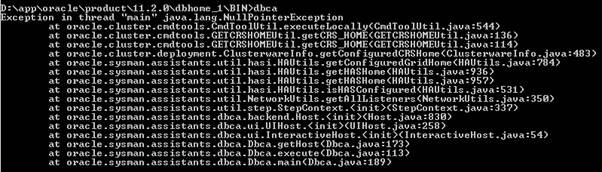
It’s been discovered that after applying 11.2.0.4.161118 Windows DB Bundle Patch 24922870, both DBCA and DBUA no longer function and give the following error:

dbca_error_after_patching

Oracle Support have only filed a bug on Wednesday this week (11th January 2017):

Bug 25369562 : DBCA & DBUA NO LONGER FUNCTION AFTER APPLYING PATCH 24922870

So if you’re planning to use either DBCA or DBUA after applying the patch, you might want to hold off until the bug is fixed 🙂

It’s also discovered NETCA no longer function after applying this patch, it will start but does nothing when you click on ‘Configure Listener’.

Credit to my colleague for sharing this info.

If you found this blog post useful, please like as well as follow me through my various Social Media avenues available on the sidebar and/or subscribe to this oracle blog via WordPress/e-mail.

Thanks

Zed DBA (Zahid Anwar)