Oracle Exadata X11M Next Generation Hardware Available Everywhere

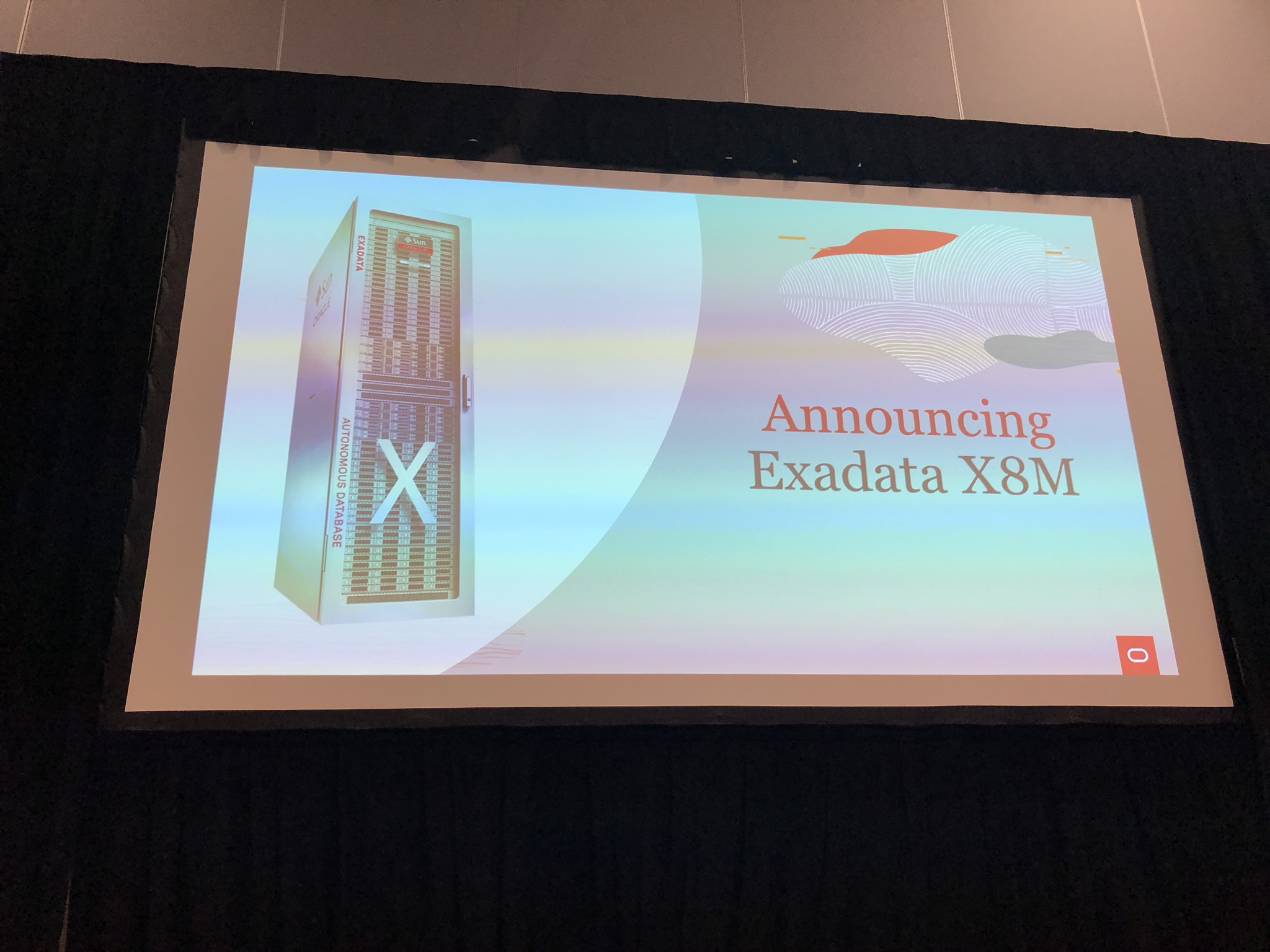
Oracle today announced Oracle Exadata X11M, labelled as the Next Generation Intelligent Data Architecture which enable Exadata Exascale Intelligent Data Architure for the Cloud Era.

Hardware Changes

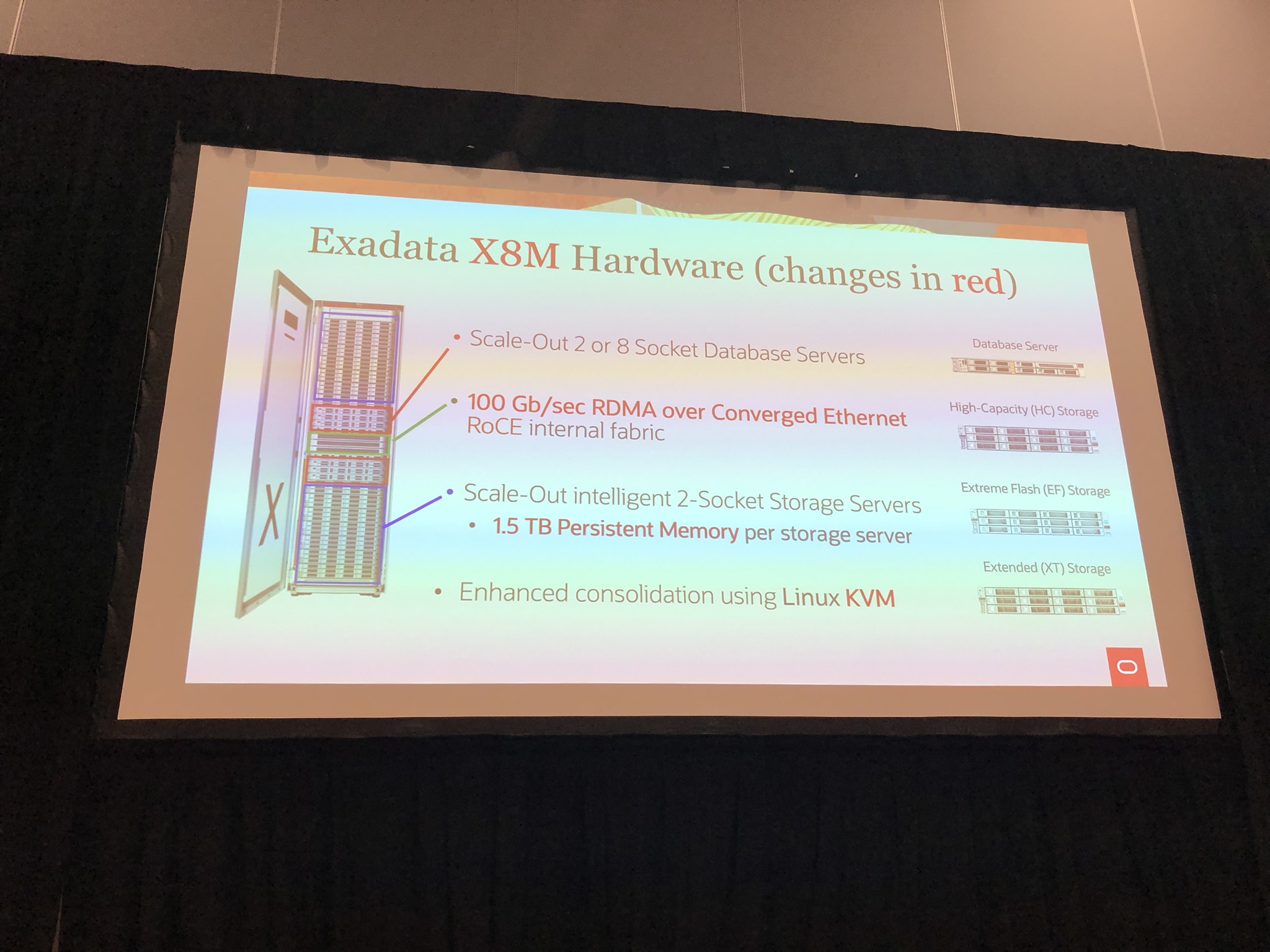
In the database server, the CPU moves from AMD EPYC 9J14 to 9J25, whilst still retaining 96 cores, they are up to 25% faster. Same memory sizes but up to 33% faster DRAM.

In the storage server, the flash is now up to 2.2x faster then 10M, with CPU up to 11% faster and DRAM 33% faster.

The amount of flash, memory, and disk remains unchanged from X10M.

Both storage server high capacity and and extreme flash remain unchanged, however the database server eighth rack and storage server eighth rack is now called database server-Z and storage server high capacity-Z.

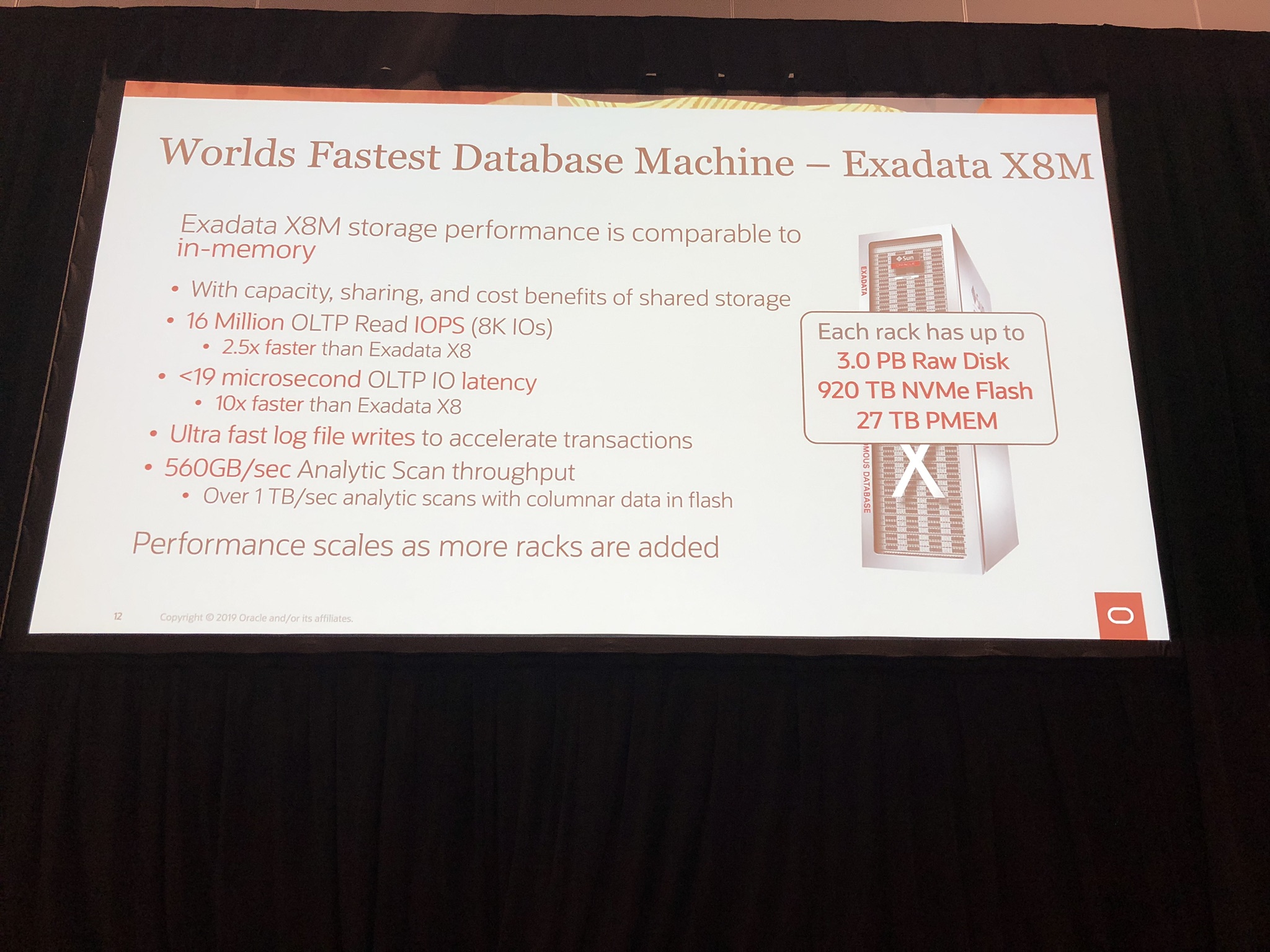
AI search are now further accelerated on X11M with AI vector search on database severs up to 43% faster with in-memory vector index (HNSW) queries and AI vector search on storage servers up to 55% faster with persistent vector index (IVF) queries.

The I/O latency was already impressive on the X10M at 17us, but Oracle have managed to reduced this now to 14us to give 21% faster XRMEM read latency and up to 43% faster flash OLTP read latency.

Software Changes

Exadata X11M has a new intelligent power efficiency capability that can limit the power consumption of the database server CPUs dynamically to save power when workload demand is low. It can also intelligently turn off unneeded cores to further conserve energy. Couple with hardware changes, this allows for running more databases and workloads or run same workload using less hardware due to the extreme performance enabling efficiently consolidate.

Available Everywhere

Oracle now has Exadata in all leading cloud providers, making Exadata accessible to even more customers.

Couple this with Exascale, which is currently limited to OCI but will in future be on Exadata Cloud@Customer, OCI Dedicated Region, and multi-cloud environments, will make Exadata even more accessible with low entry cost point and pay per use.

For more Info

Please refer to the following links:

If you found this blog post useful, please like as well as follow me through my various Social Media avenues available on the sidebar and/or subscribe to this oracle blog via WordPress/e-mail.

Thanks

Zed DBA (Zahid Anwar)

Oracle switches to AMD for full Exadata X10M lineup, what else is new?

Chipset switch to AMD

So back in September 2022, I noticed the Oracle Exadata Cloud Infrastructure X9M switched to AMD, where as the Exadata X9M On-premises and Exdata X9M Cloud @ Customer remained on Intel. More details in my blog post here.

It come as no surprise the whole lineup has now switched to AMD! Why? Well putting it simply AMD has beaten Intel on the number of cores for sometime now and with the scalability of Exadata it make senses to have the upper limit cores that AMD offers. Oracle is now using the AMD EPYC 9J14 processors.

Where has the Persistent Memory gone?

Since Exadata X8M, Intel Optane Persistent Memory has existed in the storage cells, bringing an additional layer to the multi-tiered storage architecture. Persistent Memory has the benefit of being order of magnitude faster then Flash but at the fraction of the cost of DDR memory resulting in the Exadata Persistent Memory Data Accelerator.

Simply put, you can’t have AMD chipset with Intel Optane Persistent Memory, so Oracle had to come up with a new solution which they glossed over in the announcement. Which they replaced the Persistent Memory with DDR5 memory and address the memory from the compute nodes using the new feature called Exadata RDMA Memory (XRMEM). This extends the existing Remote Direct Memory Access (RDMA), to create a new shared read accelerator. Interesting Oracle compromised on the writes accelerator that Persistent Memory gave but they would have done the analysis and probably Persistent Memory was largely fronting reads and the penalty to flush to Flash instead of Persistent Memory probably wasn’t that significant. There is now 1.5TB DDR5 DRAM in storage cell compared to 256GB in X9M with 1.5TB Persistent Memory.

What else is new?

The other highlights are:

  • Increased memory configuration of 512GB, 1.5TB, 2.25TB and 3TB DDR5 DRAM in the compute nodes
  • PCIe 4 replaced with PCIe 5, to give 2x 100Gb/sec active-active RoCE network for impressive total throughput of 200Gb/sec
  • Extreme Flash storage server now has the introduction of “capacity optimised” flash drive combined with “performance optimised” flash cards to give impressive increase of 2.4x over X9M
  • 22TB disks instead of 18TB on X9M, giving 22% increase storage

Those that know me, will know I have been predicting:

  • Full switch to AMD chipset for whole Exadata lineup
  • Some sort of replacement for Persistent Memory
  • 22TB hard disk drives

I’m glad to say I was right on all accounts 🙂

For more Info

Please refer to the following links:

If you found this blog post useful, please like as well as follow me through my various Social Media avenues available on the sidebar and/or subscribe to this oracle blog via WordPress/e-mail.

Thanks

Zed DBA (Zahid Anwar)

OGB Appreciation Day : Exadata X8M

What is OGB Appreciation Day?

The Oracle Groundbreakers (OGB) Appreciation Day formally known as OTN Appreciation Day and ODC Appreciation Day, is a great initiative by Tim Hall aka Oracle-Base.com.  Where we take the opportunity to say thanks to the Oracle Community which includes but not limited to ACEs, Java Champions, Ambassadors and all those who have the Groundbreakers spirit #ThanksOGB 🙂

I wonder what will be the name will be next year 😉

More info on Oracle Groundbreakers Community can be found here:
About Oracle Groundbreakers Community

When is it?

This year, it is on Thursday 10th October 2019 and I have to confess I totally missed it and thus my post is a few days out but I didn’t want to do disservice to the spirit of the initiative.

You can see my previous post here:
2017 – ODC Appreciation Day : Oracle Exadata Database Machine
2018 – ODC Appreciation Day : Oracle dcli Utility

You can see a summary of previous years blog posts here:
2016 – OTN Appreciation Day : Summary
2017 – ODC Appreciation Day 2017 : It’s a Wrap (#ThanksODC)
2018 – ODC Appreciation Day 2018 : It’s a Wrap (#ThanksODC)
2019 – OGB Appreciation Day 2019 : It’s a Wrap (#ThanksOGB) – this year

My Contribution : Exadata X8M

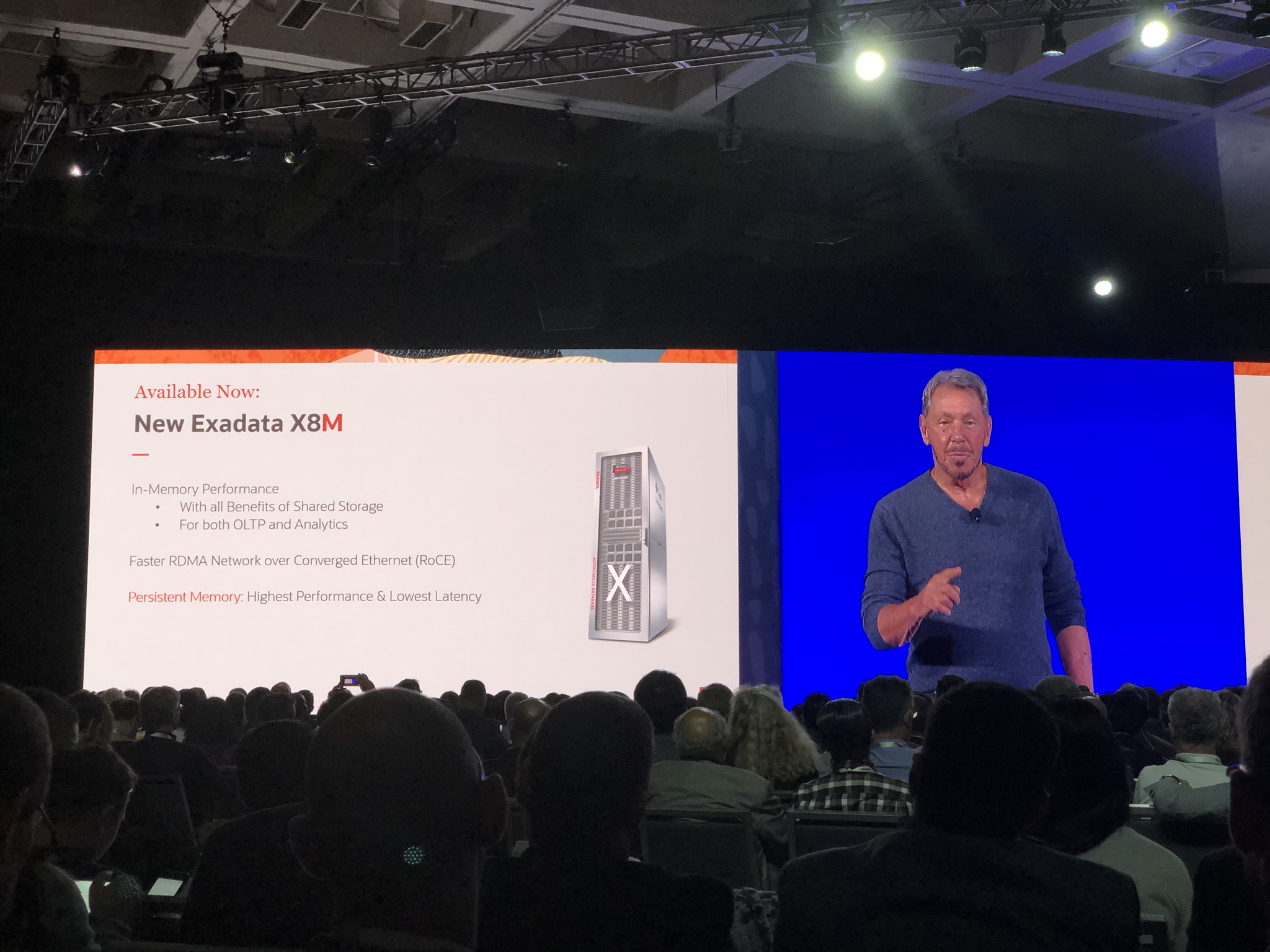
When I was at Oracle Open World 2019 a few weeks ago, Larry Ellison (CTO of Oracle) announced the new Exadata X8M:

IMG_6715

Key point being in-memory performance utilising persistence memory and RDMA Network over Converged Ethernet (RoCE), which I will detail later on in this blog post.

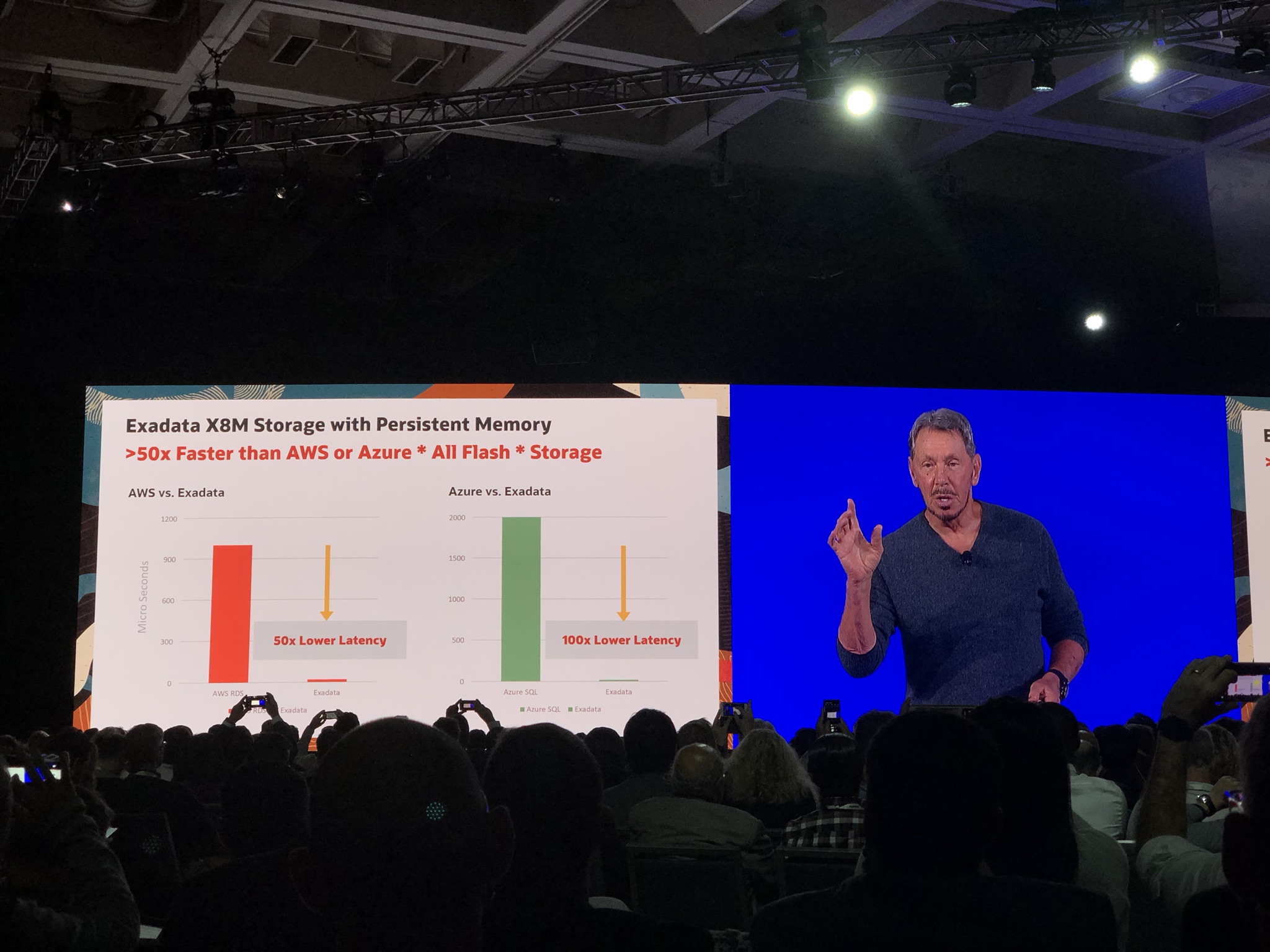
Larry also boasted the Exadata X8M storage is 50x faster then AWS and 100x faster then Azure All flash storage:

IMG_6716

Following the announcement I attended another 2 sessions with Juan Loaiza (Executive Vice President, Mission Critical Database Technologies, Oracle) and Kothanda Umamageswaran (Senior Vice President, Exadata Development)/Gavin Parish (Senior Principal Product Manager, Exadata Development), who gave more details on the Exadata X8M:

IMG_6880

The keys changes are:

  1. 100Gb/Sec RoCE internal fabric
  2. 1.5TB Persistent Memory per storage server/cell

IMG_6881

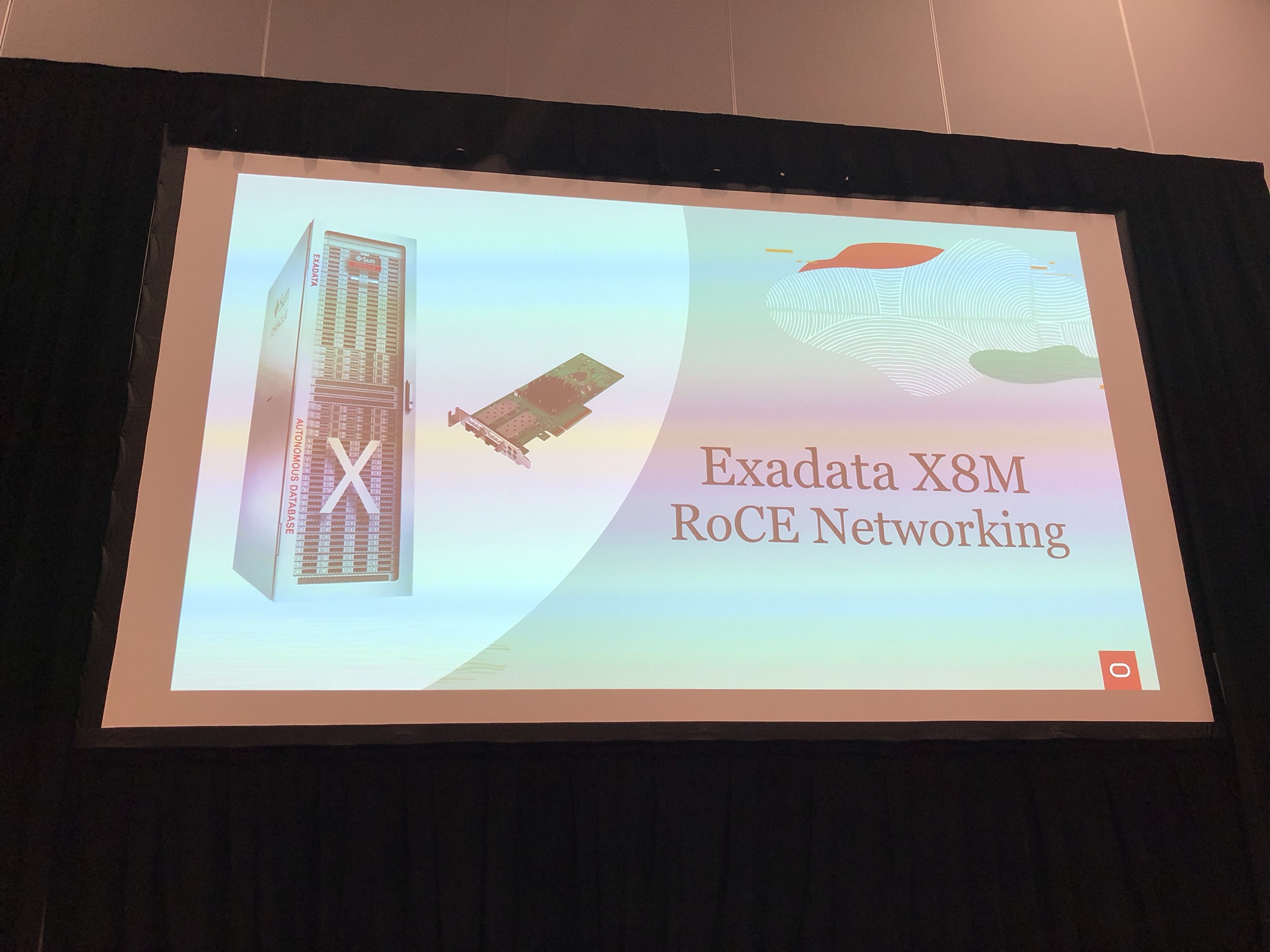
RoCE Networking

IMG_6882

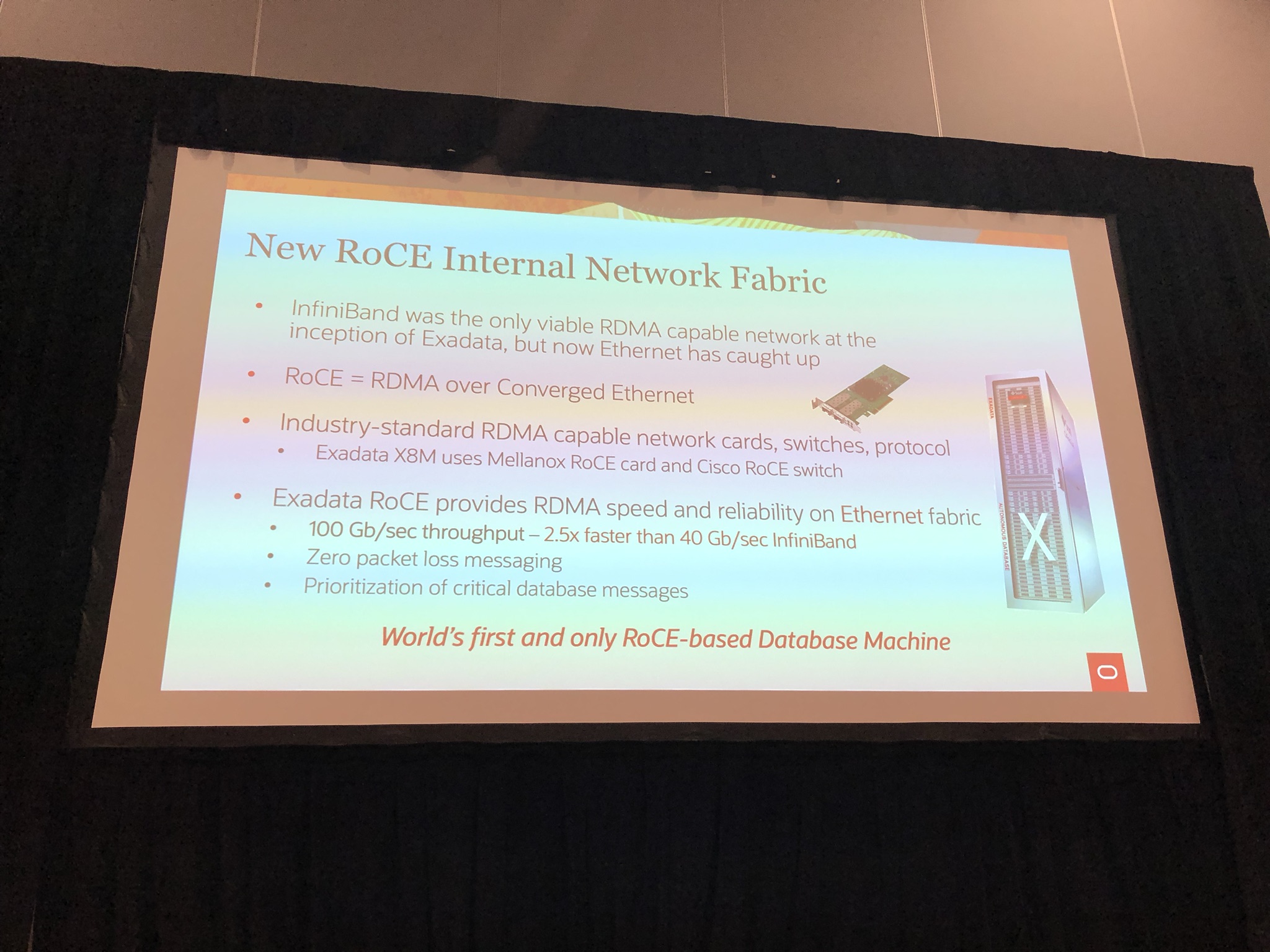
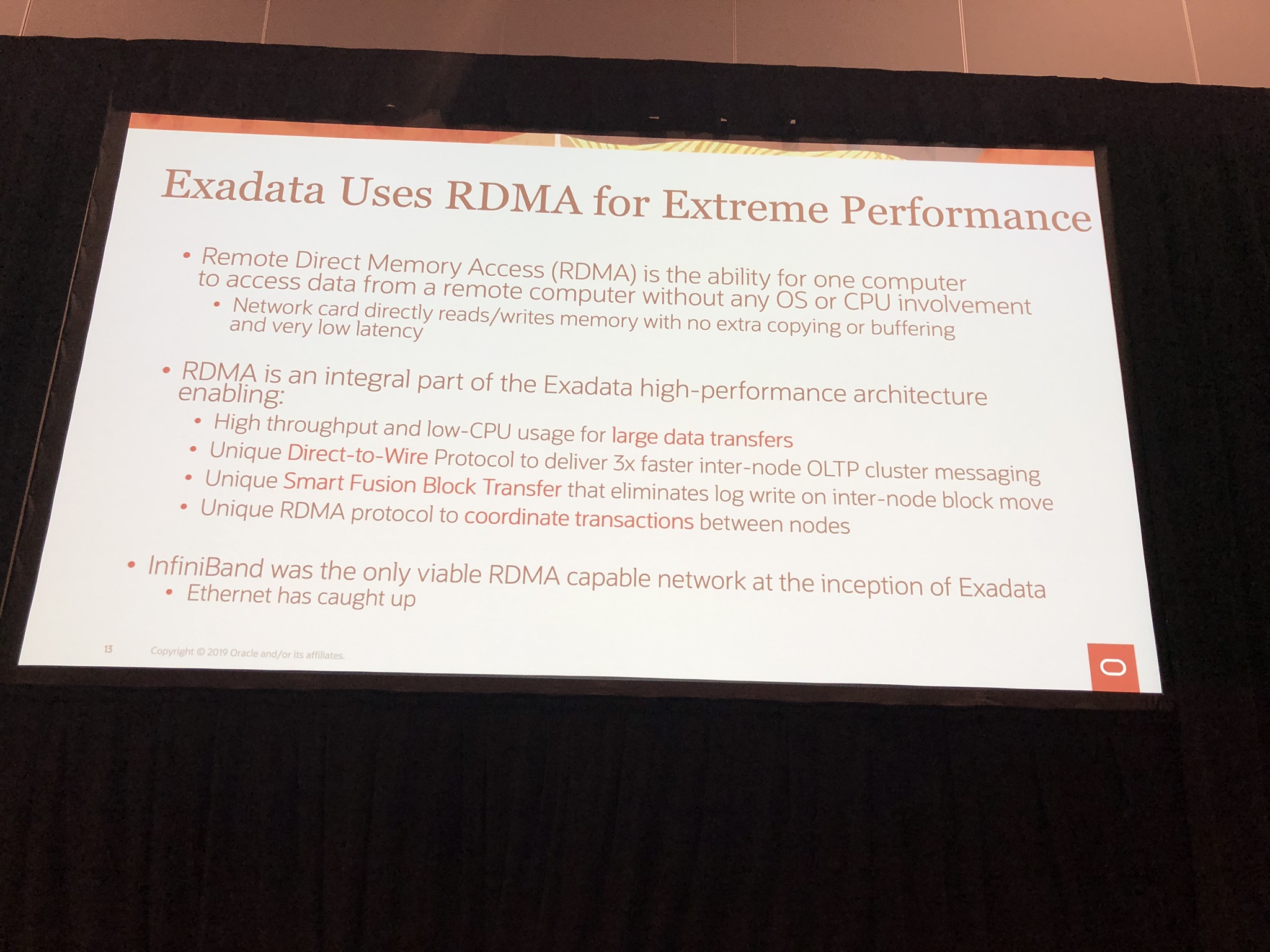
RoCE stand for RDMA (Remote Direct Memory Access) over Converged Ethernet, which initially from the start of Exadata had been over InfiniBand, however Oracle stated Ethernet has caught up and surpassed InfiniBand giving 100Gb/sec throughput as opposed to 40Gb/sec with InfiniBand which is 2.5 times faster:

IMG_6883

IMG_6910

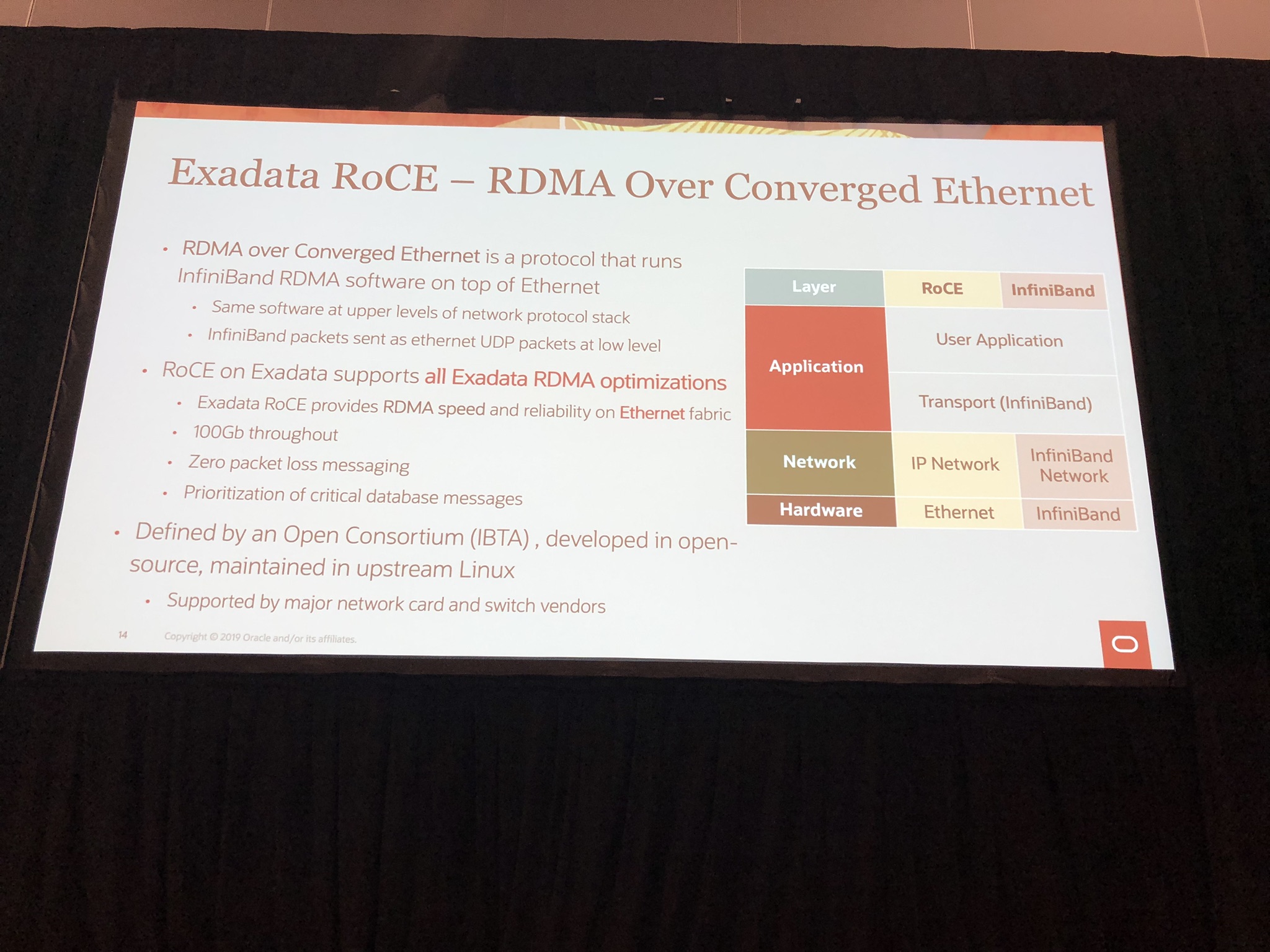
RoCE uses InfiniBand RDMA software on top of Ethernet, so includes all the optimisation and allows for backwards compatibility:

IMG_6911

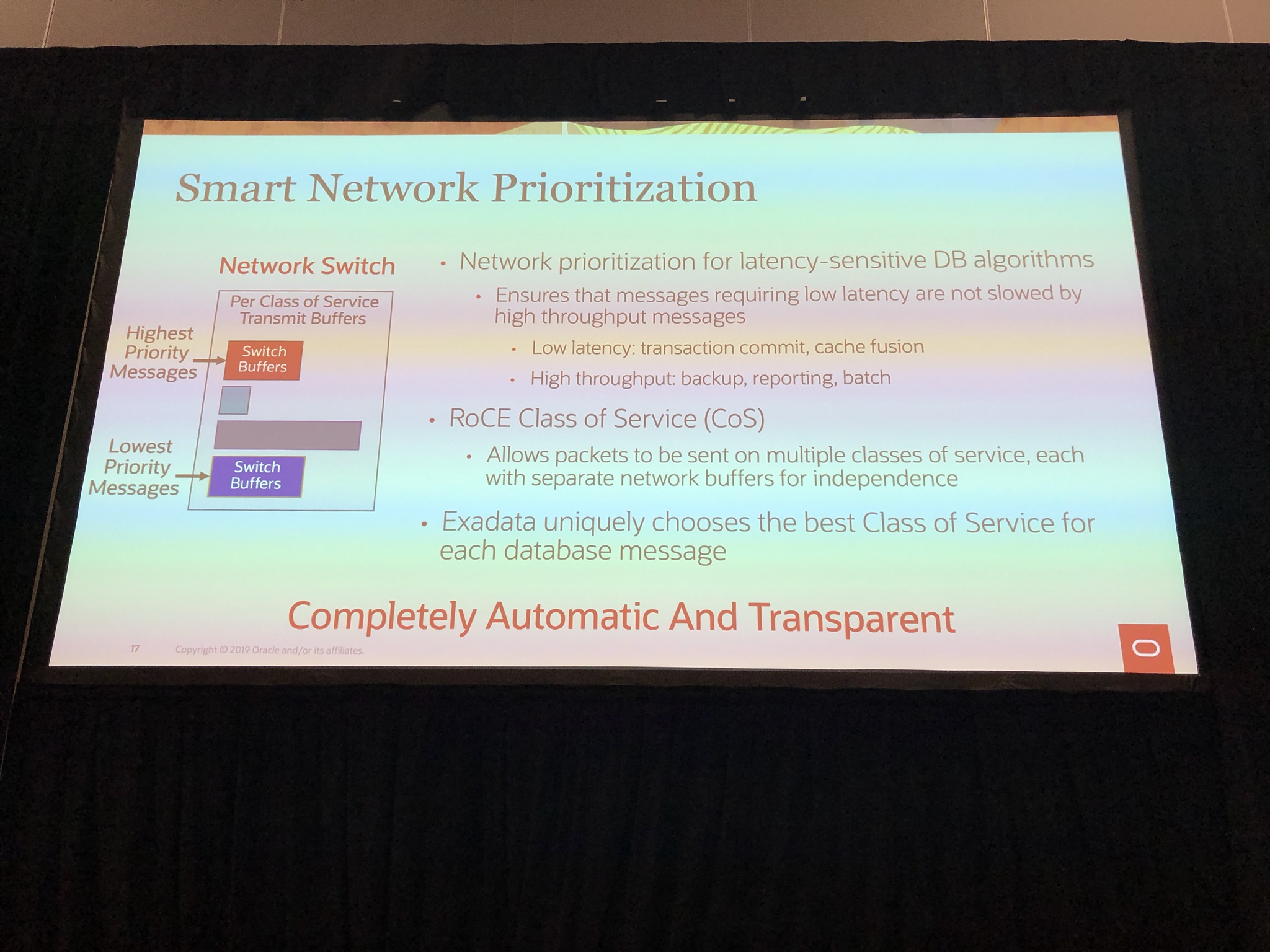
Also mentioned is the smart network prioritisation which can prioritise critical database messages such as transaction commits, cache fusion over backups, etc using Class of Service:

IMG_6914

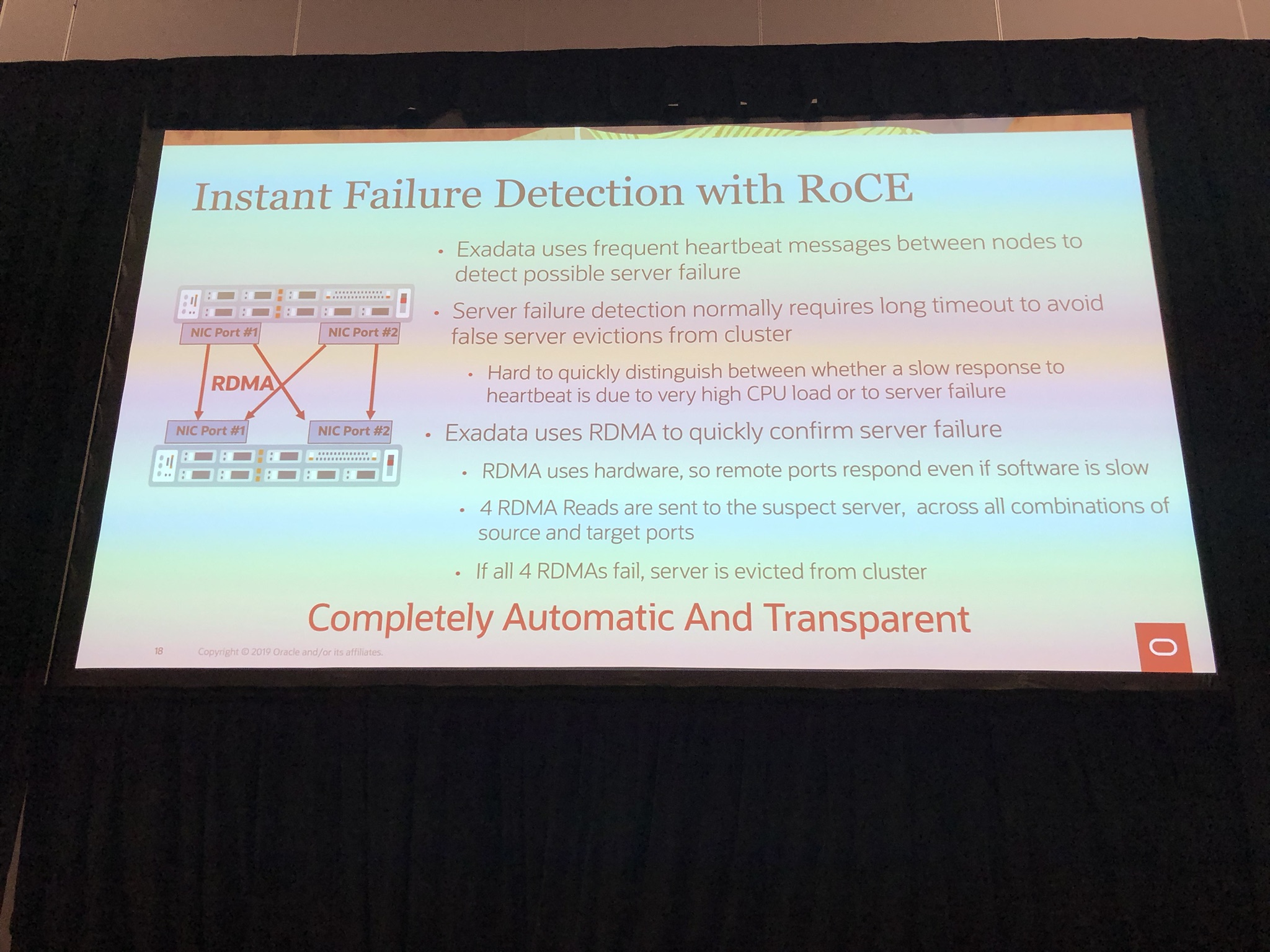
An another nice addition is instance failure detected through use of RoCE, because if all 4 ports don’t respond it confirmed server failure and instantly evicted from cluster:

IMG_6915

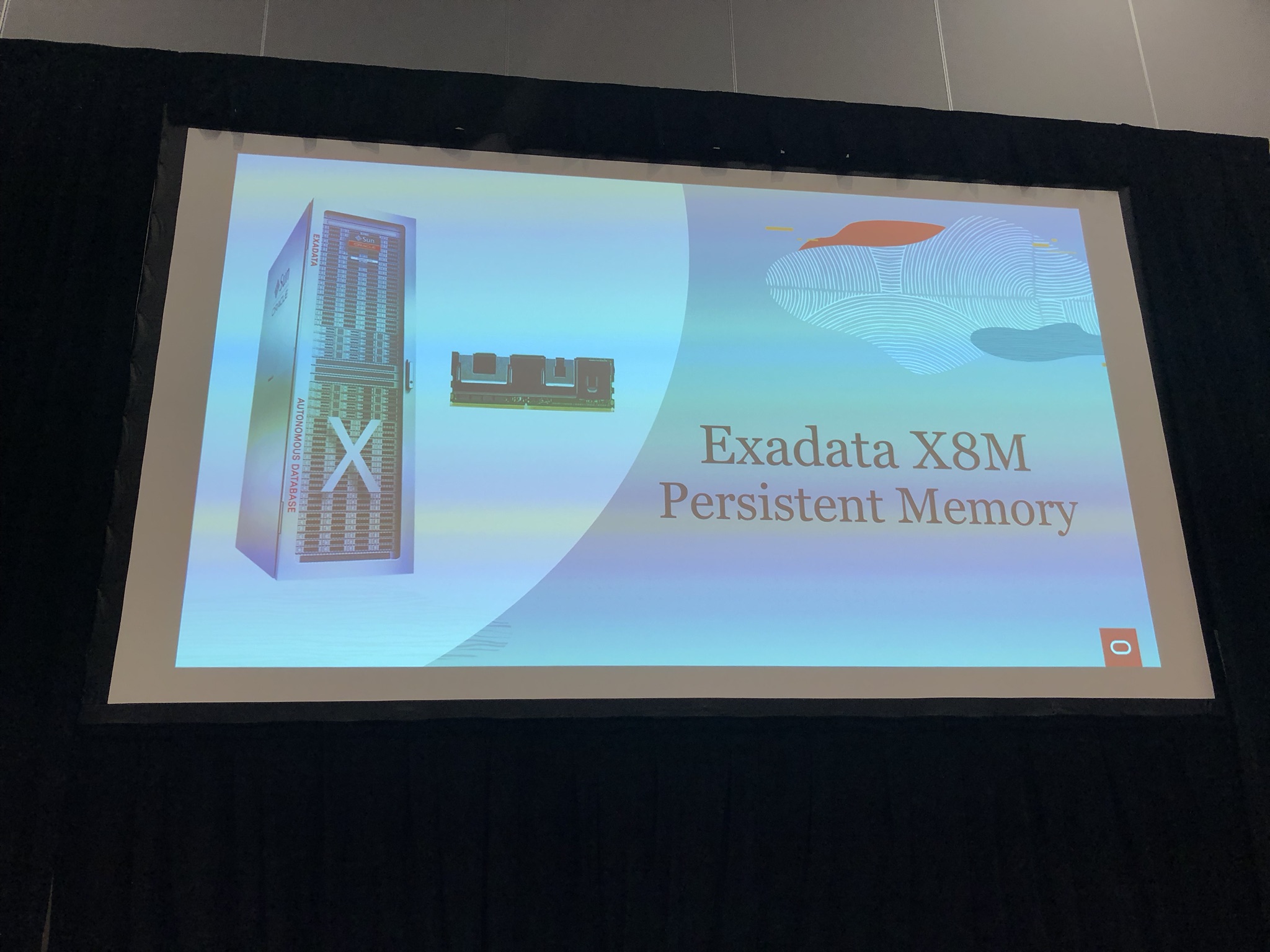
Persistent Memory

IMG_6884

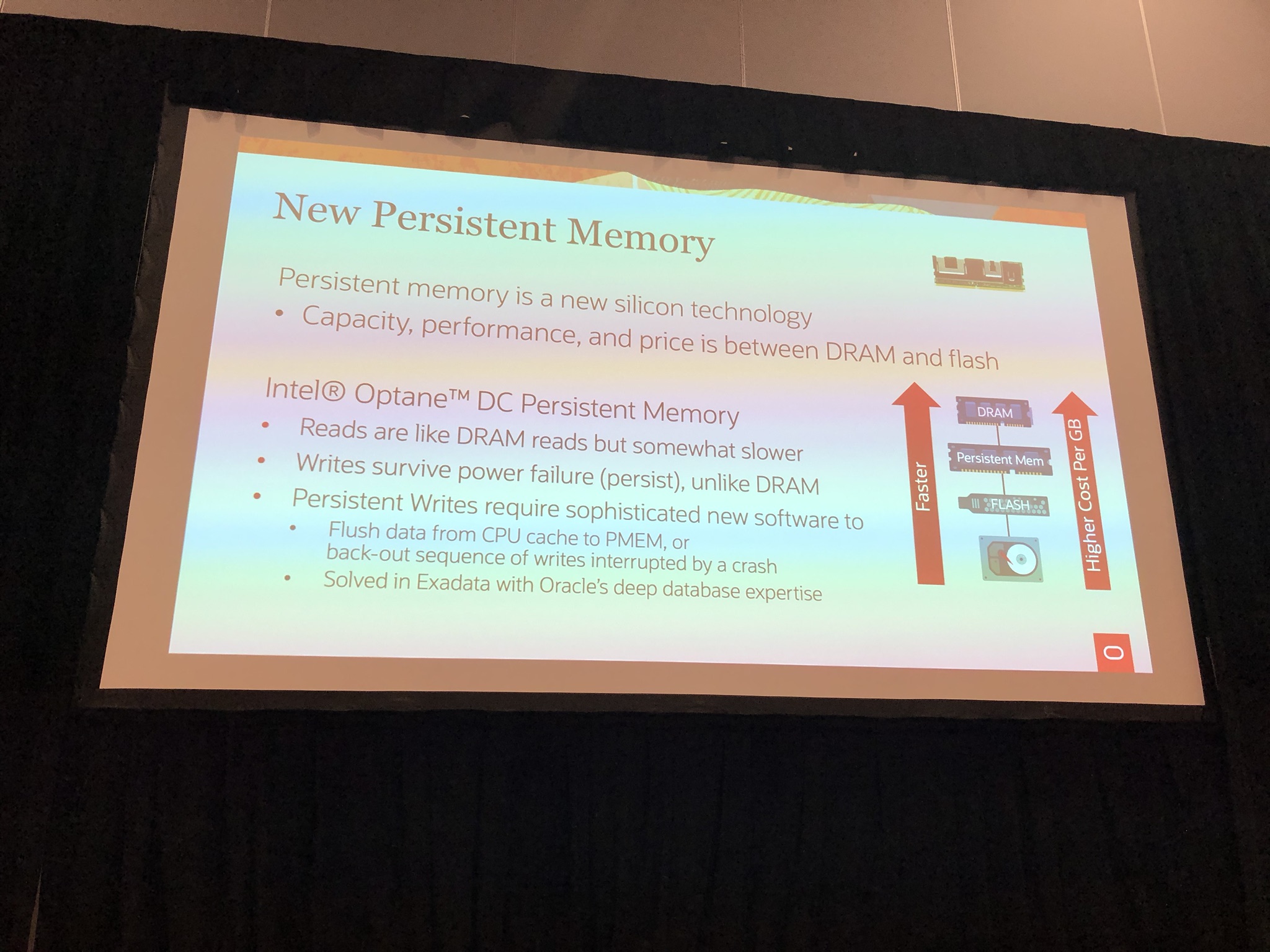
The Exadata X8M uses Intel Optane DC persistent memory a new silicon technology that capacity, performance and cost is between DRAM and flash:

IMG_6885

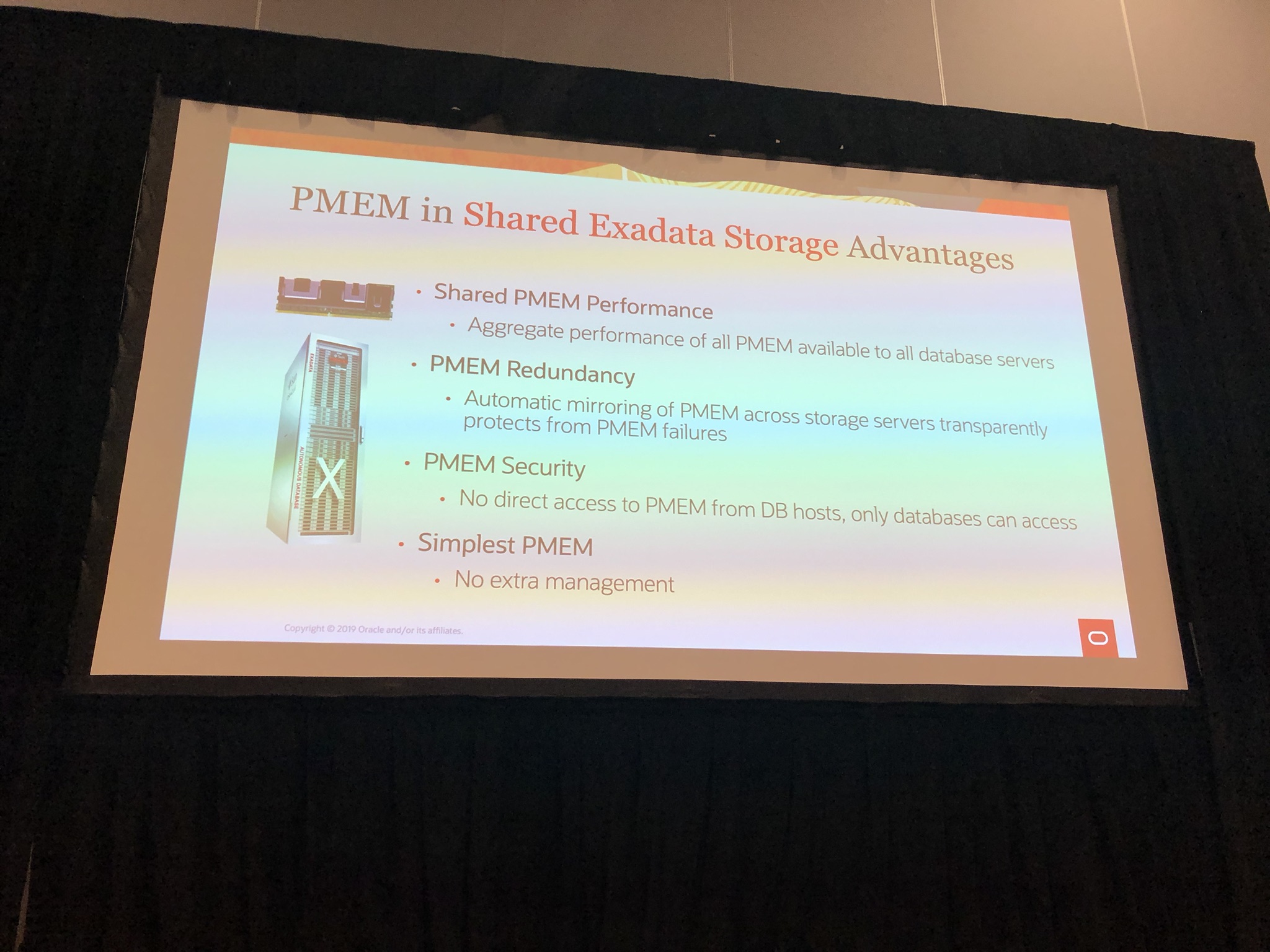
In the Exadata X8M, the persistent memory is shared, just as disks and flash are.  So you get all the benefit of aggregated performance, redundancy, etc:

IMG_6887

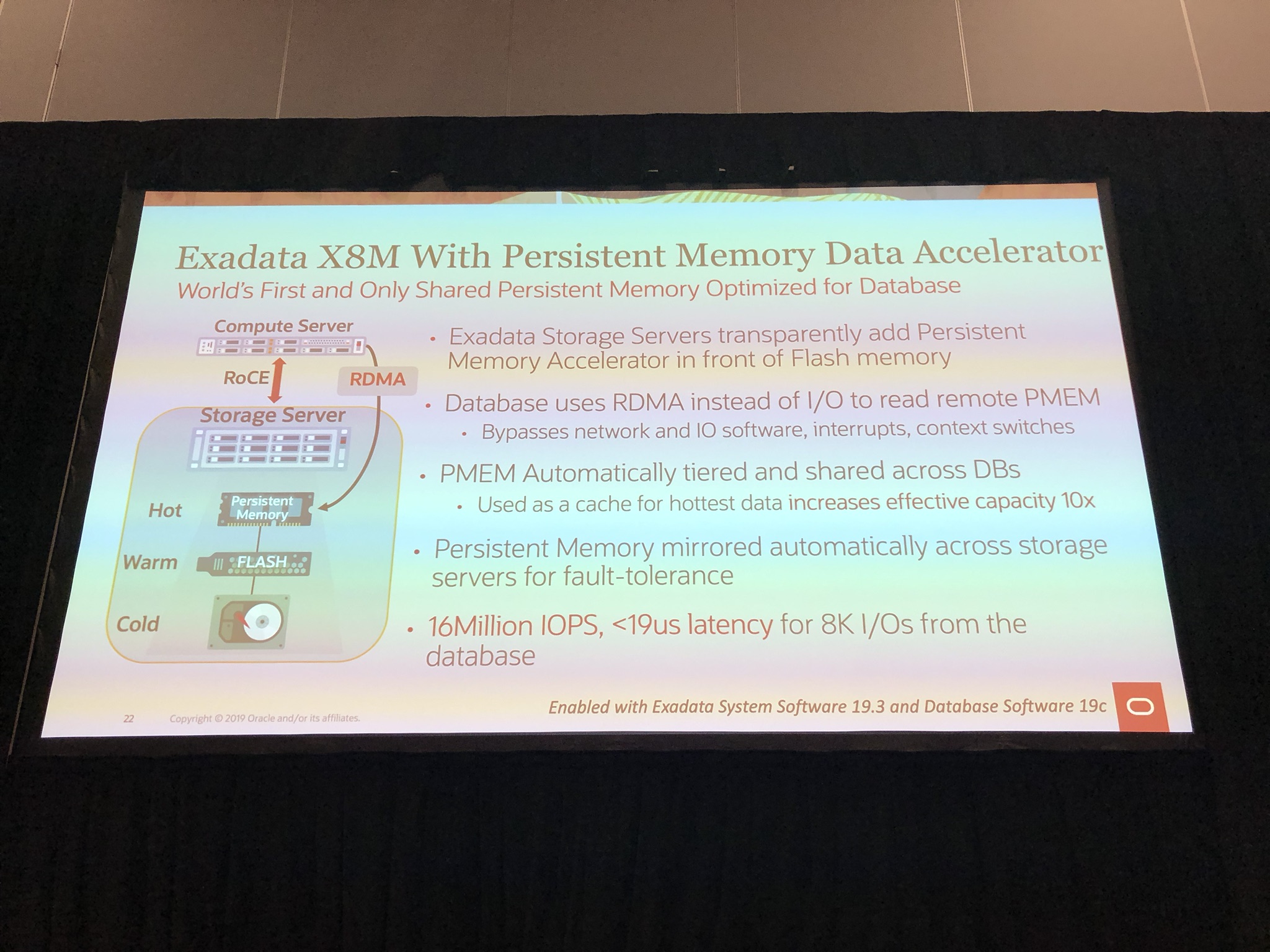
The benefit of RoCE with persistent memory is the Persistent Memory Data Accelerator, that allows the database to use RDMA instead of I/O bypassing network and IO software, interrupts, context switches:

IMG_6919

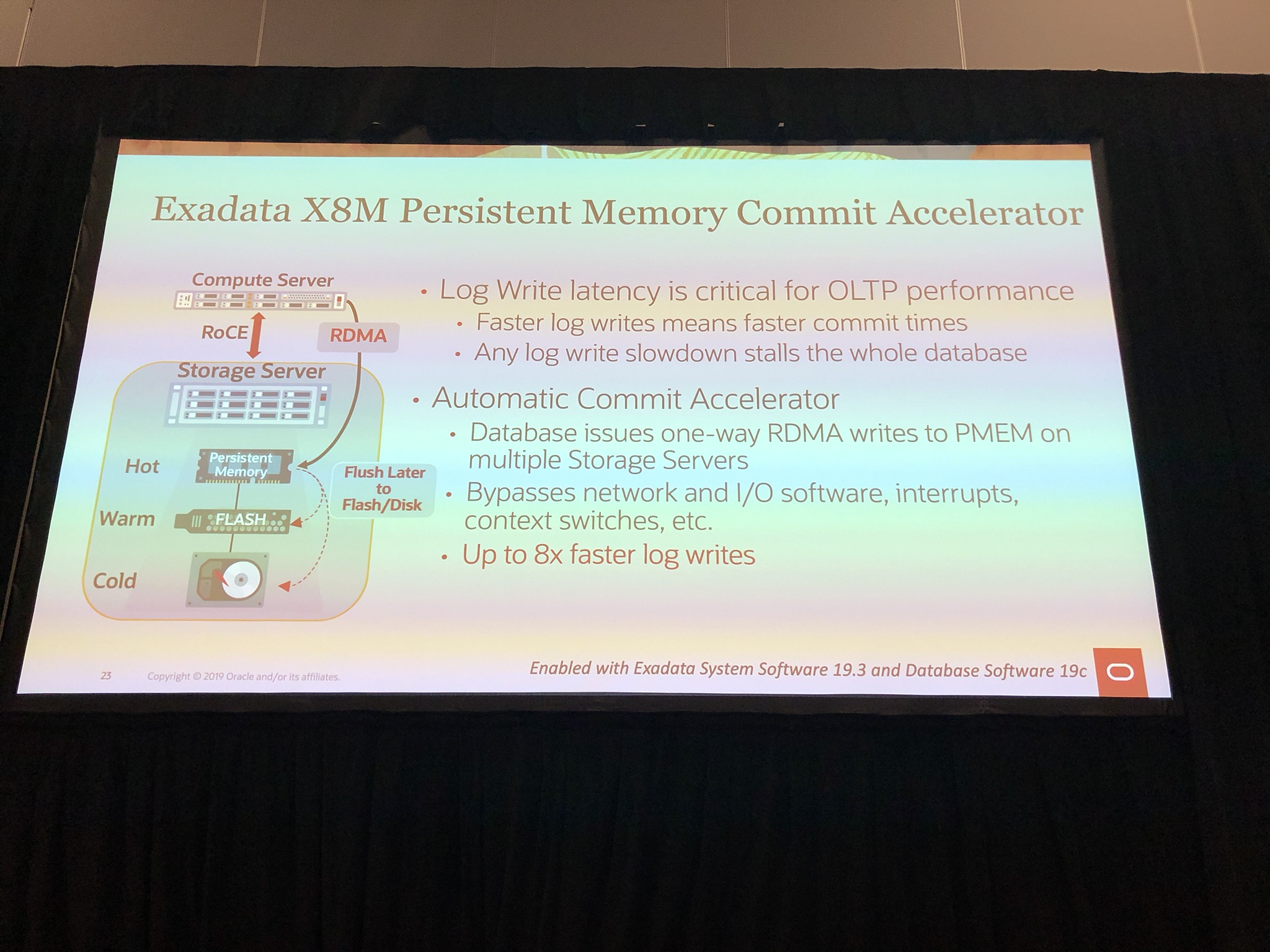
Another benefit of persistent memory is the Memory Commit Accelerator, which like Smart Flash Logging, uses persistent memory to further speed up log writes by 8x using oersistent memory as a buffer which is flushed to flash or disk later on:

IMG_6920

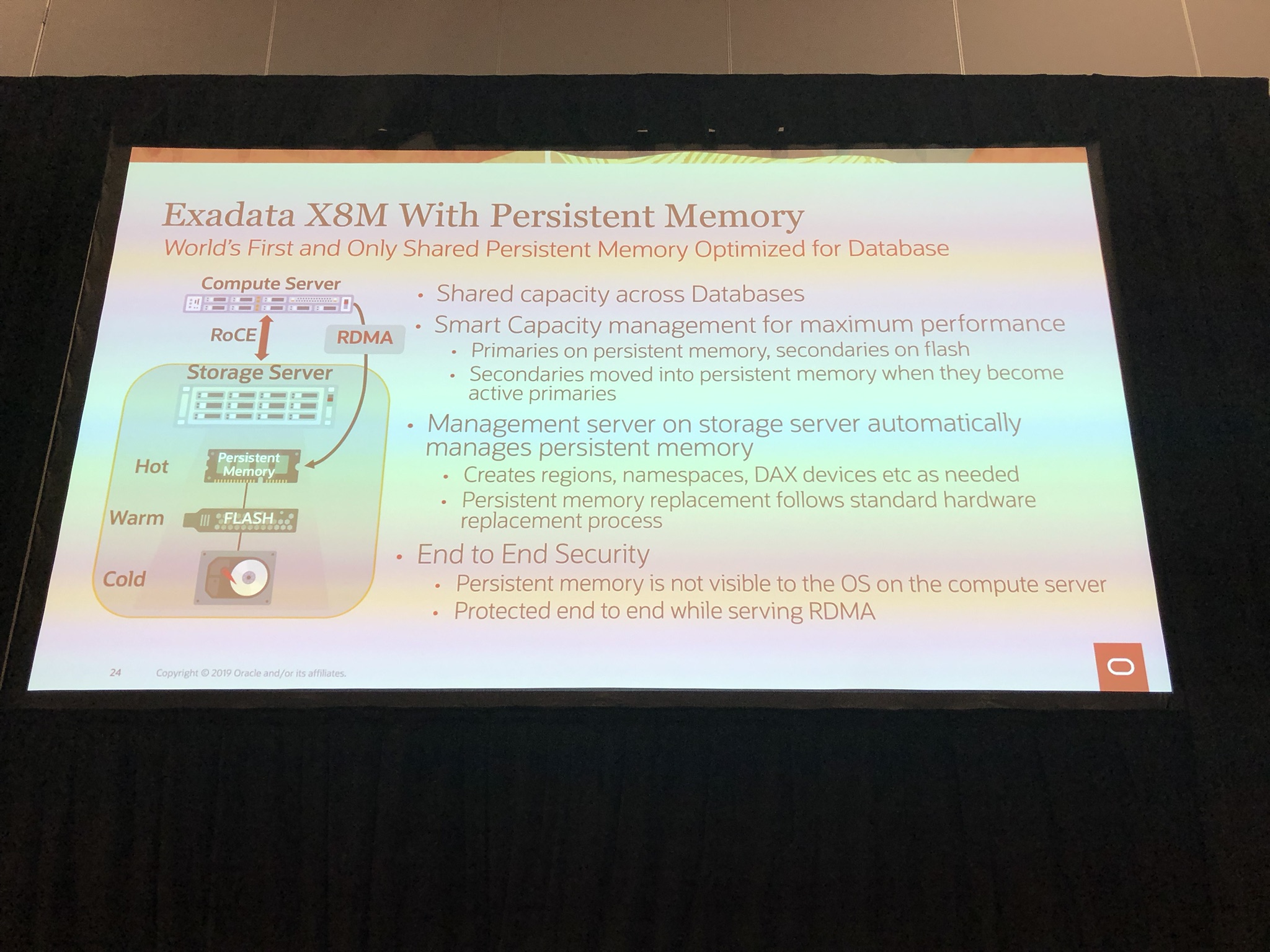
Smart capacity management of persistent memory, so primaries on persistent memory and secondary on flash, which is automatically moved to persistent memory when primary is unavailable:

IMG_6921

If Exadata was not fast enough, all this innovation has lead to the “Worlds Fastest Database Machine” with a astonishing 16 million IOPS with less then 19 microseconds:

IMG_6909

For more information on Exadata X8M can be found here.

Finally Happy OGB Appreciation Day! #ThanksOGB #ThanksODC #ThanksOTN 🙂

If you found this blog post useful, please like as well as follow me through my various Social Media avenues available on the sidebar and/or subscribe to this oracle blog via WordPress/e-mail.

Thanks

Zed DBA (Zahid Anwar)
Online Redo Log Switch Frequency Map

A query I find myself often running is the online redo log switch frequency map query, which queries the v$log_history/gv$log_history (for cluster databases) view and show the historical log switch frequency.

Why you might ask? Well it’s important to see how frequent log switches are occurring as Oracle’s rule of thumb is to not switch more then 3 logs per hour (20 minutes of redo) at peak DML activity to prevent excessive checkpoints.  The query can also highlight abnormal churn (DML activity).

Online Redo Log Switch Frequency Map Query

set pages 999 lines 400
col h0 format 999
col h1 format 999
col h2 format 999
col h3 format 999
col h4 format 999
col h5 format 999
col h6 format 999
col h7 format 999
col h8 format 999
col h9 format 999
col h10 format 999
col h11 format 999
col h12 format 999
col h13 format 999
col h14 format 999
col h15 format 999
col h16 format 999
col h17 format 999
col h18 format 999
col h19 format 999
col h20 format 999
col h21 format 999
col h22 format 999
col h23 format 999
SELECT TRUNC (first_time) "Date", inst_id, TO_CHAR (first_time, 'Dy') "Day",
 COUNT (1) "Total",
 SUM (DECODE (TO_CHAR (first_time, 'hh24'), '00', 1, 0)) "h0",
 SUM (DECODE (TO_CHAR (first_time, 'hh24'), '01', 1, 0)) "h1",
 SUM (DECODE (TO_CHAR (first_time, 'hh24'), '02', 1, 0)) "h2",
 SUM (DECODE (TO_CHAR (first_time, 'hh24'), '03', 1, 0)) "h3",
 SUM (DECODE (TO_CHAR (first_time, 'hh24'), '04', 1, 0)) "h4",
 SUM (DECODE (TO_CHAR (first_time, 'hh24'), '05', 1, 0)) "h5",
 SUM (DECODE (TO_CHAR (first_time, 'hh24'), '06', 1, 0)) "h6",
 SUM (DECODE (TO_CHAR (first_time, 'hh24'), '07', 1, 0)) "h7",
 SUM (DECODE (TO_CHAR (first_time, 'hh24'), '08', 1, 0)) "h8",
 SUM (DECODE (TO_CHAR (first_time, 'hh24'), '09', 1, 0)) "h9",
 SUM (DECODE (TO_CHAR (first_time, 'hh24'), '10', 1, 0)) "h10",
 SUM (DECODE (TO_CHAR (first_time, 'hh24'), '11', 1, 0)) "h11",
 SUM (DECODE (TO_CHAR (first_time, 'hh24'), '12', 1, 0)) "h12",
 SUM (DECODE (TO_CHAR (first_time, 'hh24'), '13', 1, 0)) "h13",
 SUM (DECODE (TO_CHAR (first_time, 'hh24'), '14', 1, 0)) "h14",
 SUM (DECODE (TO_CHAR (first_time, 'hh24'), '15', 1, 0)) "h15",
 SUM (DECODE (TO_CHAR (first_time, 'hh24'), '16', 1, 0)) "h16",
 SUM (DECODE (TO_CHAR (first_time, 'hh24'), '17', 1, 0)) "h17",
 SUM (DECODE (TO_CHAR (first_time, 'hh24'), '18', 1, 0)) "h18",
 SUM (DECODE (TO_CHAR (first_time, 'hh24'), '19', 1, 0)) "h19",
 SUM (DECODE (TO_CHAR (first_time, 'hh24'), '20', 1, 0)) "h20",
 SUM (DECODE (TO_CHAR (first_time, 'hh24'), '21', 1, 0)) "h21",
 SUM (DECODE (TO_CHAR (first_time, 'hh24'), '22', 1, 0)) "h22",
 SUM (DECODE (TO_CHAR (first_time, 'hh24'), '23', 1, 0)) "h23",
 ROUND (COUNT (1) / 24, 2) "Avg"
FROM gv$log_history
WHERE thread# = inst_id
AND first_time > sysdate -7
GROUP BY TRUNC (first_time), inst_id, TO_CHAR (first_time, 'Dy')
ORDER BY 1,2;

Online Redo Log Switch Frequency Map Output

SQL> set pages 999 lines 400
SQL> col h0 format 999
SQL> col h1 format 999
SQL> col h2 format 999
SQL> col h3 format 999
SQL> col h4 format 999
SQL> col h5 format 999
SQL> col h6 format 999
SQL> col h7 format 999
SQL> col h8 format 999
SQL> col h9 format 999
SQL> col h10 format 999
SQL> col h11 format 999
SQL> col h12 format 999
SQL> col h13 format 999
SQL> col h14 format 999
SQL> col h15 format 999
SQL> col h16 format 999
SQL> col h17 format 999
SQL> col h18 format 999
SQL> col h19 format 999
SQL> col h20 format 999
SQL> col h21 format 999
SQL> col h22 format 999
SQL> col h23 format 999
SQL> SELECT TRUNC (first_time) "Date", inst_id, TO_CHAR (first_time, 'Dy') "Day",
SQL>  COUNT (1) "Total",
SQL>  SUM (DECODE (TO_CHAR (first_time, 'hh24'), '00', 1, 0)) "h0",
SQL>  SUM (DECODE (TO_CHAR (first_time, 'hh24'), '01', 1, 0)) "h1",
SQL>  SUM (DECODE (TO_CHAR (first_time, 'hh24'), '02', 1, 0)) "h2",
SQL>  SUM (DECODE (TO_CHAR (first_time, 'hh24'), '03', 1, 0)) "h3",
SQL>  SUM (DECODE (TO_CHAR (first_time, 'hh24'), '04', 1, 0)) "h4",
SQL>  SUM (DECODE (TO_CHAR (first_time, 'hh24'), '05', 1, 0)) "h5",
SQL>  SUM (DECODE (TO_CHAR (first_time, 'hh24'), '06', 1, 0)) "h6",
SQL>  SUM (DECODE (TO_CHAR (first_time, 'hh24'), '07', 1, 0)) "h7",
SQL>  SUM (DECODE (TO_CHAR (first_time, 'hh24'), '08', 1, 0)) "h8",
SQL>  SUM (DECODE (TO_CHAR (first_time, 'hh24'), '09', 1, 0)) "h9",
SQL>  SUM (DECODE (TO_CHAR (first_time, 'hh24'), '10', 1, 0)) "h10",
SQL>  SUM (DECODE (TO_CHAR (first_time, 'hh24'), '11', 1, 0)) "h11",
SQL>  SUM (DECODE (TO_CHAR (first_time, 'hh24'), '12', 1, 0)) "h12",
SQL>  SUM (DECODE (TO_CHAR (first_time, 'hh24'), '13', 1, 0)) "h13",
SQL>  SUM (DECODE (TO_CHAR (first_time, 'hh24'), '14', 1, 0)) "h14",
SQL>  SUM (DECODE (TO_CHAR (first_time, 'hh24'), '15', 1, 0)) "h15",
SQL>  SUM (DECODE (TO_CHAR (first_time, 'hh24'), '16', 1, 0)) "h16",
SQL>  SUM (DECODE (TO_CHAR (first_time, 'hh24'), '17', 1, 0)) "h17",
SQL>  SUM (DECODE (TO_CHAR (first_time, 'hh24'), '18', 1, 0)) "h18",
SQL>  SUM (DECODE (TO_CHAR (first_time, 'hh24'), '19', 1, 0)) "h19",
SQL>  SUM (DECODE (TO_CHAR (first_time, 'hh24'), '20', 1, 0)) "h20",
SQL>  SUM (DECODE (TO_CHAR (first_time, 'hh24'), '21', 1, 0)) "h21",
SQL>  SUM (DECODE (TO_CHAR (first_time, 'hh24'), '22', 1, 0)) "h22",
SQL>  SUM (DECODE (TO_CHAR (first_time, 'hh24'), '23', 1, 0)) "h23",
SQL>  ROUND (COUNT (1) / 24, 2) "Avg"
SQL> FROM gv$log_history
SQL> WHERE thread# = inst_id
SQL> AND first_time > sysdate -7
SQL> GROUP BY TRUNC (first_time), inst_id, TO_CHAR (first_time, 'Dy')
SQL> ORDER BY 1,2;

Date         INST_ID Day      Total   h0   h1   h2   h3   h4   h5   h6   h7   h8   h9  h10  h11  h12  h13  h14  h15  h16  h17  h18  h19  h20  h21  h22  h23        Avg
--------- ---------- --- ---------- ---- ---- ---- ---- ---- ---- ---- ---- ---- ---- ---- ---- ---- ---- ---- ---- ---- ---- ---- ---- ---- ---- ---- ---- ----------
24-MAY-19          1 Fri          1    0    0    0    0    0    0    0    0    0    0    0    0    0    0    0    0    0    0    0    0    0    0    0    1        .04
24-MAY-19          2 Fri          1    0    0    0    0    0    0    0    0    0    0    0    0    0    0    0    0    0    0    0    0    0    0    0    1        .04
25-MAY-19          1 Sat         56    1    1    3    0    2    2    0    7    0    0   10    4    4    6    3    1    2    4    1    1    1    2    0    1       2.33
25-MAY-19          2 Sat         62    0    3    3    0    1    2    0    7    0    0    8    5    2    2    3    5    4    2    3    3    5    4    0    0       2.58
26-MAY-19          1 Sun         56    1    1    3    0    2    5    0   11    0    4    1    1    7    7    3    5    1    0    0    0    1    1    1    1       2.33
26-MAY-19          2 Sun         28    1    3    3    0    1    4    0    5    0    1    1    0    2    3    1    1    1    0    0    0    0    0    1    0       1.17
27-MAY-19          1 Mon         33    1    1    3    0    1    4    0    6    5    1    0    1    1    2    1    1    1    0    0    0    1    1    0    2       1.38
27-MAY-19          2 Mon         21    0    3    3    0    0    4    0    3    2    0    0    1    0    1    0    1    0    1    0    0    0    0    1    1        .88
28-MAY-19          1 Tue         43    2    3    3    0    3    5    1    4    3    1    3    0    1    1    1    1    2    3    2    1    1    0    1    1       1.79
28-MAY-19          2 Tue         38    2    4    3    1    1    4    1    7    1    1    1    1    0    1    0    0    2    4    0    1    0    1    1    1       1.58
29-MAY-19          1 Wed         58    2    4    4    1    3    5    2   12    3    1    3    1    2    5    4    1    1    0    1    0    1    0    2    0       2.42
29-MAY-19          2 Wed         28    0    2    3    0    1    4    1    5    1    0    1    1    0    2    1    1    1    1    0    0    1    1    0    1       1.17
30-MAY-19          1 Thu         39    2    3    3    0    1    5    1    7    1    1    2    3    1    2    2    1    0    1    1    0    0    1    0    1       1.63
30-MAY-19          2 Thu         29    0    1    3    0    2    4    1    4    2    1    1    1    1    1    2    0    1    2    0    0    1    1    0    0       1.21
31-MAY-19          1 Fri        153    2    1    3    0    2    4    1    8    3    0   23   29   10    2    1   18   20    6   12    2    3    3    0    0       6.38
31-MAY-19          2 Fri        223    1    2    3    0    1    4    0    3    1    0   71   86   29    1    0    6    7    2    4    0    1    1    0    0       9.29

16 rows selected.

SQL>

Where the log switch frequency exceeds 3 per hour, I have highlighted as red.

From the above output, we can see that most the time the 3 log switch per hour is met, with the 5th and 7th hour exceeding the threshold.  Also we can see today there as been abnormal and excessive churn at 10th and 11th hour.

Investigating this further, we look at v$log to see the size of the online redo logs:

SQL> set pages 999 lines 400
SQL> col FIRST_CHANGE# format 999999999999999
SQL> select GROUP#, THREAD#, SEQUENCE#, BYTES/1024/1024 SIZE_MB, BLOCKSIZE, MEMBERS, ARCHIVED, STATUS, FIRST_CHANGE#, FIRST_TIME, NEXT_CHANGE#, NEXT_TIME, CON_ID from v$log;

    GROUP#    THREAD#  SEQUENCE#    SIZE_MB  BLOCKSIZE    MEMBERS ARC STATUS              FIRST_CHANGE# FIRST_TIM NEXT_CHANGE# NEXT_TIME     CON_ID
---------- ---------- ---------- ---------- ---------- ---------- --- ---------------- ---------------- --------- ------------ --------- ----------
         1          1      40649       4096        512          2 YES INACTIVE             137921001754 31-MAY-19   1.3793E+11 31-MAY-19          0
         2          1      40650       4096        512          2 NO  CURRENT              137930464620 31-MAY-19   2.8147E+14                    0
         3          1      40648       4096        512          2 YES INACTIVE             137920121808 31-MAY-19   1.3792E+11 31-MAY-19          0
         4          2      39319       4096        512          2 NO  CURRENT              137921005288 31-MAY-19   2.8147E+14                    0
         5          2      39317       4096        512          2 YES INACTIVE             137917291807 31-MAY-19   1.3792E+11 31-MAY-19          0
         6          2      39318       4096        512          2 YES INACTIVE             137919186475 31-MAY-19   1.3792E+11 31-MAY-19          0

6 rows selected.

SQL>

As we can see the online redo logs are 4GB, which is the default size on Oracle Exadata, which this is.  We could increase the size of the redo logs but it trade-off between performance verse space usage.  The peak we can see was 29 log switches for instance 1 and 86 log switches for instance 2, assuming these were full redo logs before switching, this is 29 + 86 logs switches for the database.  Which is 115 for the the hour, equating to a significant 460 GB of churn!  But this is an Exadata Machine and is sized and designed for this sort of load 🙂  To resize the redo logs to switch only 3 per hour, we would need to resize to 154GB, this wouldn’t be feasible, so we could either increase to something more reasonable like 10GB or leave as is, depending on what more important, the performance or space usage.


If you found this blog post useful, please like as well as follow me through my various Social Media avenues available on the sidebar and/or subscribe to this oracle blog via WordPress/e-mail.

Thanks

Zed DBA (Zahid Anwar)

RMAN Incremental Differential vs Cumulative & Demo

This blog post is part of the “RMAN Back to Basics” series, which can be found here.

Differential Incremental Backups (default)

A differential incremental backup, backs up all the blocks that have changed after the most recent incremental backup, which can be either level 1 or 0.

RMAN determines which is the most recent level 1 backup and then backs up all the blocks changed after that backup, if no level 1 then all the blocks changed after the last level 0 backup are backed up.  If no level 0 backup exist, then a level 0 backup is taken.

The diagram below shows how the level 1 differential incremental backups are just backing up from the last level 1:

Incremental_Differential

Cumulative Incremental Backups

A cumulative incremental backup, backs up all the blocks that have changed after the most recent incremental backup at level 0 only.

This reduces the work needed when recovering after a restore as only the desired level 1 is required to be applied instead of several level 1 in sequence.  The trade off is as every level 1 backup needs to backup all the blocks changed from the last level 0, it is repeated the work done by the previous level 1, thus require more space and more time.

The diagram below shows how the level 1 cumulative incremental backup are backing up from the last level 0:

Incremental_Cumulative

Cumulative Incremental Backup Demo

We take an cumulative incremental level 1 backup using my script 8_incremental_level_1_cumulative.sh:

[oracle@dc1sbxdb001 demo]$ ./8_incremental_level_1_cumulative.sh 
-----------------------
Step 1: Set environment
-----------------------

Setting the Database Environment using oraenv...
The Oracle base remains unchanged with value /u01/app/oracle

ORACLE_SID: ZEDDBA
ORACLE_HOME: /u01/app/oracle/product/12.2.0/dbhome_1

Press Enter to continue

The environment is set to my ZEDDBA database, next we will take an differential backup twice, followed by cumulative incremental backup twice:

-------------------------------------------------
Step 2: Take Incremental Level 1 Cumlative Backup
-------------------------------------------------

Content of 8_incremental_level_1_cumulative.cmd file:

BACKUP INCREMENTAL LEVEL 1 DATABASE TAG 'INCR LEVEL 1';
BACKUP INCREMENTAL LEVEL 1 CUMULATIVE DATABASE TAG 'INCR LEVEL 1 CUM';
HOST 'read Press Enter to LIST BACKUP';
LIST BACKUP;

Press Enter to continue

Next a differential incremental backup is taken:

Calling 'rman target / cmdfile=/media/sf_Software/scripts/demo/8_incremental_level_1_cumulative.cmd'

Recovery Manager: Release 12.2.0.1.0 - Production on Fri May 24 18:27:49 2019

Copyright (c) 1982, 2017, Oracle and/or its affiliates. All rights reserved.

connected to target database: ZEDDBA (DBID=3520942925)

RMAN> BACKUP INCREMENTAL LEVEL 1 DATABASE TAG 'INCR LEVEL 1';
Starting backup at 24-MAY-19
using target database control file instead of recovery catalog
allocated channel: ORA_DISK_1
channel ORA_DISK_1: SID=157 device type=DISK
channel ORA_DISK_1: starting incremental level 1 datafile backup set
channel ORA_DISK_1: specifying datafile(s) in backup set
input datafile file number=00001 name=/u01/app/oracle/oradata/ZEDDBA/datafile/o1_mf_system_gftkr3fv_.dbf
input datafile file number=00002 name=/u01/app/oracle/oradata/ZEDDBA/datafile/o1_mf_sysaux_gftkr792_.dbf
input datafile file number=00003 name=/u01/app/oracle/oradata/ZEDDBA/datafile/o1_mf_undotbs1_gftkr944_.dbf
input datafile file number=00004 name=/u01/app/oracle/oradata/ZEDDBA/datafile/o1_mf_users_gftkr9fc_.dbf
channel ORA_DISK_1: starting piece 1 at 24-MAY-19
channel ORA_DISK_1: finished piece 1 at 24-MAY-19
piece handle=/u01/app/oracle/fast_recovery_area/ZEDDBA/backupset/2019_05_24/o1_mf_nnnd1_INCR_LEVEL_1_ggjbdsg0_.bkp tag=INCR LEVEL 1 comment=NONE
channel ORA_DISK_1: backup set complete, elapsed time: 00:00:03
Finished backup at 24-MAY-19

Starting Control File and SPFILE Autobackup at 24-MAY-19
piece handle=/u01/app/oracle/fast_recovery_area/ZEDDBA/autobackup/2019_05_24/o1_mf_s_1009132076_ggjbdwoh_.bkp comment=NONE
Finished Control File and SPFILE Autobackup at 24-MAY-19

Next another differential incremental backup is taken:

RMAN> BACKUP INCREMENTAL LEVEL 1 DATABASE TAG 'INCR LEVEL 1';
Starting backup at 24-MAY-19
using channel ORA_DISK_1
channel ORA_DISK_1: starting incremental level 1 datafile backup set
channel ORA_DISK_1: specifying datafile(s) in backup set
input datafile file number=00001 name=/u01/app/oracle/oradata/ZEDDBA/datafile/o1_mf_system_gftkr3fv_.dbf
input datafile file number=00002 name=/u01/app/oracle/oradata/ZEDDBA/datafile/o1_mf_sysaux_gftkr792_.dbf
input datafile file number=00003 name=/u01/app/oracle/oradata/ZEDDBA/datafile/o1_mf_undotbs1_gftkr944_.dbf
input datafile file number=00004 name=/u01/app/oracle/oradata/ZEDDBA/datafile/o1_mf_users_gftkr9fc_.dbf
channel ORA_DISK_1: starting piece 1 at 24-MAY-19
channel ORA_DISK_1: finished piece 1 at 24-MAY-19
piece handle=/u01/app/oracle/fast_recovery_area/ZEDDBA/backupset/2019_05_24/o1_mf_nnnd1_INCR_LEVEL_1_ggjbdys0_.bkp tag=INCR LEVEL 1 comment=NONE
channel ORA_DISK_1: backup set complete, elapsed time: 00:00:03
Finished backup at 24-MAY-19

Starting Control File and SPFILE Autobackup at 24-MAY-19
piece handle=/u01/app/oracle/fast_recovery_area/ZEDDBA/autobackup/2019_05_24/o1_mf_s_1009132081_ggjbf23y_.bkp comment=NONE
Finished Control File and SPFILE Autobackup at 24-MAY-19

Next a cumulative incremental backup is taken:

RMAN> BACKUP INCREMENTAL LEVEL 1 CUMULATIVE DATABASE TAG 'INCR LEVEL 1 CUM';
Starting backup at 24-MAY-19
using channel ORA_DISK_1
channel ORA_DISK_1: starting incremental level 1 datafile backup set
channel ORA_DISK_1: specifying datafile(s) in backup set
input datafile file number=00001 name=/u01/app/oracle/oradata/ZEDDBA/datafile/o1_mf_system_gftkr3fv_.dbf
input datafile file number=00002 name=/u01/app/oracle/oradata/ZEDDBA/datafile/o1_mf_sysaux_gftkr792_.dbf
input datafile file number=00003 name=/u01/app/oracle/oradata/ZEDDBA/datafile/o1_mf_undotbs1_gftkr944_.dbf
input datafile file number=00004 name=/u01/app/oracle/oradata/ZEDDBA/datafile/o1_mf_users_gftkr9fc_.dbf
channel ORA_DISK_1: starting piece 1 at 24-MAY-19
channel ORA_DISK_1: finished piece 1 at 24-MAY-19
piece handle=/u01/app/oracle/fast_recovery_area/ZEDDBA/backupset/2019_05_24/o1_mf_nnnd1_INCR_LEVEL_1_CUM_ggjbf3rn_.bkp tag=INCR LEVEL 1 CUM comment=NONE
channel ORA_DISK_1: backup set complete, elapsed time: 00:00:03
Finished backup at 24-MAY-19

Starting Control File and SPFILE Autobackup at 24-MAY-19
piece handle=/u01/app/oracle/fast_recovery_area/ZEDDBA/autobackup/2019_05_24/o1_mf_s_1009132084_ggjbf516_.bkp comment=NONE
Finished Control File and SPFILE Autobackup at 24-MAY-19

Next another cumulative incremental backup is taken:

RMAN> BACKUP INCREMENTAL LEVEL 1 CUMULATIVE DATABASE TAG 'INCR LEVEL 1 CUM';
Starting backup at 24-MAY-19
using channel ORA_DISK_1
channel ORA_DISK_1: starting incremental level 1 datafile backup set
channel ORA_DISK_1: specifying datafile(s) in backup set
input datafile file number=00001 name=/u01/app/oracle/oradata/ZEDDBA/datafile/o1_mf_system_gftkr3fv_.dbf
input datafile file number=00002 name=/u01/app/oracle/oradata/ZEDDBA/datafile/o1_mf_sysaux_gftkr792_.dbf
input datafile file number=00003 name=/u01/app/oracle/oradata/ZEDDBA/datafile/o1_mf_undotbs1_gftkr944_.dbf
input datafile file number=00004 name=/u01/app/oracle/oradata/ZEDDBA/datafile/o1_mf_users_gftkr9fc_.dbf
channel ORA_DISK_1: starting piece 1 at 24-MAY-19
channel ORA_DISK_1: finished piece 1 at 24-MAY-19
piece handle=/u01/app/oracle/fast_recovery_area/ZEDDBA/backupset/2019_05_24/o1_mf_nnnd1_INCR_LEVEL_1_CUM_ggjbf6rv_.bkp tag=INCR LEVEL 1 CUM comment=NONE
channel ORA_DISK_1: backup set complete, elapsed time: 00:00:03
Finished backup at 24-MAY-19

Starting Control File and SPFILE Autobackup at 24-MAY-19
piece handle=/u01/app/oracle/fast_recovery_area/ZEDDBA/autobackup/2019_05_24/o1_mf_s_1009132087_ggjbf81t_.bkp comment=NONE
Finished Control File and SPFILE Autobackup at 24-MAY-19

Next we list the backup within RMAN using ‘LIST BACKUP‘:

RMAN> HOST 'read Press Enter to LIST BACKUP';
host command complete

RMAN> LIST BACKUP;

List of Backup Sets
===================

...
...
...
BS Key Type LV Size Device Type Elapsed Time Completion Time
------- ---- -- ---------- ----------- ------------ ---------------
25 Incr 1 38.23M DISK 00:00:02 24-MAY-19 
BP Key: 25 Status: AVAILABLE Compressed: NO Tag: INCR LEVEL 1
Piece Name: /u01/app/oracle/fast_recovery_area/ZEDDBA/backupset/2019_05_24/o1_mf_nnnd1_INCR_LEVEL_1_ggjbdsg0_.bkp
List of Datafiles in backup set 25
File LV Type Ckp SCN Ckp Time Abs Fuz SCN Sparse Name
---- -- ---- ---------- --------- ----------- ------ ----
1 1 Incr 603534 24-MAY-19 NO /u01/app/oracle/oradata/ZEDDBA/datafile/o1_mf_system_gftkr3fv_.dbf
2 1 Incr 603534 24-MAY-19 NO /u01/app/oracle/oradata/ZEDDBA/datafile/o1_mf_sysaux_gftkr792_.dbf
3 1 Incr 603534 24-MAY-19 NO /u01/app/oracle/oradata/ZEDDBA/datafile/o1_mf_undotbs1_gftkr944_.dbf
4 1 Incr 603534 24-MAY-19 NO /u01/app/oracle/oradata/ZEDDBA/datafile/o1_mf_users_gftkr9fc_.dbf

BS Key Type LV Size Device Type Elapsed Time Completion Time
------- ---- -- ---------- ----------- ------------ ---------------
26 Full 8.31M DISK 00:00:00 24-MAY-19 
BP Key: 26 Status: AVAILABLE Compressed: NO Tag: TAG20190524T182756
Piece Name: /u01/app/oracle/fast_recovery_area/ZEDDBA/autobackup/2019_05_24/o1_mf_s_1009132076_ggjbdwoh_.bkp
SPFILE Included: Modification time: 24-MAY-19
SPFILE db_unique_name: ZEDDBA
Control File Included: Ckp SCN: 603541 Ckp time: 24-MAY-19

BS Key Type LV Size Device Type Elapsed Time Completion Time
------- ---- -- ---------- ----------- ------------ ---------------
27 Incr 1 64.00K DISK 00:00:03 24-MAY-19 
BP Key: 27 Status: AVAILABLE Compressed: NO Tag: INCR LEVEL 1
Piece Name: /u01/app/oracle/fast_recovery_area/ZEDDBA/backupset/2019_05_24/o1_mf_nnnd1_INCR_LEVEL_1_ggjbdys0_.bkp
List of Datafiles in backup set 27
File LV Type Ckp SCN Ckp Time Abs Fuz SCN Sparse Name
---- -- ---- ---------- --------- ----------- ------ ----
1 1 Incr 603560 24-MAY-19 NO /u01/app/oracle/oradata/ZEDDBA/datafile/o1_mf_system_gftkr3fv_.dbf
2 1 Incr 603560 24-MAY-19 NO /u01/app/oracle/oradata/ZEDDBA/datafile/o1_mf_sysaux_gftkr792_.dbf
3 1 Incr 603560 24-MAY-19 NO /u01/app/oracle/oradata/ZEDDBA/datafile/o1_mf_undotbs1_gftkr944_.dbf
4 1 Incr 603560 24-MAY-19 NO /u01/app/oracle/oradata/ZEDDBA/datafile/o1_mf_users_gftkr9fc_.dbf

BS Key Type LV Size Device Type Elapsed Time Completion Time
------- ---- -- ---------- ----------- ------------ ---------------
28 Full 8.31M DISK 00:00:01 24-MAY-19 
BP Key: 28 Status: AVAILABLE Compressed: NO Tag: TAG20190524T182801
Piece Name: /u01/app/oracle/fast_recovery_area/ZEDDBA/autobackup/2019_05_24/o1_mf_s_1009132081_ggjbf23y_.bkp
SPFILE Included: Modification time: 24-MAY-19
SPFILE db_unique_name: ZEDDBA
Control File Included: Ckp SCN: 603567 Ckp time: 24-MAY-19

BS Key Type LV Size Device Type Elapsed Time Completion Time
------- ---- -- ---------- ----------- ------------ ---------------
29 Incr 1 38.23M DISK 00:00:01 24-MAY-19 
BP Key: 29 Status: AVAILABLE Compressed: NO Tag: INCR LEVEL 1 CUM
Piece Name: /u01/app/oracle/fast_recovery_area/ZEDDBA/backupset/2019_05_24/o1_mf_nnnd1_INCR_LEVEL_1_CUM_ggjbf3rn_.bkp
List of Datafiles in backup set 29
File LV Type Ckp SCN Ckp Time Abs Fuz SCN Sparse Name
---- -- ---- ---------- --------- ----------- ------ ----
1 1 Incr 603585 24-MAY-19 NO /u01/app/oracle/oradata/ZEDDBA/datafile/o1_mf_system_gftkr3fv_.dbf
2 1 Incr 603585 24-MAY-19 NO /u01/app/oracle/oradata/ZEDDBA/datafile/o1_mf_sysaux_gftkr792_.dbf
3 1 Incr 603585 24-MAY-19 NO /u01/app/oracle/oradata/ZEDDBA/datafile/o1_mf_undotbs1_gftkr944_.dbf
4 1 Incr 603585 24-MAY-19 NO /u01/app/oracle/oradata/ZEDDBA/datafile/o1_mf_users_gftkr9fc_.dbf

BS Key Type LV Size Device Type Elapsed Time Completion Time
------- ---- -- ---------- ----------- ------------ ---------------
30 Full 8.31M DISK 00:00:01 24-MAY-19 
BP Key: 30 Status: AVAILABLE Compressed: NO Tag: TAG20190524T182804
Piece Name: /u01/app/oracle/fast_recovery_area/ZEDDBA/autobackup/2019_05_24/o1_mf_s_1009132084_ggjbf516_.bkp
SPFILE Included: Modification time: 24-MAY-19
SPFILE db_unique_name: ZEDDBA
Control File Included: Ckp SCN: 603592 Ckp time: 24-MAY-19

BS Key Type LV Size Device Type Elapsed Time Completion Time
------- ---- -- ---------- ----------- ------------ ---------------
31 Incr 1 38.23M DISK 00:00:01 24-MAY-19 
BP Key: 31 Status: AVAILABLE Compressed: NO Tag: INCR LEVEL 1 CUM
Piece Name: /u01/app/oracle/fast_recovery_area/ZEDDBA/backupset/2019_05_24/o1_mf_nnnd1_INCR_LEVEL_1_CUM_ggjbf6rv_.bkp
List of Datafiles in backup set 31
File LV Type Ckp SCN Ckp Time Abs Fuz SCN Sparse Name
---- -- ---- ---------- --------- ----------- ------ ----
1 1 Incr 603610 24-MAY-19 NO /u01/app/oracle/oradata/ZEDDBA/datafile/o1_mf_system_gftkr3fv_.dbf
2 1 Incr 603610 24-MAY-19 NO /u01/app/oracle/oradata/ZEDDBA/datafile/o1_mf_sysaux_gftkr792_.dbf
3 1 Incr 603610 24-MAY-19 NO /u01/app/oracle/oradata/ZEDDBA/datafile/o1_mf_undotbs1_gftkr944_.dbf
4 1 Incr 603610 24-MAY-19 NO /u01/app/oracle/oradata/ZEDDBA/datafile/o1_mf_users_gftkr9fc_.dbf

BS Key Type LV Size Device Type Elapsed Time Completion Time
------- ---- -- ---------- ----------- ------------ ---------------
32 Full 8.31M DISK 00:00:01 24-MAY-19 
BP Key: 32 Status: AVAILABLE Compressed: NO Tag: TAG20190524T182807
Piece Name: /u01/app/oracle/fast_recovery_area/ZEDDBA/autobackup/2019_05_24/o1_mf_s_1009132087_ggjbf81t_.bkp
SPFILE Included: Modification time: 24-MAY-19
SPFILE db_unique_name: ZEDDBA
Control File Included: Ckp SCN: 603617 Ckp time: 24-MAY-19

Recovery Manager complete.

Press Enter to continue

Next we can see the first differential incremental backup backed up 39M of changed blocks, however the second differential incremental backup only backed up 72K as only backed up the blocks changed from the last level 1 backup.  Where as the cumulative incremental on both the first and second backup, backed up 39M of changed blocks:

Files size on disk:
...
...
...

/u01/app/oracle/fast_recovery_area/ZEDDBA/backupset/2019_05_24:
total 115M
-rw-r-----. 1 oracle oinstall 39M May 24 18:27 o1_mf_nnnd1_INCR_LEVEL_1_ggjbdsg0_.bkp
-rw-r-----. 1 oracle oinstall 72K May 24 18:28 o1_mf_nnnd1_INCR_LEVEL_1_ggjbdys0_.bkp
-rw-r-----. 1 oracle oinstall 39M May 24 18:28 o1_mf_nnnd1_INCR_LEVEL_1_CUM_ggjbf3rn_.bkp
-rw-r-----. 1 oracle oinstall 39M May 24 18:28 o1_mf_nnnd1_INCR_LEVEL_1_CUM_ggjbf6rv_.bkp

Press Enter to continue

Finally, we update the demo log table:

-------------------------------------
Step 3: Updating and viewing demo log
-------------------------------------
Calling 'sqlplus / as sysdba'
To updated and view demo log

1 row created.

Commit complete.

WHEN COMMENTS
------------------------------ --------------------------------------------------
16-MAY-19 05.31.24.000000 PM Enable Archive Log Mode
16-MAY-19 05.40.23.000000 PM Full Backup
16-MAY-19 05.46.17.000000 PM Full Backup plus Archive Logs
17-MAY-19 04.55.12.000000 PM Image Copy
20-MAY-19 05.13.44.000000 PM Incremental Level 0
22-MAY-19 12.09.17.000000 PM Incremental Level 1
22-MAY-19 12.54.43.000000 PM Incremental Level 1 with BCT
24-MAY-19 06.28.33.000000 PM Incremental Level 1 Cumulative

8 rows selected.

Press Enter to exit shell script

[oracle@dc1sbxdb001 demo]$

Reference

Scripts

  1. 8_incremental_level_1_cumulative.sh
  2. 8_incremental_level_1_cumulative.cmd

To download all 2 in one zip: 8_incremental_level_1_cumulative.zip

The rest of the series

  1. Oracle Database File Placement Best Practice & Create Database Demo
  2. RMAN Full Backup & Demo
  3. RMAN Image Copy & Demo
  4. RMAN Incremental & Demo Part 1 (Level 0)
  5. RMAN Incremental & Demo Part 2 (Level 1)
  6. RMAN Incremental with Block Change Tracking & Demo
  7. RMAN Incremental Differential vs Cumulative & Demo
  8. RMAN Incremental Updating Backup & Demo Part 1
  9. RMAN Incremental Updating Backup & Demo Part 2
  10. Flashback
  11. RMAN Block Media Recovery
  12. RMAN Recover database with only FRA
  13. RMAN Obsolete

Please Note: Links to the blog posts will be released daily and updated here.


If you found this blog post useful, please like as well as follow me through my various Social Media avenues available on the sidebar and/or subscribe to this oracle blog via WordPress/e-mail.

Thanks

Zed DBA (Zahid Anwar)