Oracle Exadata X11M Next Generation Hardware Available Everywhere

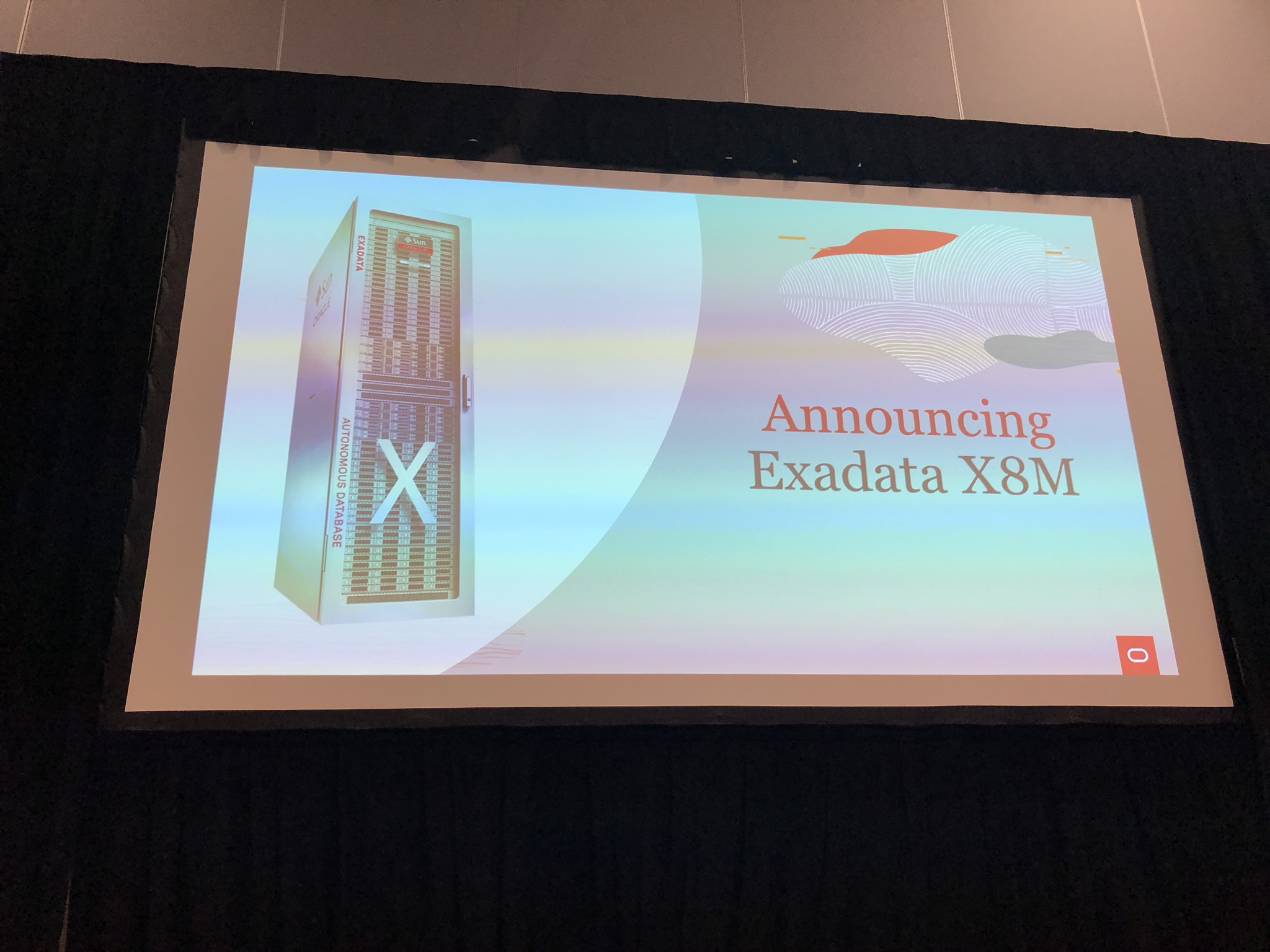
Oracle today announced Oracle Exadata X11M, labelled as the Next Generation Intelligent Data Architecture which enable Exadata Exascale Intelligent Data Architure for the Cloud Era.

Hardware Changes

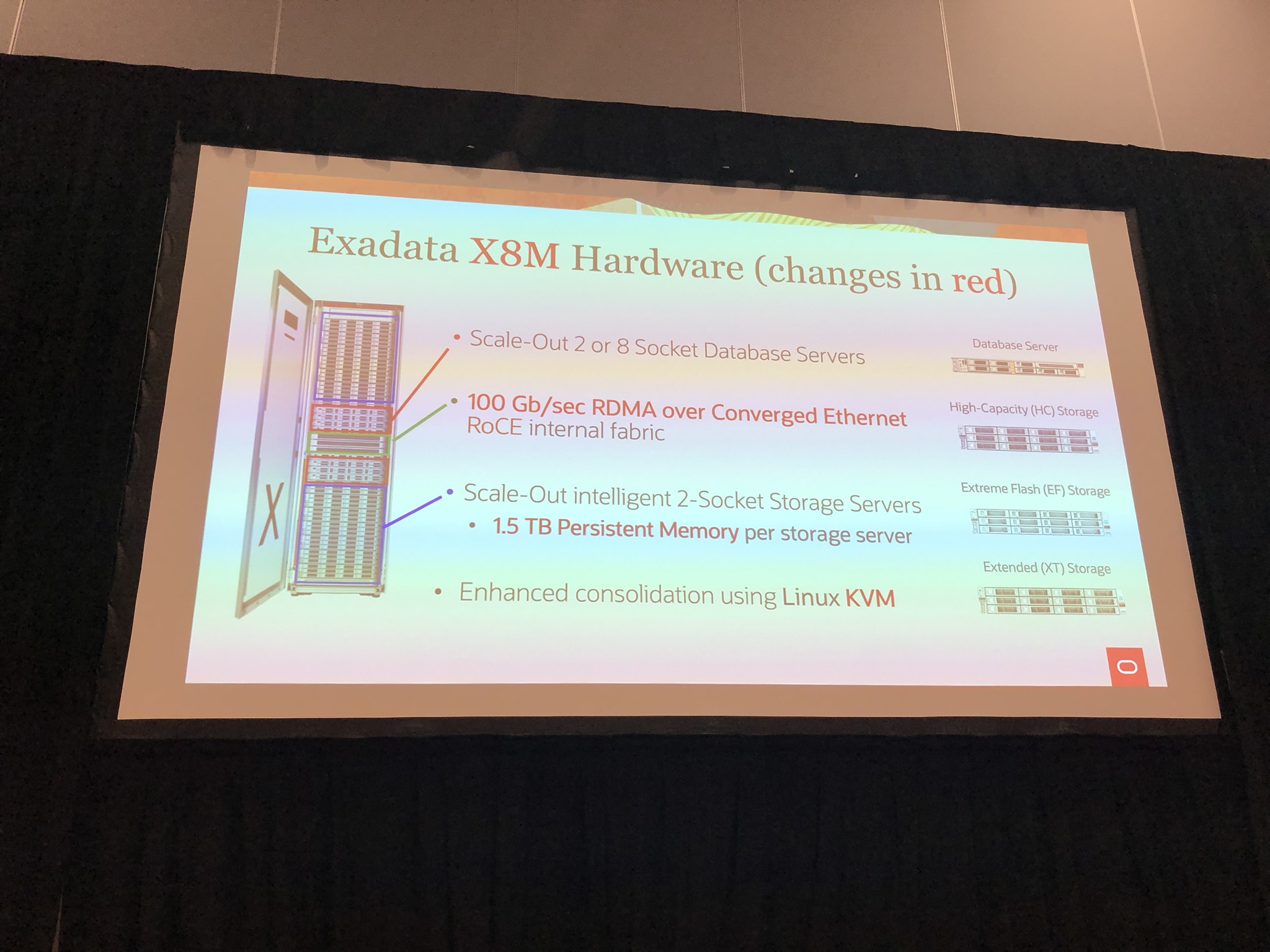
In the database server, the CPU moves from AMD EPYC 9J14 to 9J25, whilst still retaining 96 cores, they are up to 25% faster. Same memory sizes but up to 33% faster DRAM.

In the storage server, the flash is now up to 2.2x faster then 10M, with CPU up to 11% faster and DRAM 33% faster.

The amount of flash, memory, and disk remains unchanged from X10M.

Both storage server high capacity and and extreme flash remain unchanged, however the database server eighth rack and storage server eighth rack is now called database server-Z and storage server high capacity-Z.

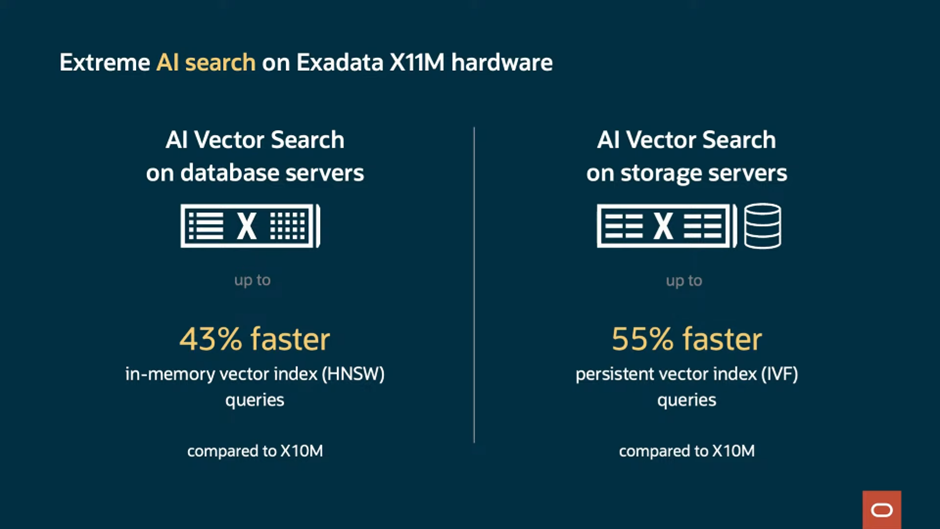
AI search are now further accelerated on X11M with AI vector search on database severs up to 43% faster with in-memory vector index (HNSW) queries and AI vector search on storage servers up to 55% faster with persistent vector index (IVF) queries.

The I/O latency was already impressive on the X10M at 17us, but Oracle have managed to reduced this now to 14us to give 21% faster XRMEM read latency and up to 43% faster flash OLTP read latency.

Software Changes

Exadata X11M has a new intelligent power efficiency capability that can limit the power consumption of the database server CPUs dynamically to save power when workload demand is low. It can also intelligently turn off unneeded cores to further conserve energy. Couple with hardware changes, this allows for running more databases and workloads or run same workload using less hardware due to the extreme performance enabling efficiently consolidate.

Available Everywhere

Oracle now has Exadata in all leading cloud providers, making Exadata accessible to even more customers.

Couple this with Exascale, which is currently limited to OCI but will in future be on Exadata Cloud@Customer, OCI Dedicated Region, and multi-cloud environments, will make Exadata even more accessible with low entry cost point and pay per use.

For more Info

Please refer to the following links:

If you found this blog post useful, please like as well as follow me through my various Social Media avenues available on the sidebar and/or subscribe to this oracle blog via WordPress/e-mail.

Thanks

Zed DBA (Zahid Anwar)

Oracle switches to AMD for full Exadata X10M lineup, what else is new?

Chipset switch to AMD

So back in September 2022, I noticed the Oracle Exadata Cloud Infrastructure X9M switched to AMD, where as the Exadata X9M On-premises and Exdata X9M Cloud @ Customer remained on Intel. More details in my blog post here.

It come as no surprise the whole lineup has now switched to AMD! Why? Well putting it simply AMD has beaten Intel on the number of cores for sometime now and with the scalability of Exadata it make senses to have the upper limit cores that AMD offers. Oracle is now using the AMD EPYC 9J14 processors.

Where has the Persistent Memory gone?

Since Exadata X8M, Intel Optane Persistent Memory has existed in the storage cells, bringing an additional layer to the multi-tiered storage architecture. Persistent Memory has the benefit of being order of magnitude faster then Flash but at the fraction of the cost of DDR memory resulting in the Exadata Persistent Memory Data Accelerator.

Simply put, you can’t have AMD chipset with Intel Optane Persistent Memory, so Oracle had to come up with a new solution which they glossed over in the announcement. Which they replaced the Persistent Memory with DDR5 memory and address the memory from the compute nodes using the new feature called Exadata RDMA Memory (XRMEM). This extends the existing Remote Direct Memory Access (RDMA), to create a new shared read accelerator. Interesting Oracle compromised on the writes accelerator that Persistent Memory gave but they would have done the analysis and probably Persistent Memory was largely fronting reads and the penalty to flush to Flash instead of Persistent Memory probably wasn’t that significant. There is now 1.5TB DDR5 DRAM in storage cell compared to 256GB in X9M with 1.5TB Persistent Memory.

What else is new?

The other highlights are:

  • Increased memory configuration of 512GB, 1.5TB, 2.25TB and 3TB DDR5 DRAM in the compute nodes
  • PCIe 4 replaced with PCIe 5, to give 2x 100Gb/sec active-active RoCE network for impressive total throughput of 200Gb/sec
  • Extreme Flash storage server now has the introduction of “capacity optimised” flash drive combined with “performance optimised” flash cards to give impressive increase of 2.4x over X9M
  • 22TB disks instead of 18TB on X9M, giving 22% increase storage

Those that know me, will know I have been predicting:

  • Full switch to AMD chipset for whole Exadata lineup
  • Some sort of replacement for Persistent Memory
  • 22TB hard disk drives

I’m glad to say I was right on all accounts 🙂

For more Info

Please refer to the following links:

If you found this blog post useful, please like as well as follow me through my various Social Media avenues available on the sidebar and/or subscribe to this oracle blog via WordPress/e-mail.

Thanks

Zed DBA (Zahid Anwar)

OGB Appreciation Day : Exadata X8M

What is OGB Appreciation Day?

The Oracle Groundbreakers (OGB) Appreciation Day formally known as OTN Appreciation Day and ODC Appreciation Day, is a great initiative by Tim Hall aka Oracle-Base.com.  Where we take the opportunity to say thanks to the Oracle Community which includes but not limited to ACEs, Java Champions, Ambassadors and all those who have the Groundbreakers spirit #ThanksOGB 🙂

I wonder what will be the name will be next year 😉

More info on Oracle Groundbreakers Community can be found here:
About Oracle Groundbreakers Community

When is it?

This year, it is on Thursday 10th October 2019 and I have to confess I totally missed it and thus my post is a few days out but I didn’t want to do disservice to the spirit of the initiative.

You can see my previous post here:
2017 – ODC Appreciation Day : Oracle Exadata Database Machine
2018 – ODC Appreciation Day : Oracle dcli Utility

You can see a summary of previous years blog posts here:
2016 – OTN Appreciation Day : Summary
2017 – ODC Appreciation Day 2017 : It’s a Wrap (#ThanksODC)
2018 – ODC Appreciation Day 2018 : It’s a Wrap (#ThanksODC)
2019 – OGB Appreciation Day 2019 : It’s a Wrap (#ThanksOGB) – this year

My Contribution : Exadata X8M

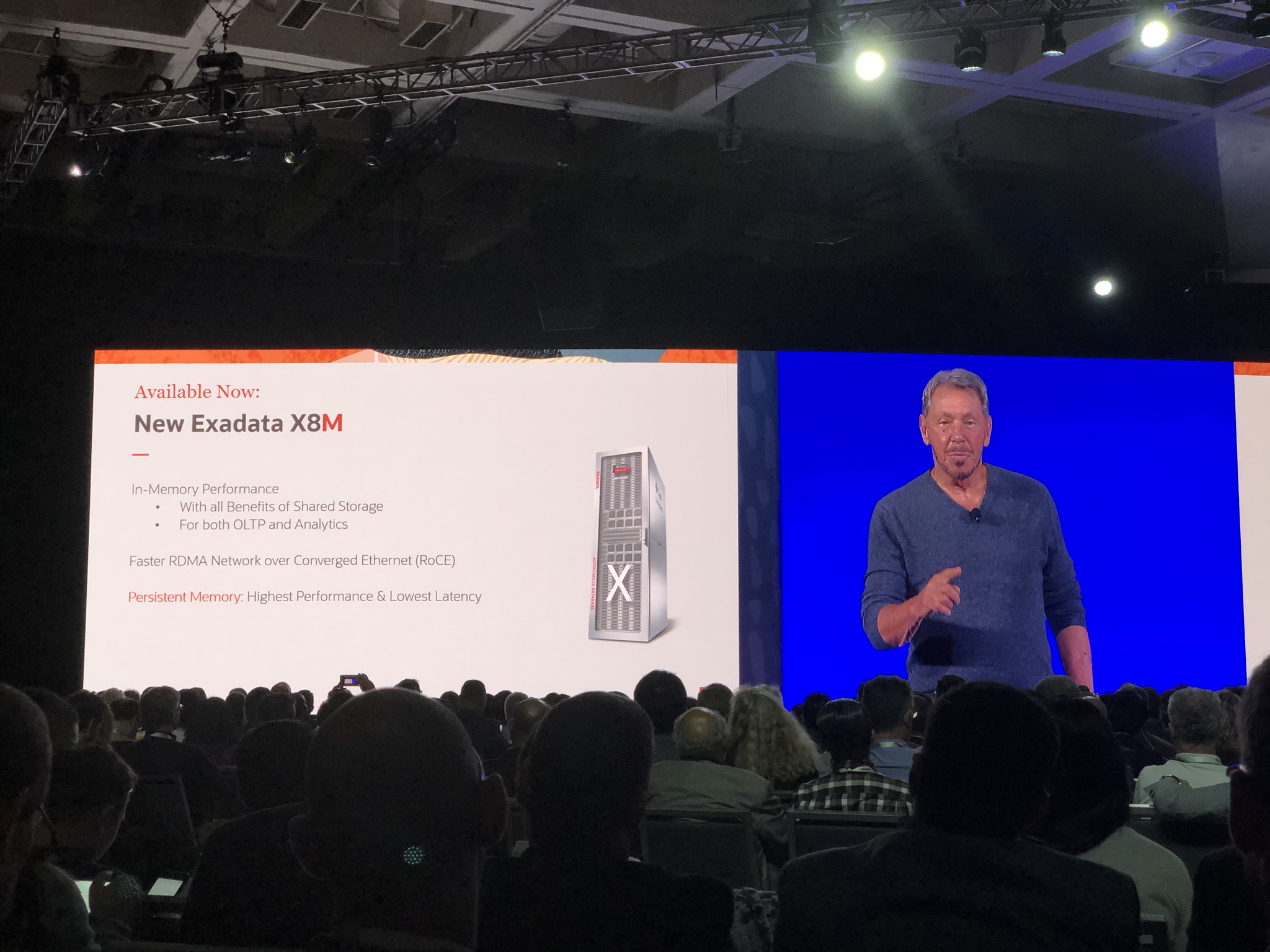
When I was at Oracle Open World 2019 a few weeks ago, Larry Ellison (CTO of Oracle) announced the new Exadata X8M:

IMG_6715

Key point being in-memory performance utilising persistence memory and RDMA Network over Converged Ethernet (RoCE), which I will detail later on in this blog post.

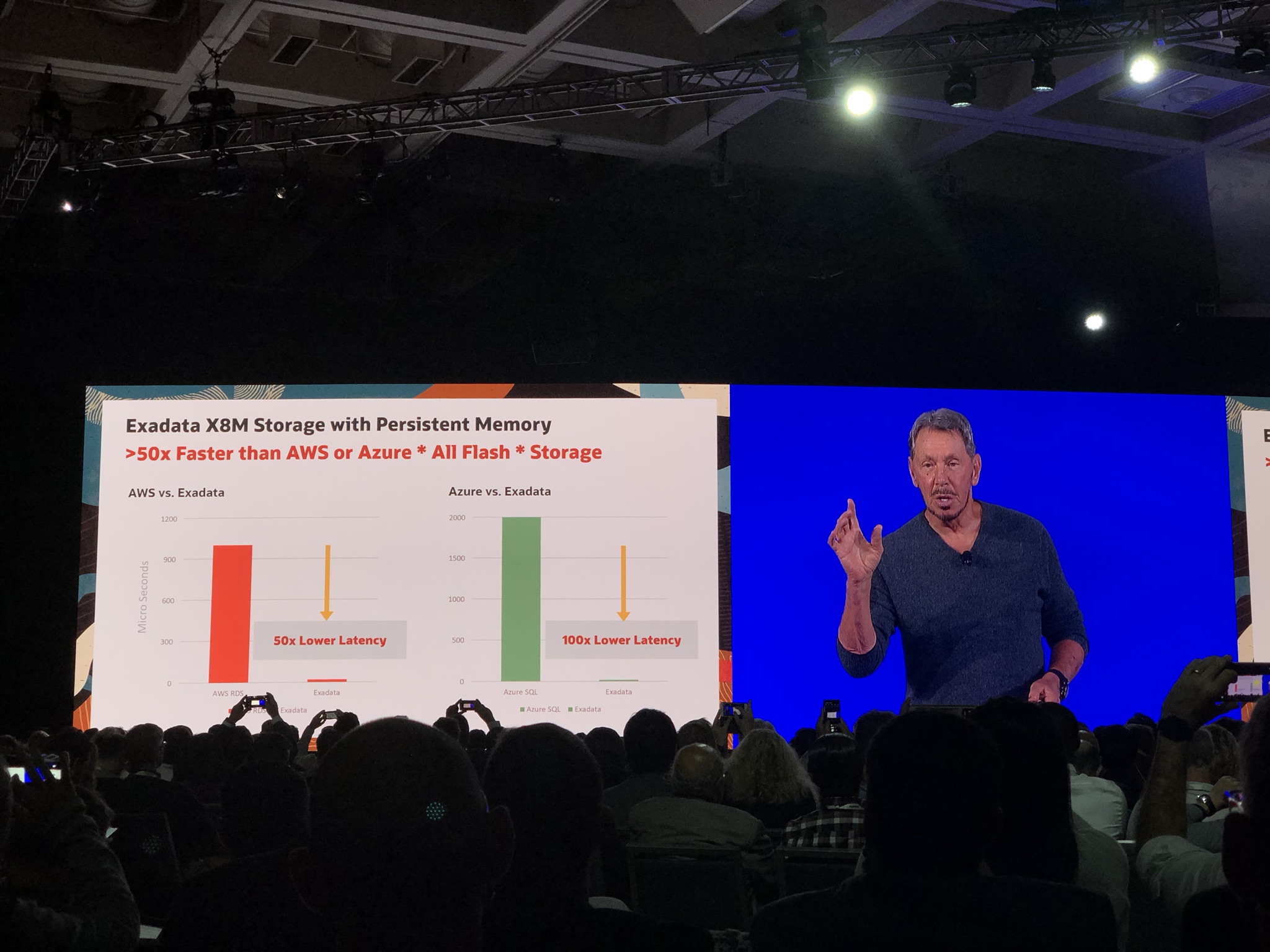
Larry also boasted the Exadata X8M storage is 50x faster then AWS and 100x faster then Azure All flash storage:

IMG_6716

Following the announcement I attended another 2 sessions with Juan Loaiza (Executive Vice President, Mission Critical Database Technologies, Oracle) and Kothanda Umamageswaran (Senior Vice President, Exadata Development)/Gavin Parish (Senior Principal Product Manager, Exadata Development), who gave more details on the Exadata X8M:

IMG_6880

The keys changes are:

  1. 100Gb/Sec RoCE internal fabric
  2. 1.5TB Persistent Memory per storage server/cell

IMG_6881

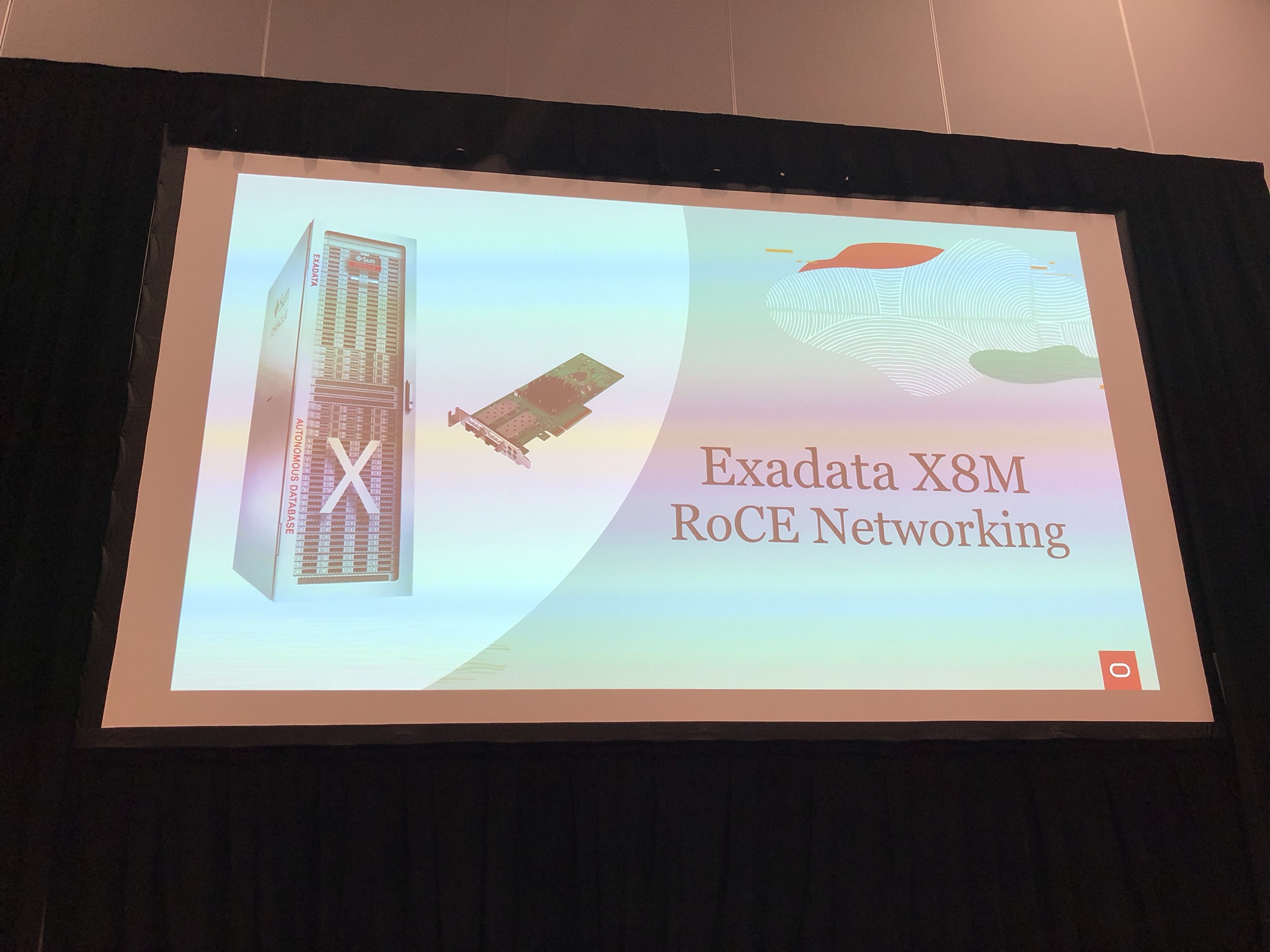
RoCE Networking

IMG_6882

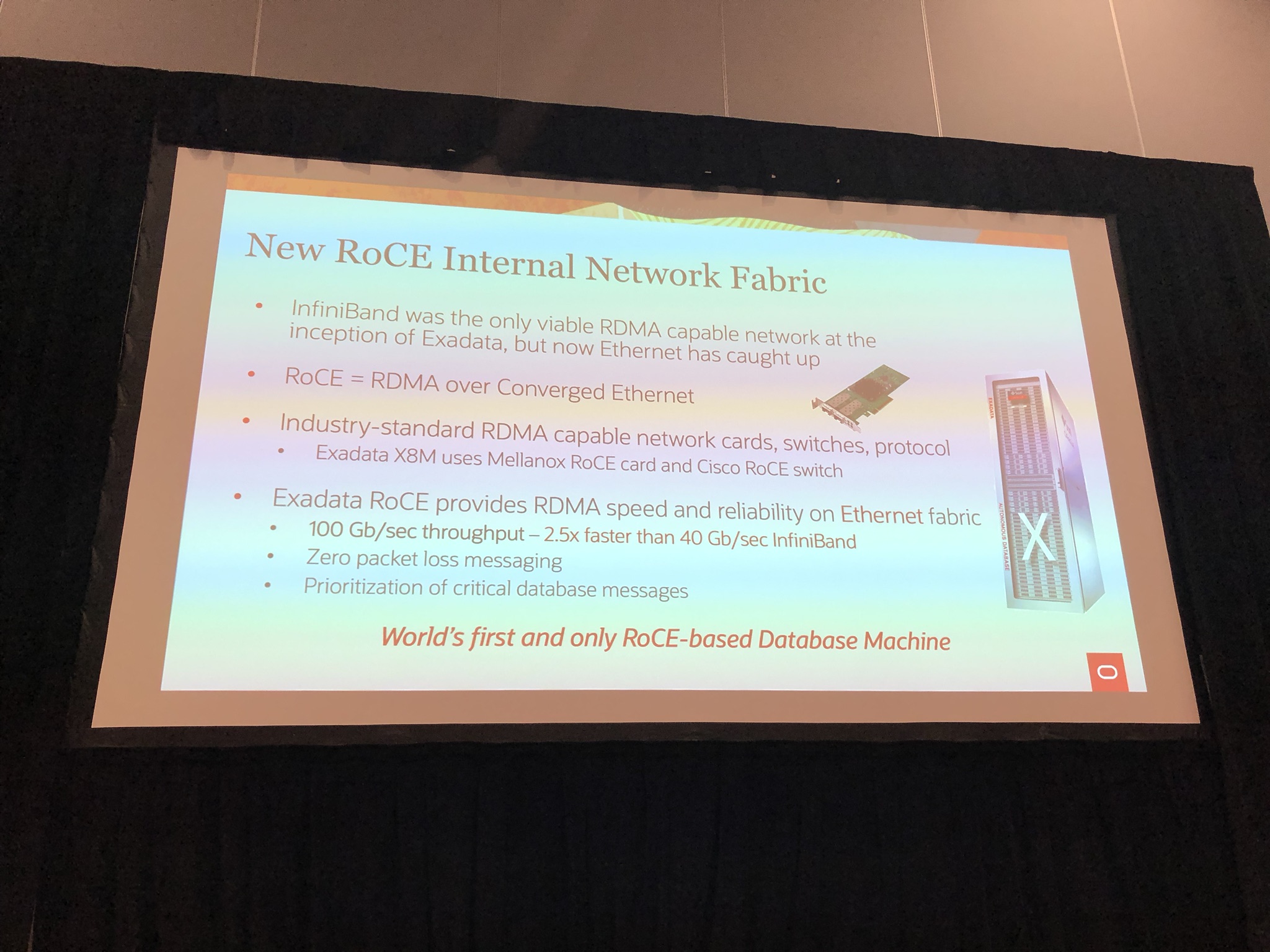
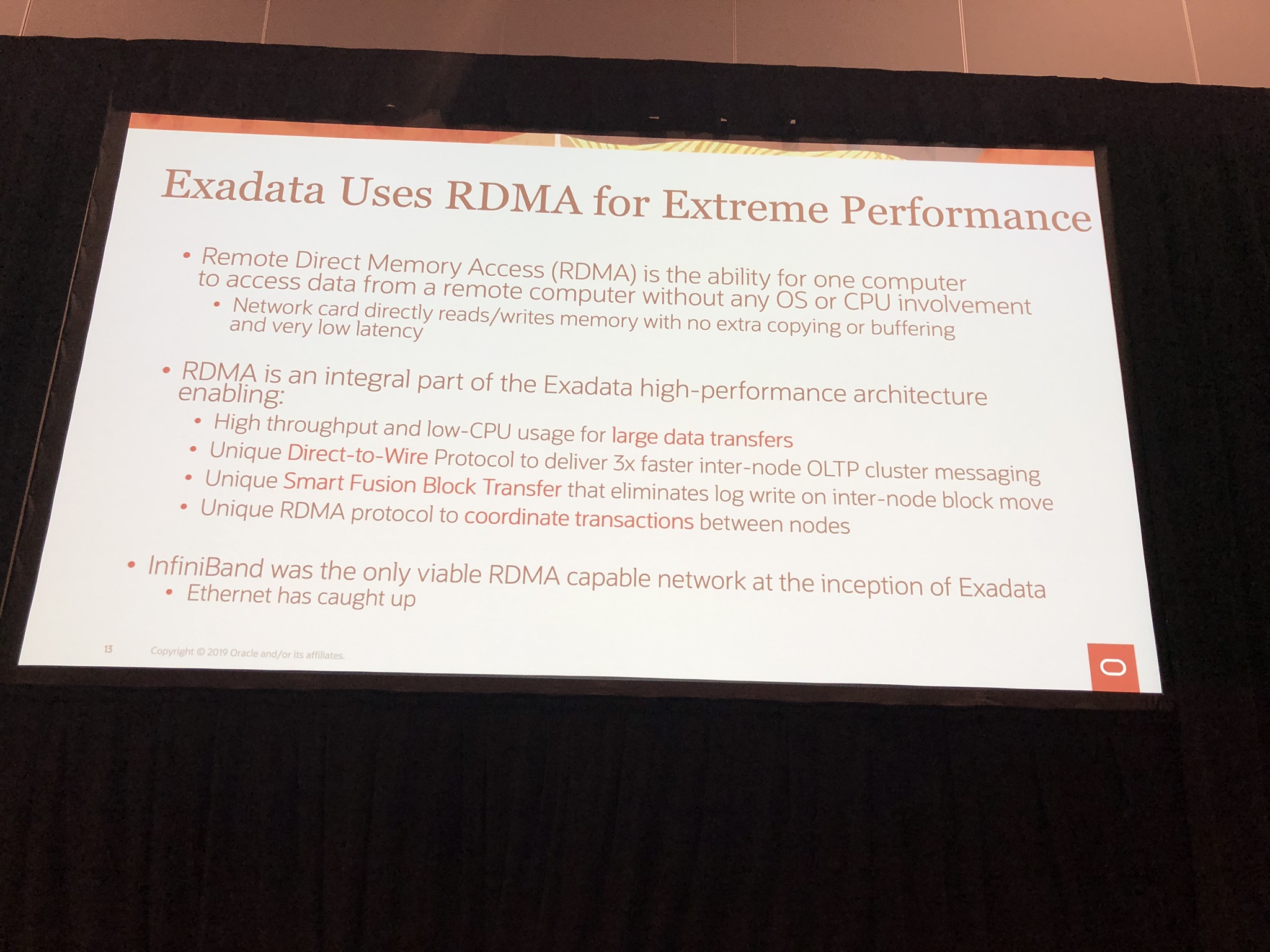
RoCE stand for RDMA (Remote Direct Memory Access) over Converged Ethernet, which initially from the start of Exadata had been over InfiniBand, however Oracle stated Ethernet has caught up and surpassed InfiniBand giving 100Gb/sec throughput as opposed to 40Gb/sec with InfiniBand which is 2.5 times faster:

IMG_6883

IMG_6910

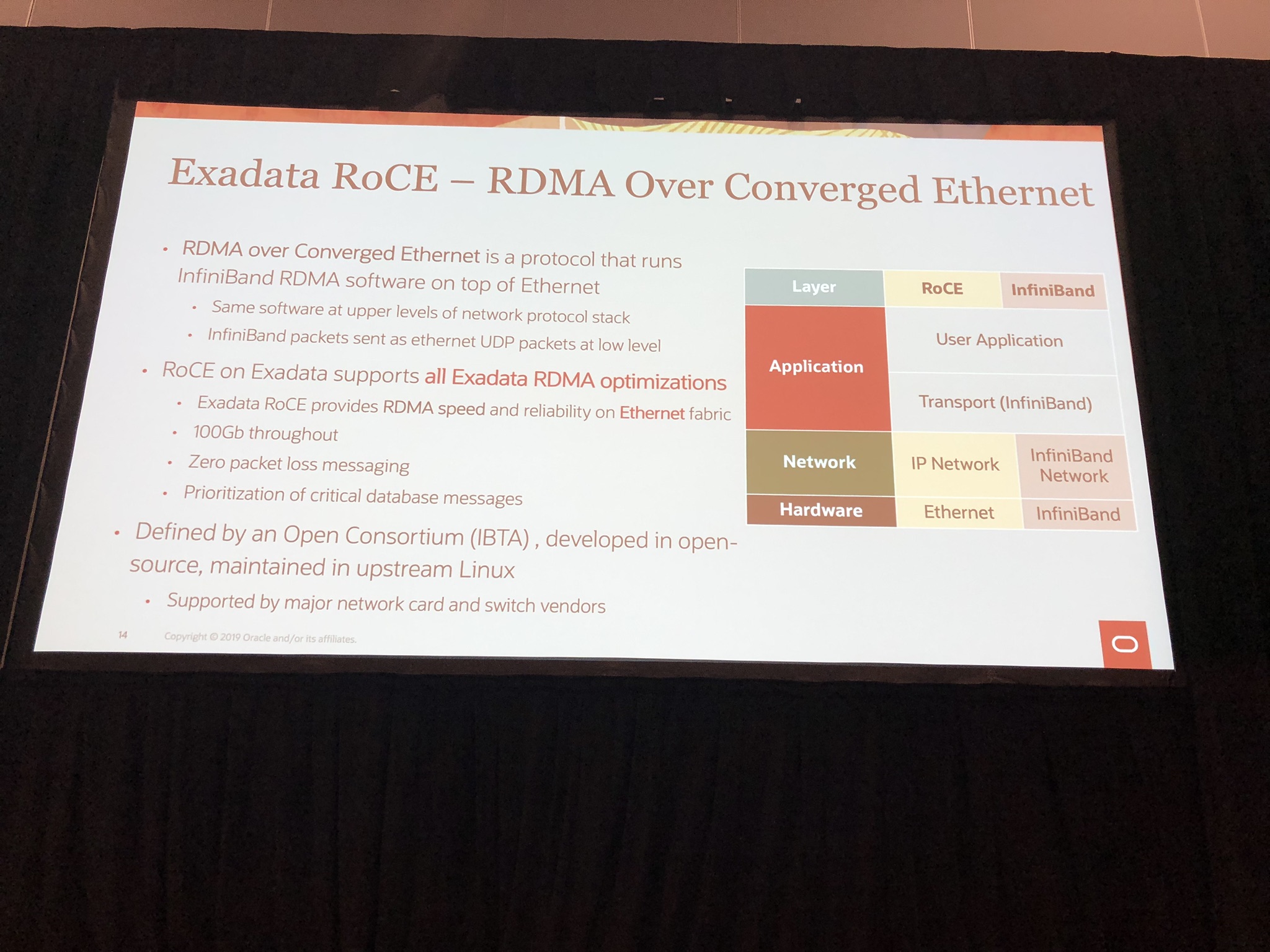
RoCE uses InfiniBand RDMA software on top of Ethernet, so includes all the optimisation and allows for backwards compatibility:

IMG_6911

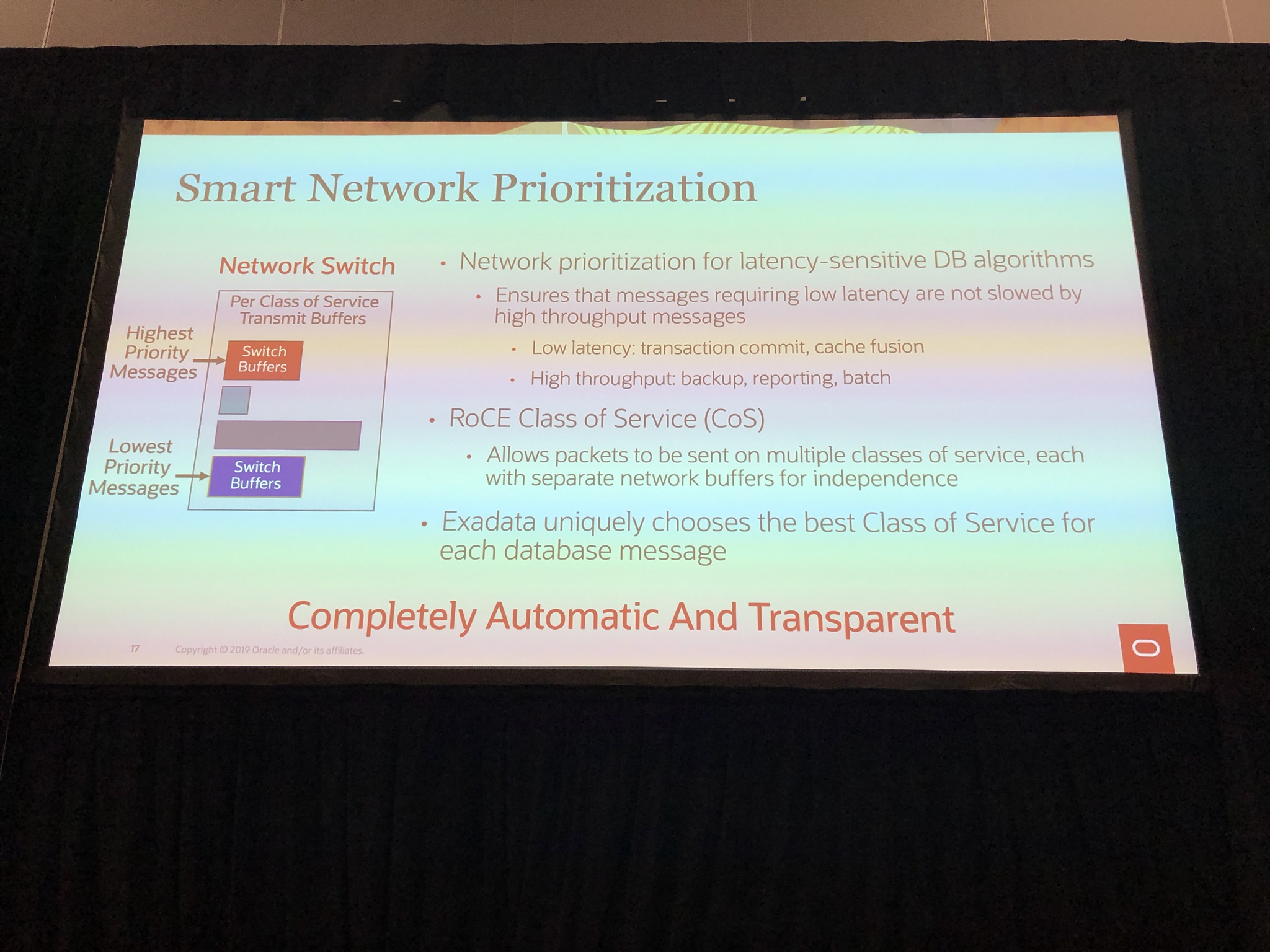
Also mentioned is the smart network prioritisation which can prioritise critical database messages such as transaction commits, cache fusion over backups, etc using Class of Service:

IMG_6914

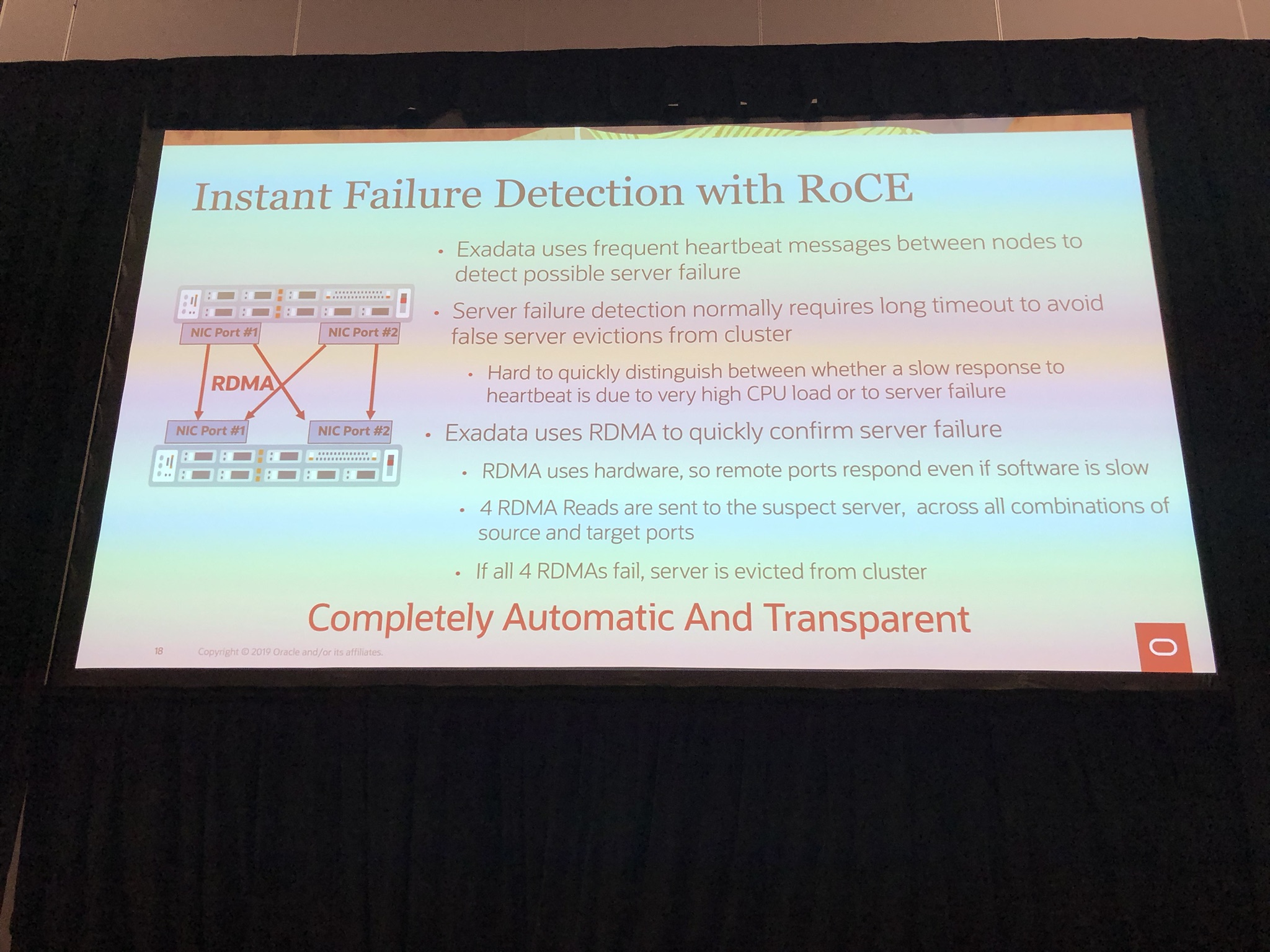
An another nice addition is instance failure detected through use of RoCE, because if all 4 ports don’t respond it confirmed server failure and instantly evicted from cluster:

IMG_6915

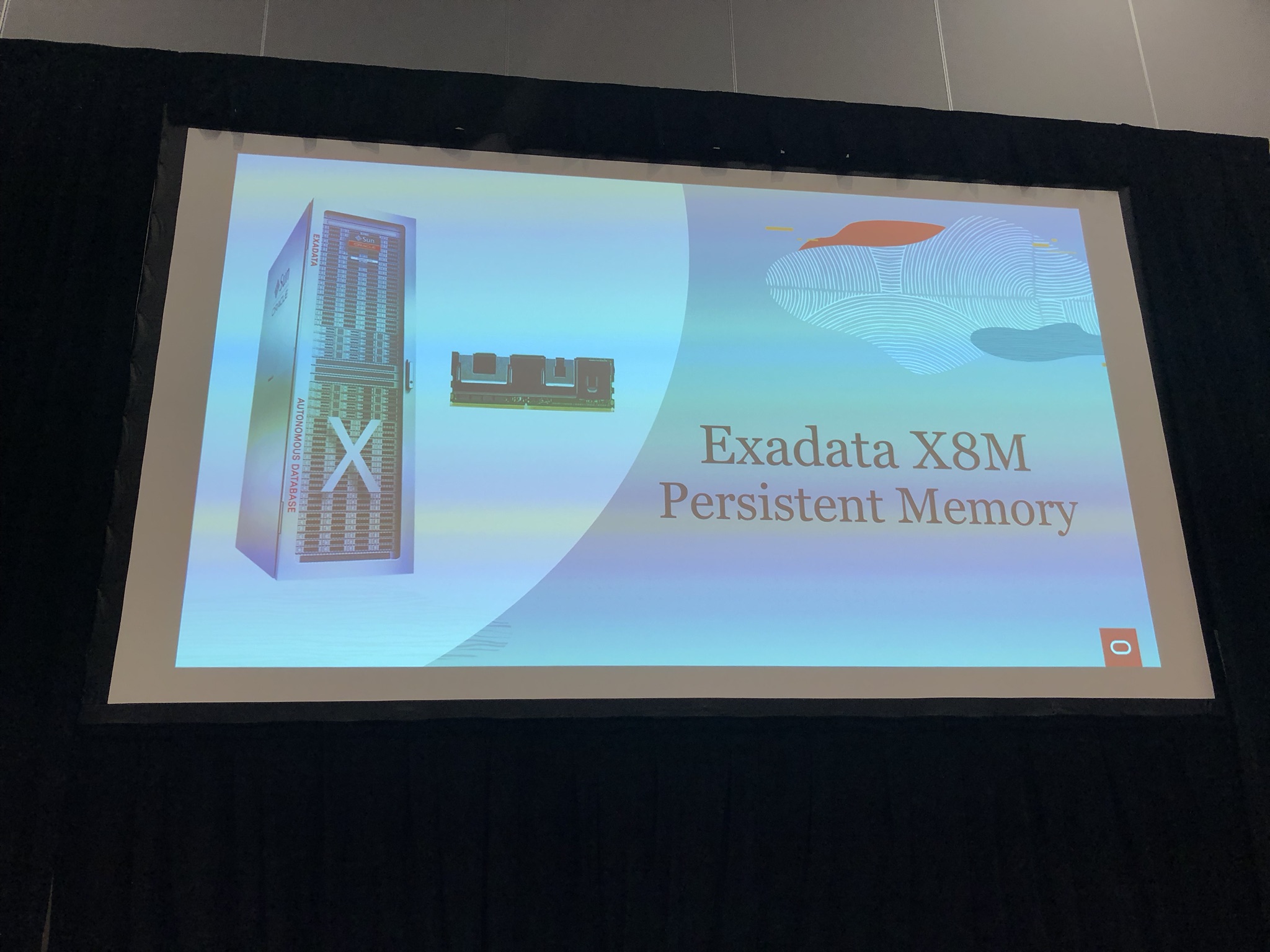
Persistent Memory

IMG_6884

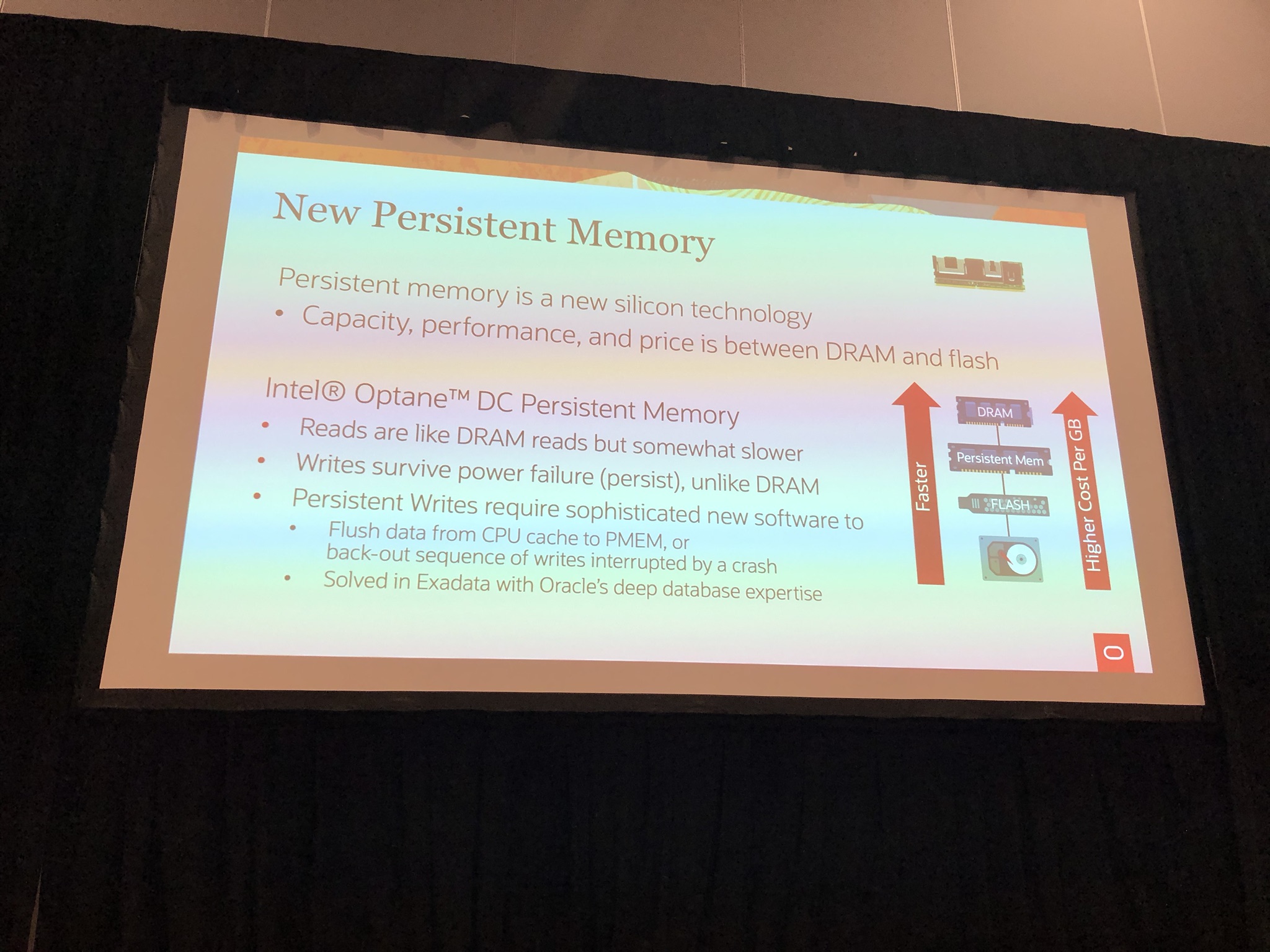
The Exadata X8M uses Intel Optane DC persistent memory a new silicon technology that capacity, performance and cost is between DRAM and flash:

IMG_6885

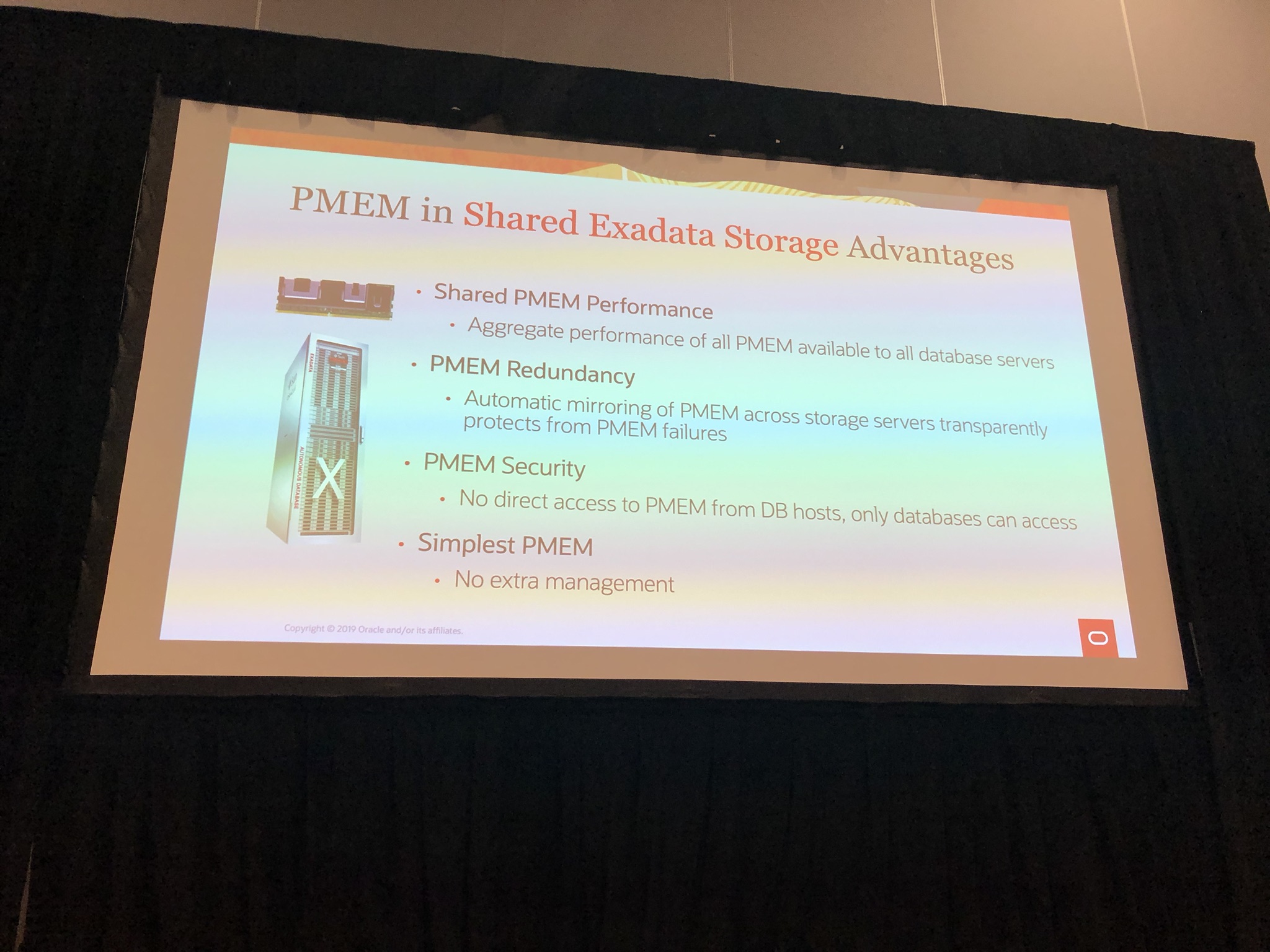
In the Exadata X8M, the persistent memory is shared, just as disks and flash are.  So you get all the benefit of aggregated performance, redundancy, etc:

IMG_6887

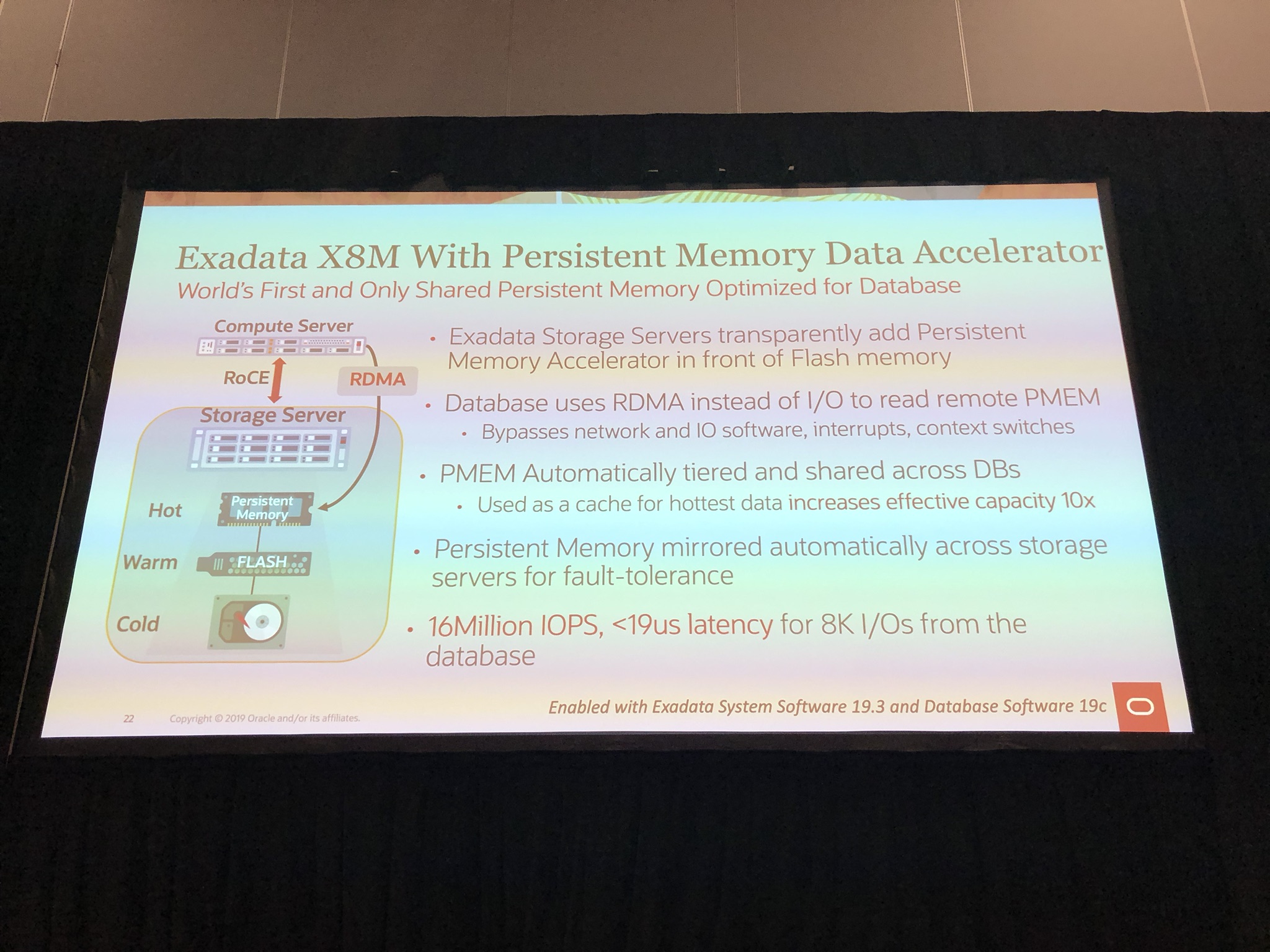
The benefit of RoCE with persistent memory is the Persistent Memory Data Accelerator, that allows the database to use RDMA instead of I/O bypassing network and IO software, interrupts, context switches:

IMG_6919

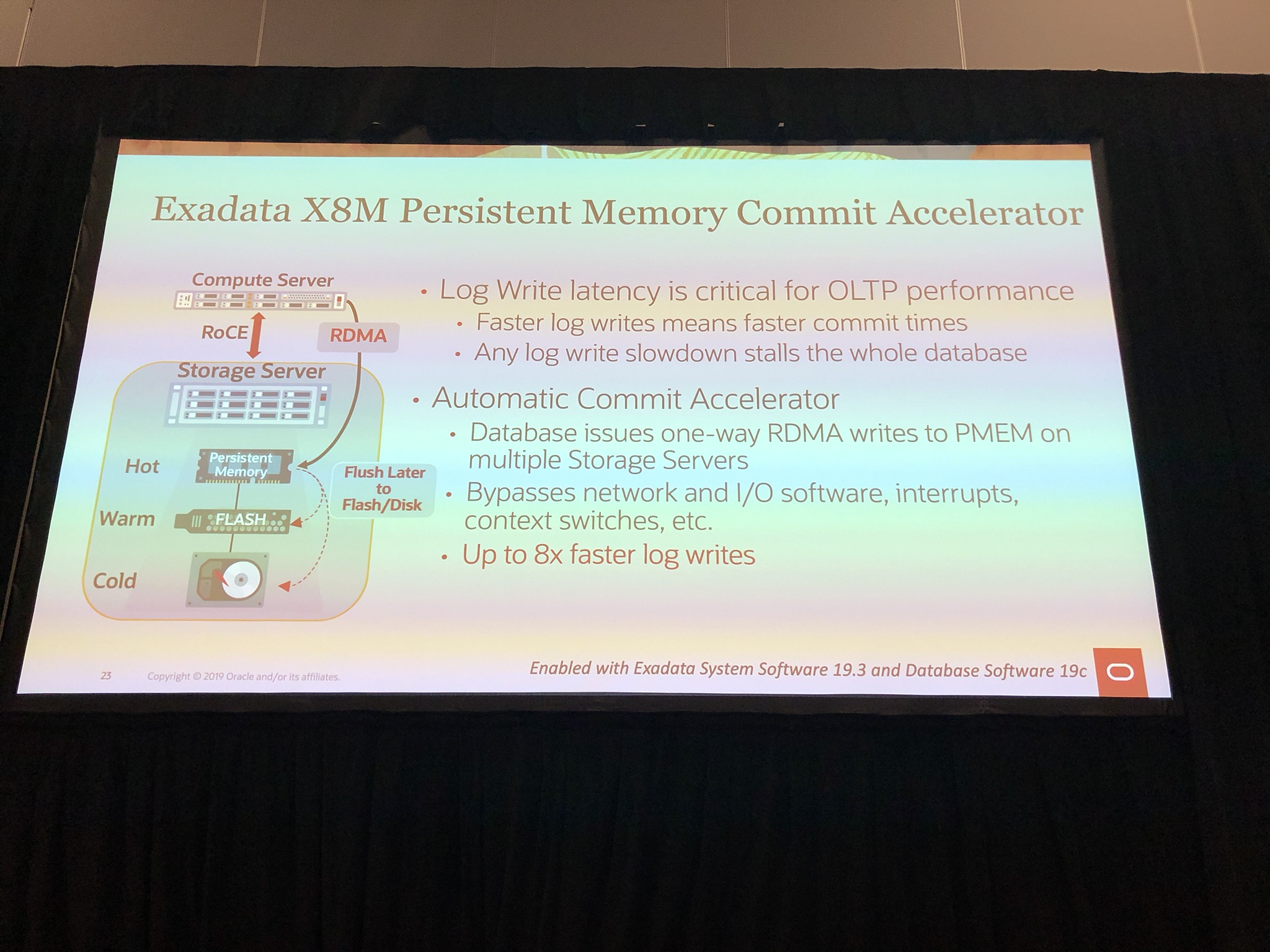
Another benefit of persistent memory is the Memory Commit Accelerator, which like Smart Flash Logging, uses persistent memory to further speed up log writes by 8x using oersistent memory as a buffer which is flushed to flash or disk later on:

IMG_6920

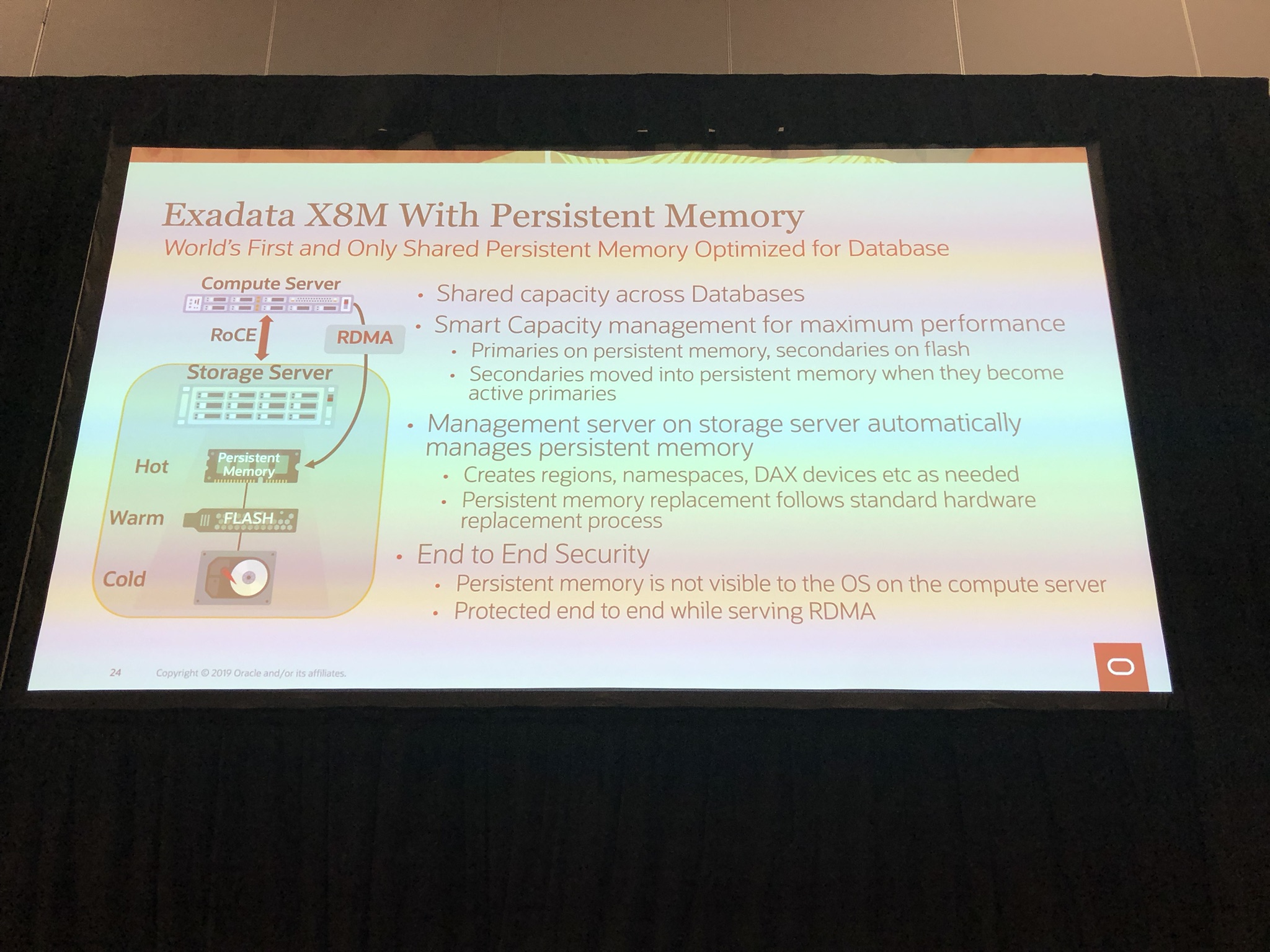
Smart capacity management of persistent memory, so primaries on persistent memory and secondary on flash, which is automatically moved to persistent memory when primary is unavailable:

IMG_6921

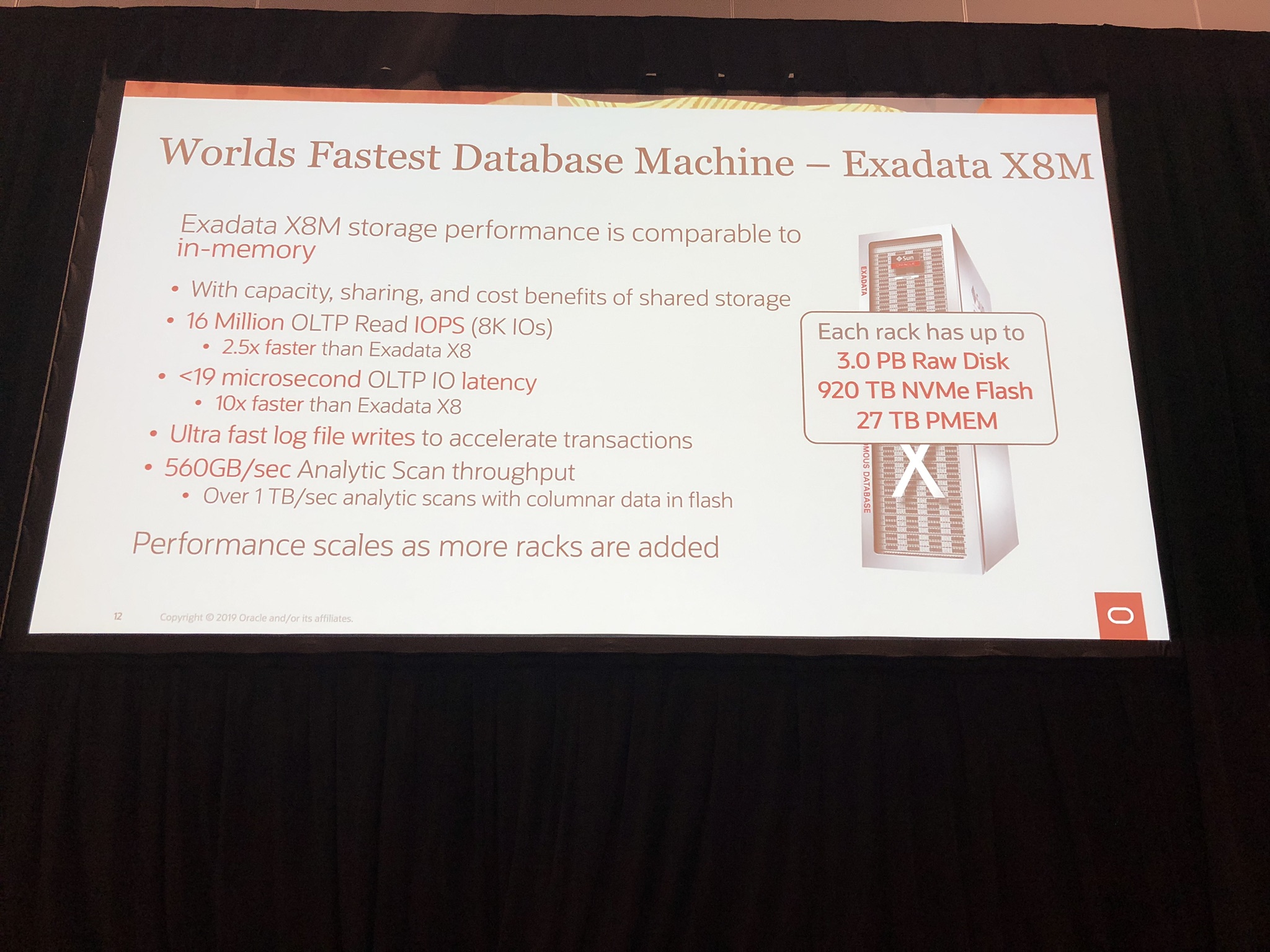
If Exadata was not fast enough, all this innovation has lead to the “Worlds Fastest Database Machine” with a astonishing 16 million IOPS with less then 19 microseconds:

IMG_6909

For more information on Exadata X8M can be found here.

Finally Happy OGB Appreciation Day! #ThanksOGB #ThanksODC #ThanksOTN 🙂

If you found this blog post useful, please like as well as follow me through my various Social Media avenues available on the sidebar and/or subscribe to this oracle blog via WordPress/e-mail.

Thanks

Zed DBA (Zahid Anwar)
Oracle Database File Placement Best Practice & Create Database Demo

This blog post is part of the “RMAN Back to Basics” series, which can be found here.

Introduction

In order for an Oracle Database to be resilient to physical storage failures, i.e. disk failure, it is imperative that the database files are placed according to Best Practice, so to avoid loss of database in case of a storage failure.  For example, don’t have your database and backups on the same disk, because if the disk fails, you have no means to resolve the failure.

This blog post will advise which files need to be protected and how, followed by a demo of creating a new database which shows how Oracle conforms to the best practice when setting a few parameters.

What files comprise a database?

An Oracle database comprises of the following files:

  • spfile
  • password file
  • control files*
  • datafiles including temp files
  • redo logs*

The files marked with * should be multiplexed over a minimum of 2 locations:

Automatic Storage Management (ASM): +DATA and +FRA

  • If HIGH redundancy, Oracle say to use 1 control file and log member to reduce the control file and log file writes.  However this is Availability vs Performance, if Data Guard is in place then this is a more viable recommendation to have 1, but I recommend still to multiple.

Oracle Managed Files: /oradata and /fast_recovery_area

  • Can be prefixed with the Oracle default of /u01/app/oracle as long as the oradata and fast_recovery_area are physically different, i.e. mounts to different disks or mounts to SAN/NAS.

Once the above is conformed to, you will be able to resolve any issues from any scenario, assuming you take backups 🙂

Create Database Demo

Below we create a database called ZEDDBA, using my createZEDDBA.sh script:

[oracle@dc1sbxdb001 scripts]$ ./createZEDDBA.sh
------------------------------
Step 1: Add Database to oratab
------------------------------

Press Enter to continue

adding ZEDDBA to oratab...

Databases in oratab:
ZEDDBA:/u01/app/oracle/product/12.2.0/dbhome_1:N

Setting the Database Environment using oraenv...
The Oracle base has been set to /u01/app/oracle

ORACLE_SID: ZEDDBA
ORACLE_HOME: /u01/app/oracle/product/12.2.0/dbhome_1

Press Enter to continue

The script adds the line:

ZEDDBA:/u01/app/oracle/product/12.2.0/dbhome_1:N

To the oratab and then sets the environment by using .oraenv in slient mode.

Next the pfile is created from the content shown below:

--------------------
Step 2: Create pfile
--------------------

Press Enter to continue

Content of pfile just created:

db_name='ZEDDBA'
memory_target=2816M
processes = 150
db_block_size=8192
db_create_file_dest='/u01/app/oracle/oradata'
db_domain=''
db_recovery_file_dest='/u01/app/oracle/fast_recovery_area'
db_recovery_file_dest_size=10G
diagnostic_dest='u01/app/oracle'
dispatchers='(PROTOCOL=TCP) (SERVICE=ZEDDBAXDB)'
open_cursors=300
remote_login_passwordfile='EXCLUSIVE'
undo_tablespace='UNDOTBS1'
compatible ='12.2.0.1'

Press Enter to continue

--------------------------------
Step 3: Create spfile from pfile
--------------------------------

Press Enter to continue

Calling 'sqlplus / as sysdba'
And running 'create spfile from pfile;'

File created.

Press Enter to continue

PLEASE NOTE: The lines highlighted in red, are the minimum parameters required for Oracle to use Oracle Managed Files (OMF) and multiplex critical files.  This example shows both paths under ‘/u01‘ as an example, which is fine as long as the ‘oradata‘ and ‘fast_recovery_area‘ are physically different as explained earlier on.  They could also be under ‘/u02/oradata‘ for oradata and ‘/u03/fast_recovery_area‘ for fast_recovery_area, which is my personal preference, leaving ‘/u01‘ for oracle binaries.

Next the instance is started in nomount, so to spawn the processes and create the memory structure but not attempt to access controlfiles or datafiles as they do not exist as yet:

-------------------------------------
Step 4: Start the instance in nomount
-------------------------------------

Press Enter to continue

Calling 'sqlplus / as sysdba'
And running 'startup nomount;'

ORACLE instance started.

Total System Global Area 2952790016 bytes
Fixed Size 8625080 bytes
Variable Size 1677722696 bytes
Database Buffers 1258291200 bytes
Redo Buffers 8151040 bytes

Press Enter to continue

Next the database is created using the create database statement:

-------------------------------------------------------
Step 5: Create database using create database statement
-------------------------------------------------------

Press Enter to continue

Content of createZEDDBA.sql just created:

CREATE DATABASE ZEDDBA
USER SYS IDENTIFIED BY oracle
USER SYSTEM IDENTIFIED BY oracle
CHARACTER SET AL32UTF8
NATIONAL CHARACTER SET AL16UTF16
EXTENT MANAGEMENT LOCAL
DEFAULT TABLESPACE users
DEFAULT TEMPORARY TABLESPACE tempts1
UNDO TABLESPACE undotbs1;

Press Enter to continue

Calling 'sqlplus / as sysdba'
And running '@?/dbs/createZEDDBA.sql'

Database created.

Press Enter to continue

Please Note: I haven’t specified any control files, datafiles or redo logs.  Oracle will automatically create them based on the settings mentioned earlier.

Next we show the database layout:

----------------------------
Step 6: Show database layout
----------------------------

Press Enter to continue

Calling 'sqlplus / as sysdba'
And running '@?/dbs/showfiles.sql'

Showing 'select name from v$controlfile;' Press Enter to continue

NAME
----------------------------------------------------------------------------------------------------
/u01/app/oracle/oradata/ZEDDBA/controlfile/o1_mf_gftkqxjg_.ctl
/u01/app/oracle/fast_recovery_area/ZEDDBA/controlfile/o1_mf_gftkqxof_.ctl

Showing 'select GROUP#, TYPE, MEMBER, IS_RECOVERY_DEST_FILE from v$logfile;' Press Enter to continue

GROUP# TYPE MEMBER IS_
---------- ------- -------------------------------------------------------------------------------- ---
1 ONLINE /u01/app/oracle/oradata/ZEDDBA/onlinelog/o1_mf_1_gftkqy26_.log NO
1 ONLINE /u01/app/oracle/fast_recovery_area/ZEDDBA/onlinelog/o1_mf_1_gftkqzk3_.log YES
2 ONLINE /u01/app/oracle/oradata/ZEDDBA/onlinelog/o1_mf_2_gftkqztn_.log NO
2 ONLINE /u01/app/oracle/fast_recovery_area/ZEDDBA/onlinelog/o1_mf_2_gftkr1x7_.log YES

Showing 'select name from v$datafile;' Press Enter to continue

NAME
----------------------------------------------------------------------------------------------------
/u01/app/oracle/oradata/ZEDDBA/datafile/o1_mf_system_gftkr3fv_.dbf
/u01/app/oracle/oradata/ZEDDBA/datafile/o1_mf_sysaux_gftkr792_.dbf
/u01/app/oracle/oradata/ZEDDBA/datafile/o1_mf_undotbs1_gftkr944_.dbf
/u01/app/oracle/oradata/ZEDDBA/datafile/o1_mf_users_gftkr9fc_.dbf

Showing 'select name from v$tempfile;' Press Enter to continue

NAME
----------------------------------------------------------------------------------------------------
/u01/app/oracle/oradata/ZEDDBA/datafile/o1_mf_tempts1_gftkr9c7_.tmp

Press Enter to exit sqlplus

Press Enter to continue

As you can see the control files and redo logs have automatically multiplexed over ‘oradata‘ and ‘fast_recovery_area‘, where as the rest are in ‘oradata‘.  When backups are taken, they will be in ‘fast_recovery_area‘ which allows for control file and datafiles to be recovered in case of lost of ‘oradata‘ once the physical issue is resolved.

Finally run the rest of the script to run the catelog.sql, cateproc.sql, datapatch, etc to complete the database creation:

----------------------------------------------------
Step 7: run catalog.sql, catproc.sql, datapatch, etc
----------------------------------------------------

Press Enter to continue

...
...
...

Session altered.

SQL Patching tool version 12.2.0.1.0 Production on Thu May 16 12:50:03 2019
Copyright (c) 2012, 2017, Oracle. All rights reserved.

Log file for this invocation: /u01/app/oracle/cfgtoollogs/sqlpatch/sqlpatch_10329_2019_05_16_12_50_03/sqlpatch_invocation.log

Connecting to database...OK
Bootstrapping registry and package to current versions...done
Determining current state...done

Current state of SQL patches:
Patch 25811364 (OJVM RELEASE UPDATE: 12.2.0.1.170718 (25811364)):
Installed in the binary registry only
Bundle series DBRU:
ID 170814 in the binary registry and not installed in the SQL registry

Adding patches to installation queue and performing prereq checks...
Installation queue:
Nothing to roll back
The following patches will be applied:
25811364 (OJVM RELEASE UPDATE: 12.2.0.1.170718 (25811364))
26609817 (DATABASE RELEASE UPDATE 12.2.0.1.170814)

Installing patches...
Patch installation complete. Total patches installed: 2

Validating logfiles...
Patch 25811364 apply: SUCCESS
logfile: /u01/app/oracle/cfgtoollogs/sqlpatch/25811364/21188920/25811364_apply_ZEDDBA_2019May16_12_50_21.log (no errors)
Patch 26609817 apply: SUCCESS
logfile: /u01/app/oracle/cfgtoollogs/sqlpatch/26609817/21483023/26609817_apply_ZEDDBA_2019May16_12_50_21.log (no errors)
SQL Patching tool complete on Thu May 16 12:50:38 2019
Start Time: 16-05-2019_12_20
En Time: 16-05-2019_12_50

Press Enter to exit shell script

[oracle@dc1sbxdb001 scripts]$

Reference

Scripts

  1. createZEDDBA.sh
  2. initZEDDBA.ora
  3. createZEDDBA.sql
  4. showfiles.sql
  5. catalog_catproc.sql

To download all 5 in one zip: createZEDDBA.zip

The above demo is based on Oracle Database 12cR2, installed under “/u01/app/oracle/product/12.2.0/dbhome_1“.  Scripts under “/media/sf_Software/scripts/” which I am running Oracle Linux 7.4 on VirtualBox.  Some modification may be required to work in your environment.

The rest of the series

  1. Oracle Database File Placement Best Practice & Create Database Demo
  2. RMAN Full Backup & Demo
  3. RMAN Image Copy & Demo
  4. RMAN Incremental & Demo Part 1 (Level 0)
  5. RMAN Incremental & Demo Part 2 (Level 1)
  6. RMAN Incremental with Block Change Tracking & Demo
  7. RMAN Incremental Differential vs Cumulative & Demo
  8. RMAN Incremental Updating Backup & Demo Part 1
  9. RMAN Incremental Updating Backup & Demo Part 2
  10. Flashback
  11. RMAN Block Media Recovery
  12. RMAN Recover database with only FRA
  13. RMAN Obsolete

Please Note: Links to the blog posts will be released daily and updated here.


If you found this blog post useful, please like as well as follow me through my various Social Media avenues available on the sidebar and/or subscribe to this oracle blog via WordPress/e-mail.

Thanks

Zed DBA (Zahid Anwar)

Adding a Datafile to Temp Tablespace

When monitoring Tablespace Usage (see my Tablespace Usage blog post for more info), there comes a point when you need to add a datafile to the temp tablespace to allow for growth and more importantly get below a monitoring threshold for example in OEM or OpsView.

Query to see Current Temp Datafiles State

To see the current state of the temp datafiles:

set pages 999
set lines 400
col FILE_NAME format a75
select d.TABLESPACE_NAME, d.FILE_NAME, d.BYTES/1024/1024 SIZE_MB, d.AUTOEXTENSIBLE, d.MAXBYTES/1024/1024 MAXSIZE_MB, d.INCREMENT_BY*(v.BLOCK_SIZE/1024)/1024 INCREMENT_BY_MB
from dba_temp_files d,
 v$tempfile v
where d.FILE_ID = v.FILE#
order by d.TABLESPACE_NAME, d.FILE_NAME;

Please Note: For pluggable databases, please ensure you are in the right PDB as temp datafiles can be at container level and/or pluggable database level.

Output from Current Temp Datafiles State

This is the output you will get from the query:

TABLESPACE_NAME FILE_NAME SIZE_MB AUT MAXSIZE_MB INCREMENT_BY_MB
------------------------------ --------------------------------------------------------------------------- ---------- --- ---------- ---------------
TEMP +DATAC1/VERS/TEMPFILE/temp.451.891367325 32767 YES 32767 1024
TEMP +DATAC1/VERS/TEMPFILE/temp.452.891367321 32767 YES 32767 1024
TEMP +DATAC1/VERS/TEMPFILE/temp.454.891367305 32767 YES 32767 1024
TEMP +DATAC1/VERS/TEMPFILE/temp.455.891367301 32767 YES 32767 1024
TEMP +DATAC1/VERS/TEMPFILE/temp.457.891367299 32767 YES 32767 1024
TEMP +DATAC1/VERS/TEMPFILE/temp.458.891367295 32767 YES 32767 1024
TEMP +DATAC1/VERS/TEMPFILE/temp.459.891367159 32767 YES 32767 1024
TEMP +DATAC1/VERS/TEMPFILE/temp.461.891367165 32767 YES 32767 1024
TEMP +DATAC1/VERS/TEMPFILE/temp.463.891367201 32767 YES 32767 1024
TEMP +DATAC1/VERS/TEMPFILE/temp.465.891367203 32767 YES 32767 1024
TEMP +DATAC1/VERS/TEMPFILE/temp.466.891367207 32767 YES 32767 1024
TEMP +DATAC1/VERS/TEMPFILE/temp.468.891367223 32767 YES 32767 1024
TEMP +DATAC1/VERS/TEMPFILE/temp.469.891367227 32767 YES 32767 1024
TEMP +DATAC1/VERS/TEMPFILE/temp.471.891367243 32767 YES 32767 1024
TEMP +DATAC1/VERS/TEMPFILE/temp.472.891367251 32767 YES 32767 1024
TEMP +DATAC1/VERS/TEMPFILE/temp.473.891367255 32767 YES 32767 1024
TEMP +DATAC1/VERS/TEMPFILE/temp.475.891367261 32767 YES 32767 1024
TEMP +DATAC1/VERS/TEMPFILE/temp.477.891367289 32767 YES 32767 1024
...

38 rows selected.

SQL>

The … represents the several lines removed to make the output readable 🙂

Add Temp Datafile to Temp Tablespace

To add a temp datafile to ‘TEMP‘ to be initially 10G, auto extendable by 1G to maxsize of 32Gb:

ALTER TABLESPACE TEMP ADD TEMPFILE '+DATAC1' SIZE 10G AUTOEXTEND ON NEXT 1G MAXSIZE 32767M;

See Oracle Documentation for more info and Syntax:
https://docs.oracle.com/database/121/SQLRF/statements_3002.htm

Once added you’ll see the temp datafile in the above query:

TABLESPACE_NAME FILE_NAME SIZE_MB AUT MAXSIZE_MB INCREMENT_BY_MB
------------------------------ --------------------------------------------------------------------------- ---------- --- ---------- ---------------
TEMP +DATAC1/VERS/TEMPFILE/temp.451.891367325 32767 YES 32767 1024
TEMP +DATAC1/VERS/TEMPFILE/temp.452.891367321 32767 YES 32767 1024
TEMP +DATAC1/VERS/TEMPFILE/temp.454.891367305 32767 YES 32767 1024
TEMP +DATAC1/VERS/TEMPFILE/temp.455.891367301 32767 YES 32767 1024
TEMP +DATAC1/VERS/TEMPFILE/temp.457.891367299 32767 YES 32767 1024
TEMP +DATAC1/VERS/TEMPFILE/temp.458.891367295 32767 YES 32767 1024
TEMP +DATAC1/VERS/TEMPFILE/temp.459.891367159 32767 YES 32767 1024
TEMP +DATAC1/VERS/TEMPFILE/temp.461.891367165 32767 YES 32767 1024
TEMP +DATAC1/VERS/TEMPFILE/temp.463.891367201 32767 YES 32767 1024
TEMP +DATAC1/VERS/TEMPFILE/temp.465.891367203 32767 YES 32767 1024
TEMP +DATAC1/VERS/TEMPFILE/temp.466.891367207 32767 YES 32767 1024
TEMP +DATAC1/VERS/TEMPFILE/temp.468.891367223 32767 YES 32767 1024
TEMP +DATAC1/VERS/TEMPFILE/temp.469.891367227 32767 YES 32767 1024
TEMP +DATAC1/VERS/TEMPFILE/temp.471.891367243 32767 YES 32767 1024
TEMP +DATAC1/VERS/TEMPFILE/temp.472.891367251 32767 YES 32767 1024
TEMP +DATAC1/VERS/TEMPFILE/temp.473.891367255 32767 YES 32767 1024
TEMP +DATAC1/VERS/TEMPFILE/temp.475.891367261 32767 YES 32767 1024
TEMP +DATAC1/VERS/TEMPFILE/temp.477.891367289 32767 YES 32767 1024
...
TEMP +DATAC1/VERS/TEMPFILE/temp.843.973079825 10240 YES 32767 1024

39 rows selected.

SQL>

Related Blog Posts:
Querying Tablespace Usage
Adding a Datafile to Tablespace

Updates
27th April 2018: Change the query to use v$tempfile instead of v$datafile as doesn’t work for PDBs.

If you found this blog post useful, please like as well as follow me through my various Social Media avenues available on the sidebar and/or subscribe to this oracle blog via WordPress/e-mail.

Thanks

Zed DBA (Zahid Anwar)