How to update OPatch

When applying patches, such as PSUs or one-offs, you may need to update OPatch to meet the minimum OPatch version.  It is also recommended to update OPatch when applying any patch.

To see your current OPatch version:

[oracle@v1ex1dbadm01 ~]$ export ORACLE_HOME=/u01/app/oracle/product/12.1.0.2/dbhome_1
[oracle@v1ex1dbadm01 ~]$ $ORACLE_HOME/OPatch/opatch version
OPatch Version: 12.1.0.1.3

OPatch succeeded.
[oracle@v1ex1dbadm01 ~]$

Backup existing OPatch:

[oracle@v1ex1dbadm01 ~]$ cd $ORACLE_HOME
[oracle@v1ex1dbadm01 dbhome_1]$ tar -cvf OPatch_backup.tar OPatch/*
OPatch/datapatch
OPatch/datapatch.bat
OPatch/docs/
...
OPatch/oplan/README.txt
OPatch/oplan/README.html
OPatch/oplan/oplan
[oracle@v1ex1dbadm01 dbhome_1]$

Check the backup of OPatch:

[oracle@v1ex1dbadm01 dbhome_1]$ ls -lh | grep OPatch_backup.tar
-rw-rw-r--. 1 oracle oracle 6.7M Aug 29 11:51 OPatch_backup.tar
[oracle@v1ex1dbadm01 dbhome_1]$

Remove the existing OPatch:

[oracle@v1ex1dbadm01 dbhome_1]$ rm -rf OPatch

Unzip the latest OPatch:

[oracle@v1ex1dbadm01 dbhome_1]$ unzip -d $ORACLE_HOME ~/sw/p6880880_122010_Linux-x86-64.zip
Archive: /home/oracle/sw/p6880880_122010_Linux-x86-64.zip
creating: /u01/app/oracle/product/12.1.0/dbhome_1/OPatch/
inflating: /u01/app/oracle/product/12.1.0/dbhome_1/OPatch/datapatch
...
inflating: /u01/app/oracle/product/12.1.0/dbhome_1/OPatch/docs/cversion.txt
inflating: /u01/app/oracle/product/12.1.0/dbhome_1/OPatch/docs/FAQ
inflating: /u01/app/oracle/product/12.1.0/dbhome_1/OPatch/opatch.bat
[oracle@v1ex1dbadm01 dbhome_1]$

Which can be found here:
OPatch – Where Can I Find the Latest Version of OPatch(6880880)? [Video] (Doc ID 224346.1)
OPATCH PLACEHOLDER Patch 6880880

To see your newOPatch version:

[oracle@v1ex1dbadm01 dbhome_1]$ $ORACLE_HOME/OPatch/opatch version
OPatch Version: 12.2.0.1.9

OPatch succeeded.
[oracle@v1ex1dbadm01 dbhome_1]$


If you found this blog post useful, please like as well as follow me through my various Social Media avenues available on the sidebar and/or subscribe to this oracle blog via WordPress/e-mail.

Thanks

Zed DBA (Zahid Anwar)
How to obtain the Historical Database Total Used and Allocated Size from OEM Repository

From time to time, it’s useful to know the total allocated size of a database at OS level, how much of it has been used and what the maximum total size the database can grow to at OS level, see blog post:
How to obtain the Database Total Used, Allocated and Max Size

However, it’s also good to know the historical size.  The below query will give you this from the Oracle Enterprise Manager (OEM) repository:

SELECT Database,
Month_Date,
round(sum(decode(metric_column, 'spaceUsed', maximum))/1024/1024, 3) Used_Size_Tb,
round(sum(decode(metric_column, 'spaceAllocated', maximum))/1024/1024, 3) Allocated_Size_Tb
FROM
(
SELECT target_name Database, trunc(rollup_timestamp, 'MONTH') Month_Date, key_value TB, metric_column, round(max(maximum),0) maximum
FROM mgmt$metric_daily
WHERE target_type = 'rac_database'
and metric_name = 'tbspAllocation'
and metric_column in ('spaceAllocated', 'spaceUsed')
and target_name in ('VERS')
GROUP BY target_name, key_value, trunc(rollup_timestamp, 'MONTH'), metric_column
)
GROUP BY Database, Month_Date
ORDER BY Database, Month_Date
/

Output:

DATABASE   MONTH_DAT USED_SIZE_TB ALLOCATED_SIZE_TB
---------- --------- ------------ -----------------
VERS       01-SEP-15        1.198             1.554
VERS       01-OCT-15        1.209             1.652
VERS       01-NOV-15          1.3             1.805
...
VERS       01-MAY-17        6.526             7.226
VERS       01-JUN-17        7.085             8.528
VERS       01-JUL-17        7.136             7.569

23 rows selected.

SQL>

The unit is in Tb, which should be suitable for most, however this can be changed by add/removing division of 1024.

If you found this blog post useful, please like as well as follow me through my various Social Media avenues available on the sidebar and/or subscribe to this oracle blog via WordPress/e-mail.

Thanks

Zed DBA (Zahid Anwar)
How to obtain the Database Total Used, Allocated and Max Size

From time to time, it’s useful to know the total allocated size of a database at OS level, how much of it has been used and what the maximum total size the database can grow to at OS level.

The below query will give you this:

SELECT round(sum(used_ts_size)/1024/1024, 2) total_used_db_size_tb,
 round(sum(curr_ts_size)/1024/1024, 2) total_current_db_size_tb,
 round(sum(max_ts_size)/1024/1024, 2) total_max_allocated_db_size_tb
FROM
(SELECT df.tablespace_name, (df.bytes - sum(fs.bytes)) / (1024 * 1024) used_ts_size,
df.bytes / (1024 * 1024) curr_ts_size,
df.maxbytes / (1024 * 1024) max_ts_size
FROM dba_free_space fs,
 (select tablespace_name,
 sum(bytes) bytes,
 sum(decode(maxbytes, 0, bytes, maxbytes)) maxbytes
 from dba_data_files
 group by tablespace_name) df
WHERE fs.tablespace_name (+) = df.tablespace_name
GROUP BY df.tablespace_name,df.bytes,df.maxbytes);

Output:

SQL> SELECT round(sum(used_ts_size)/1024/1024, 2) total_used_db_size_tb,
 2 round(sum(curr_ts_size)/1024/1024, 2) total_current_db_size_tb,
 3 round(sum(max_ts_size)/1024/1024, 2) total_max_allocated_db_size_tb
 4 FROM
 5 (SELECT df.tablespace_name, (df.bytes - sum(fs.bytes)) / (1024 * 1024) used_ts_size,
 6 df.bytes / (1024 * 1024) curr_ts_size,
 7 df.maxbytes / (1024 * 1024) max_ts_size
 8 FROM dba_free_space fs,
 9 (select tablespace_name,
 10 sum(bytes) bytes,
 11 sum(decode(maxbytes, 0, bytes, maxbytes)) maxbytes
 12 from dba_data_files
 13 group by tablespace_name) df
 14 WHERE fs.tablespace_name (+) = df.tablespace_name
 15 GROUP BY df.tablespace_name,df.bytes,df.maxbytes);

TOTAL_USED_DB_SIZE_TB TOTAL_CURRENT_DB_SIZE_TB TOTAL_MAX_ALLOCATED_DB_SIZE_TB
--------------------- ------------------------ ------------------------------
                 7.15                     7.36                           9.04

SQL>

The unit is in Tb, which should be suitable for most, however this can be changed by add/removing division of 1024.

Related Post:
How to obtain the Historical Database Total Used and Allocated Size from OEM Repository

If you found this blog post useful, please like as well as follow me through my various Social Media avenues available on the sidebar and/or subscribe to this oracle blog via WordPress/e-mail.

Thanks

Zed DBA (Zahid Anwar)

VMware Expert Database Workshop Program Oracle Edition – Day 3

Day 3 kicked off again with another early start at 7am, yawn πŸ™‚

Again, it was a very intense day, with lots of presentations and then ending with video interviews of each attendee:

  • Dean Bolton from VLSS, talked to us about “License Fortress from VLSS”
    • Very interesting product, where VLSS can advise you how to run your Oracle on VMware, then protect you from Oracle with the License Fortress guarantee, that has lawyers ready to defend you in case of license compliance backed by an insurance policy if required.  So the customer is never at risk when they take out the “License Fortress from VLSS”.
    • Plug for my current employer who also offer License Audit Consulting.
  • Chris Rohan from VMware, talked to us about “VMware vSphere Core & SDDC – Networking – NSX & VCNS”
  • Marcus Thordal from Brocade, talked to us about “Brocade and VMware Technology and the VMware Solutions Lab”
    • Interestingly Brocade have worked out a way to tag network packets, so you can identify which VM guest is causing network traffic
    • Also had a good example of how NVMe is causing need to higher network bandwidth
  • Simon Guyennet from VMware, talked to us about “Emerging Products” & “VMware Integrated Containers and Oracle”
    • Lot of NDA stuff, so those interested in this area, keep a look out, some interesting stuff coming soon πŸ™‚
  • Mike Adams from VMware, talked to us about “The CPBU, vSphere and Friends, and the Experts Program”
    • Key take away that was not NDA, is VMware on AWS that is currently available to select customers and will be Generally Available soon πŸ™‚
  • Somu Rajarathinam and Ron Ekins from Pure Storage gave a Technical Session
  • Feidhlim O’Leary from VMware, talked to us about “High Availability and Disaster Recovery in the SDDC”
  • Alain Geenrits from Blue Medora, talked to us about “Management & Monitoring – Blue Medora and Oracle on vSphere”
  • Daniel Hesselink from License Consulting, talked to us about “License Audit with License Consulting”
  • The duo Sudhir Balasubramanian and Mohan Potheri, talked to us about “vSphere HA or Oracle RAC, SRM or Data Guard, they are all complimentary when Oracle is run in the SDDC”
    • I enjoyed the labs from this duo, with their “good cop, bad cop” style πŸ™‚

The workshop ended with a short video interview, where we were each asked to introduce ourselves, answer a few questions about the workshop and Pure Storage.  I’m not the best at this sort of things, so I don’t think I’ll end up in the marketing video of the event, but time will tell πŸ™‚

My OCM buddy Yvonne Murphy, then gave a few of us an extended tour of the Global Support Services (GSS) whilst we waited for the shuttle back to the hotel.

Then it was a quick chauffeured ride to the airport and a short flight back home to Manchester.

Another great day that concluded the workshop, it increased my knowledge of VMware and gave me a great opportunity to network with Oracle Database Experts from around Europe πŸ™‚

Many thanks to VMware and Pure Storage for organising this workshop and allowing me to be a part of it πŸ™‚

My tweets for the day can be seen here.

The VMware Expert Database Workshop Program hashtag is #VMWORA

My related Blog Posts

VMware Expert Database Workshop Program Oracle Edition
VMware Expert Database Workshop Program Oracle Edition – Day 1
VMware Expert Database Workshop Program Oracle Edition – Day 2

Other related Blog Posts

Tim Hall (Oracle Base) – VMware Expert Database Workshop Program Oracle Edition
Tim Hall (Oracle Base) – VMware Workshop – The Journey Begins
Tim Hall (Oracle Base) – VMware Workshop – Day 1
Tim Hall (Oracle Base) – VMware Workshop – Day 2
Tim Hall (Oracle Base) – VMware Workshop – Day 3
Michael Corey (Columnist) – VMware Experts Program Oracle Edition
Michael Corey (Columnist) – Day 1 VMware Experts Program Oracle Edition
Michael Corey (Columnist) – Day 2 VMware Experts Program Oracle Edition

If you found this blog post useful, please like as well as follow me through my various Social Media avenues available on the sidebar and/or subscribe to this oracle blog via WordPress/e-mail.

Thanks

Zed DBA (Zahid Anwar)

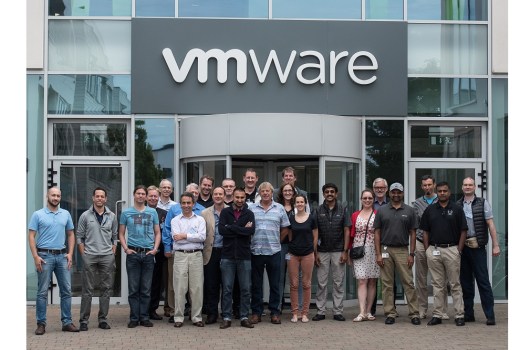
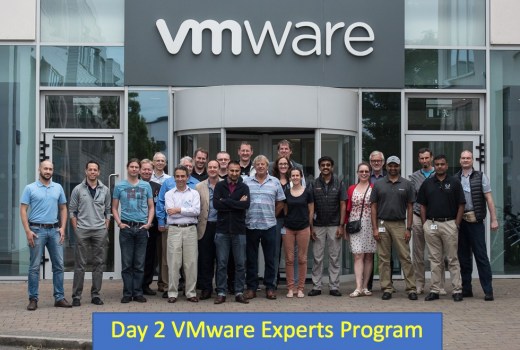
VMware Expert Database Workshop Program Oracle Edition – Day 2

Day 2 kicked off again with another early start at 7am, coupled with the late night, I was a bit tired to say the least, but was all worth it πŸ™‚

Again, it was a very intense day, with lots of presentations and technical deep dives, ending with a lab session:

  • My OCM buddy Yvonne Murphy, kicked the day off by talking to us about “The Best Oracle Support Team on Earth – Global Support Services Oracle Team”
  • Dave Welch, House of Brick, talked to us about “Oracle on vSphere Licensing”
    • Some interesting Oracle license cases of which the main one discussed is available here
  • Jad El-Zein, talked to us about “vRealizeAutomation and Oracle”
  • Andreas Scherr, talked to us about “vSphere Core Storage Fundamentals” & “Modern Converged Storage, & vSAN & vVols”
    • I was impressed with the vSAN concept of using spare drive bays in an ESXi host to put a Hard Disks or SSD Drives in and/or using spare PCIe slots to put a Flash Cards in (including NVMe πŸ™‚ )
    • Then these server attached storage devices are pooled together to provide a shared Datastore that has resilience built in using software rather then hardware πŸ™‚
    • Can be all flash or hybird but each ESXi needs a cache device i.e. SSD Drive or Flash Card
    • More info can be found here
  • Valentin Bondzio, gave us an very enjoyable deep dive on CPU usage in Virtual Environment and how to troubleshoot πŸ™‚
  • We then finished the day with a lab session with Sudhir Bala and Mohan Potheri, where we got to for example:
    • Create a Virtual Hard Drive
    • Attach an Existing Virtual Hard Drive (useful for RAC clusters πŸ™‚ )
    • Then we played a game to stress test a Pure Storage, however I could only get 2Gb a second using 10 sessions running a parallel query of 10 on the largest object in the database. Β This is not because the Pure Storage but because of I/O queue in the VMware stack, which we didn’t get time to change but highlight the point πŸ™‚

Another great day of the 3 days workshop, in which I got to gain even more new knowledge in regards to VMware, in particular CPU usage and vSAN πŸ™‚

The day ended with a meal and drinks atΒ The Oliver Plunkett, more socialising withΒ Johannes Ahrends,Β Ron Ekins,Β Frits Hoogland,Β Tim HallΒ andΒ Mohan Potheri. Β Then a nice walk back to the hotel withΒ Mohan Potheri,Β Johannes AhrendsΒ andΒ Martin Klier. Β It’s a small world as I foundΒ Martin KlierΒ and I had overlap with some customers and people πŸ™‚ Β The socialising then continued in the reception lounge withΒ Carl Dudley, Ron Ekins,Β Frits Hoogland and Tim Hall.

Many thanksΒ to VMwareΒ andΒ Pure Storage, I’m looking forward to the rest of the workshop πŸ™‚

My tweets for the day can be seen here.

The VMware Expert Database Workshop Program hashtag is #VMWORA

My related Blog Posts

VMware Expert Database Workshop Program Oracle Edition
VMware Expert Database Workshop Program Oracle Edition – Day 1

Other related Blog Posts

Tim Hall (Oracle Base) –Β VMware Expert Database Workshop Program Oracle Edition
Tim Hall (Oracle Base) –Β VMware Workshop – The Journey Begins
Tim Hall (Oracle Base) –Β VMware Workshop – Day 1
Tim Hall (Oracle Base) –Β VMware Workshop – Day 2
Michael Corey (Columnist) – VMware Experts Program Oracle Edition
Michael Corey (Columnist) – Day 1 VMware Experts Program Oracle Edition
Michael Corey (Columnist) – Day 2 VMware Experts Program Oracle Edition

If you found this blog post useful, please like as well as follow me through my various Social Media avenues available on the sidebar and/or subscribe to this oracle blog via WordPress/e-mail.

Thanks

Zed DBA (Zahid Anwar)